Inside NOFILTER-NFEXEC: A Deep Dive into WFP Implementation and BOF OPSEC Engineering
A detailed walkthrough of implementing the DEF CON 31 NoFilter WFP technique as an OPSEC-hardened Havoc C2 BOF, including indirect syscalls, return address spoofing, patchless AMSI/ETW bypass, and lessons learned from Havoc BOF development.
Introduction
This post is a deep dive into NOFILTER-NFEXEC, a two-stage privilege escalation and command execution toolchain I built for Havoc C2 as a BOF (Beacon Object File — a small, position-independent C object that runs inside the C2 agent’s process without spawning a new one).
The first stage, NOFILTER, implements a privilege escalation technique originally discovered and presented by Ron Ben-Yizhak (@RonB_Y) at DEF CON 31 on August 13, 2023. At the time of the talk, Ron was a Security Researcher at Deep Instinct, where the NoFilter research was conducted; he is currently a Security Researcher at SafeBreach Labs.
The NoFilter research demonstrated that the Windows Filtering Platform (WFP — a kernel-mode framework that Windows uses to inspect and filter network traffic) can be abused to duplicate tokens entirely within kernel space, bypassing the user-mode API calls that EDR (Endpoint Detection and Response — security software that monitors process behavior for malicious activity) products typically hook. The original proof-of-concept was a standalone executable, and the Deep Instinct blog post provides an excellent technical breakdown of the WFP internals. The research was reported to the Microsoft Security Response Center, and according to Microsoft the behavior is by design.
The second stage, NFEXEC, is my own design — a command execution framework that uses the stolen SYSTEM token to run native executables or PowerShell scripts, with a full OPSEC (operational security — measures taken to avoid detection during an engagement) stack including indirect syscalls (a technique where system calls are routed through instructions inside ntdll.dll rather than executed directly from the tool’s own memory, making call-stack analysis harder), return address spoofing, and patchless AMSI/ETW bypass.
This post covers three things. First, how the WFP technique works and the specific implementation decisions I made when porting it to a Havoc BOF. Second, the OPSEC engineering that went into NFEXEC, from PEB-based function resolution to hardware breakpoint AMSI bypass. Third, practical notes from Havoc C2 BOF development — implementation details that are best understood by reading the source code directly.
Part 1: Background
What Is Havoc C2?
Havoc is an open-source command-and-control framework. Its agent, called a Demon, supports BOF execution through a component called CoffeeLdr (a COFF loader that parses the object file, resolves symbols, and calls the go() entry point). Havoc provides a set of Beacon-compatible APIs (BeaconPrintf, BeaconOutput, BeaconDataParse, etc.) and extends them with features like an NtApi[] table that automatically routes NT syscalls (calls into the NT API — the low-level Windows native API exposed by ntdll.dll, where every function name starts with Nt or Zw; this is the layer that sits directly above the kernel) through indirect syscall stubs when the Demon’s SysIndirect setting is enabled.
Handles, Tokens, and Privileges
Before diving into the technique, three Windows concepts need to be clear.
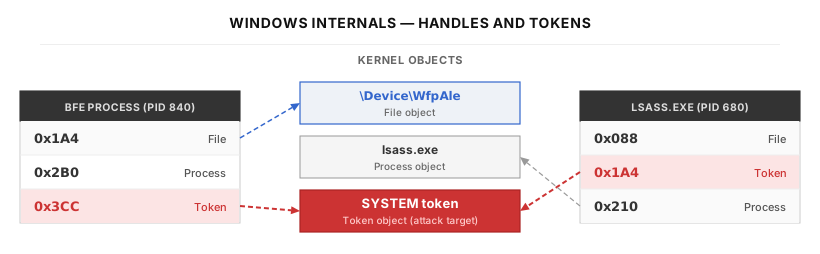
A handle is an integer value that a process uses to refer to a kernel object — a file, a process, a thread, a registry key, or an access token. The kernel maintains a per-process handle table that maps each handle number to the actual kernel object. When you call NtOpenProcess, the kernel creates an entry in your handle table pointing to the target process object and returns the handle number. Handles are process-local: handle 0x1A4 in Process A and handle 0x1A4 in Process B refer to completely different objects. To use another process’s object, you must duplicate the handle — NtDuplicateObject creates a new handle in your own handle table that references the same underlying kernel object as the source handle, incrementing the kernel object’s reference count.
An access token is a kernel data structure that encodes a security identity: which user account owns the process, which groups the user belongs to, and which privileges are enabled. Every process has a primary token that defines its identity. Individual threads can additionally carry an impersonation token — a temporary override that makes that specific thread act as a different user. When a thread with an impersonation token accesses a file or opens a process, the kernel checks the impersonation token’s permissions, not the process’s primary token. This is the mechanism NOFILTER exploits: by attaching a SYSTEM impersonation token to the Demon’s thread, all subsequent operations on that thread run with full SYSTEM authority.
The two token types differ in ways that matter for NOFILTER’s design:
| Primary token | Impersonation token | |
|---|---|---|
| Attached to | The process | A single thread |
| Effect | Defines the process’s identity | Overrides identity for that thread only |
| Set via | Process creation APIs (e.g., CreateProcessAsUser) | NtSetInformationThread |
| Required by | CreateProcessWithTokenW and other process-creation APIs | Thread-scope operations |
| Lifetime | Process lifetime | Until reverted (token revert in Havoc, RevertToSelf() in raw Win32) or the thread exits |
NOFILTER retrieves a primary token from the WFP IOCTL, converts it to an impersonation token with NtDuplicateToken, then attaches it to the Demon’s thread via NtSetInformationThread.
A privilege is a system-wide permission that goes beyond file/object access. SeDebugPrivilege, for example, allows a process to open any other process on the system regardless of its security descriptor (a data structure attached to every Windows object that specifies which users and groups are allowed to access it) — without it, a process can normally only open processes whose security descriptor grants its identity the requested access, which in practice is usually limited to processes running under the same user account. Administrator accounts have SeDebugPrivilege in their token, but it is disabled by default. It must be explicitly enabled with RtlAdjustPrivilege before it takes effect. NOFILTER needs this privilege to open the BFE service process and the target SYSTEM process.
What Is the Windows Filtering Platform?
The Windows Filtering Platform (WFP) is a set of APIs and kernel-mode services that Windows provides for inspecting and filtering network packets. Firewalls, antivirus software, and VPN clients all build on top of WFP. Internally, WFP is implemented primarily in tcpip.sys, the kernel driver responsible for the TCP/IP network stack. WFP exposes a device called \Device\WfpAle (Application Layer Enforcement) that user-mode services — particularly the BFE (Base Filtering Engine) service — communicate with through IOCTL calls (Input/Output Control — a mechanism for user-mode programs to send commands to kernel drivers).
The key insight from Ron Ben-Yizhak’s research is that certain WFP IOCTLs allow inserting and retrieving access tokens in a kernel-managed hash table. These IOCTLs exist for a legitimate purpose: WFP needs to associate network connections with the identity of the user who initiated them, so that per-user firewall rules can be applied. The BFE service uses IOCTL 0x128000 to register a process’s token in the WFP hash table, and IOCTL 0x124008 to retrieve it later. The critical detail is that tcpip.sys performs the token duplication internally using kernel-mode APIs — no user-mode NtDuplicateToken call is made. Because the duplication happens at the kernel level, user-mode hooks placed on the standard token-manipulation APIs (NtDuplicateToken, DuplicateHandle) have no visibility into the operation.
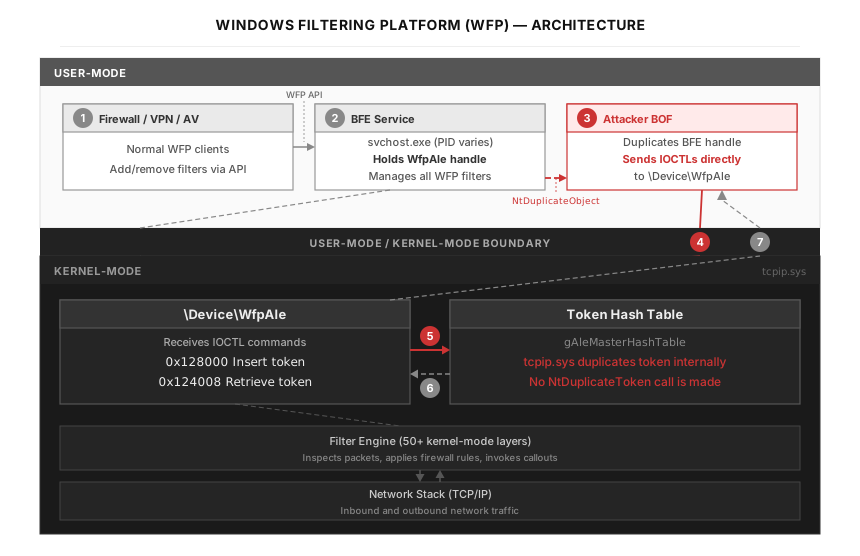
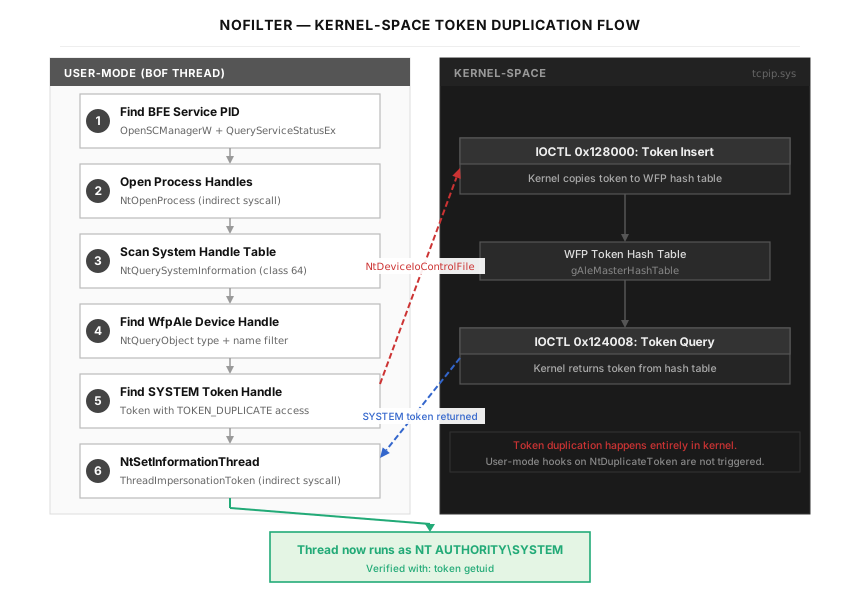
The figure below shows how WFP components are connected. The numbered steps below explain the flow that the NoFilter technique exploits:
- Normal WFP clients (firewalls, VPN software, antivirus) communicate with the BFE service through the standard WFP management API. This is the legitimate, intended use of the platform.
- BFE holds a handle to the kernel device
\Device\WfpAle. This handle is how BFE sends IOCTL commands totcpip.sys. The security descriptor on\Device\WfpAleprevents other processes from opening new handles directly — only BFE is supposed to have access. - The attacker’s BOF duplicates BFE’s handle using
NtDuplicateObject. This copies the WfpAle handle from BFE’s handle table into the Demon’s handle table. Now the BOF can send IOCTLs to\Device\WfpAleas if it were BFE. - BOF sends IOCTL 0x128000 (Token Insert) to
\Device\WfpAle, specifying the target process PID and token handle value. The kernel receives this command. - tcpip.sys duplicates the token internally within kernel-mode. It reads the token from the target process, creates a copy, and stores it in the WFP token hash table (
gAleMasterHashTable). User-mode hooks on the standard token-manipulation APIs have no visibility into this path — noNtDuplicateTokenis called in user-mode. (Kernel callbacks such as those registered viaPsSetCreateProcessNotifyRoutineor kernel-level EDR drivers can still observe related events.) - BOF sends IOCTL 0x124008 (Token Query) with the LUID received from step 5. The kernel retrieves the duplicated token from the hash table.
- Token handle is returned to the BOF in user-mode. The BOF now holds a handle to a SYSTEM token that was duplicated entirely within the kernel.
What Is a BOF?
A Beacon Object File (BOF) is a compiled C object file (COFF — Common Object File Format, the binary layout Windows uses for compiled .obj files before they are linked into an .exe or .dll) that a C2 framework loads and executes directly inside the agent’s (called a “Demon” in Havoc) process.
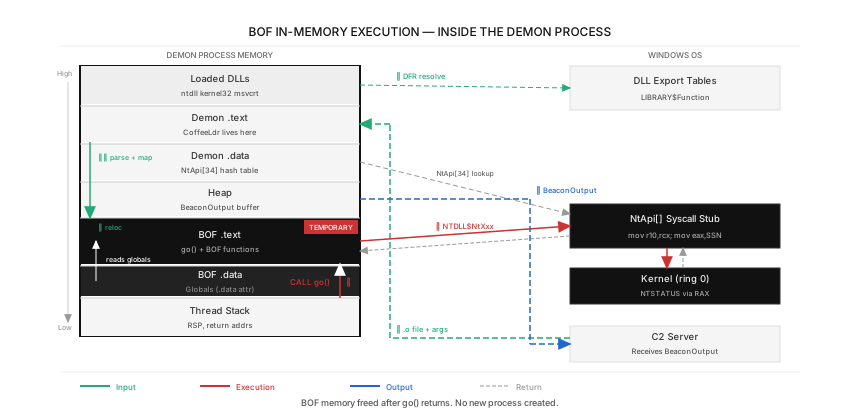
The figure below shows the Demon process’s memory layout during BOF execution. The numbered steps below explain the flow from start to finish:
- C2 server sends the .o file. The compiled BOF (a COFF object file, typically a few KB) is transmitted from the Havoc server to the Demon agent over the encrypted C2 channel.
- CoffeeLdr parses the COFF headers. CoffeeLdr reads the COFF section table (
.textfor code,.datafor initialized variables), the symbol table (a list of function and variable names the BOF references), and the relocation entries (instructions for fixing up addresses). - CoffeeLdr allocates memory and maps sections.
VirtualAlloc(the standard Windows API for reserving and committing pages of virtual memory directly from the OS) is called to allocate memory with read-write-execute (RWX) permissions — the page is simultaneously writable (so the loader can copy code into it) and executable (so the CPU can later run that code). RWX pages are highly suspicious from an EDR perspective because legitimate code rarely needs them; this is one of the inherent OPSEC tradeoffs of a runtime loader like CoffeeLdr. The.textand.datasections from the COFF file are copied into this allocation. Note: the.bsssection (where zero-initialized globals would normally go) is not mapped by CoffeeLdr — this is the root cause of the .bss pitfall described in Part 5.
To understand what CoffeeLdr is doing here, it helps to know why a compiled file is split into sections in the first place. When you write C code, the compiler separates your code into categories based on how the data will be used at runtime. Your functions — the actual CPU instructions — go into .text. Variables that you set to a specific value, like int counter = 42;, go into .data, because the number 42 needs to be stored in the file so it is available when the program starts. Variables that start at zero or are left blank, like static int counter;, go into .bss — but .bss is special: the file does not actually store any bytes for it. Instead, the file just records “I need X bytes of zeroed memory,” and the loader is expected to create that memory when the program starts. This saves file size.
In a normal .exe, the Windows loader handles all of this: it reads the file, copies each section into memory, sets the right permissions (code pages get “executable” permission, data pages get “writable” permission), and fills in the real memory addresses wherever the code references a variable or function. In a BOF, there is no Windows loader — CoffeeLdr does this job manually. This is important because CoffeeLdr does not handle every section the same way the Windows loader would. In particular, CoffeeLdr skips the .bss section entirely, which means any variable that the compiler places in .bss will not have memory allocated for it. This is the root cause of the .bss crash described in Part 5.
Relocations are the mechanism that makes this loading process work. When the compiler generates code, it does not know where in memory the code will end up — CoffeeLdr decides that at runtime. So the compiler writes placeholder values (usually zero) wherever the code references a function or variable, and records a list of “relocation entries” that say things like “at byte offset 0x42 in the .text section, replace the 8-byte placeholder with the actual address of the function NtOpenProcess.” CoffeeLdr reads these entries and patches in the real addresses after it has decided where everything goes in memory.
- CoffeeLdr resolves DFR symbols. DFR (Dynamic Function Resolution — a BOF convention where you declare an external function as
LIBRARY$Function, and the loader resolves the actual address at runtime instead of relying on the OS loader) is how BOFs reference Windows APIs. In source code the developer writes a declaration likeDECLSPEC_IMPORT NTSTATUS NTDLL$NtOpenProcess(...). TheDECLSPEC_IMPORTdecorator (which expands to__declspec(dllimport)) tells the compiler that this function lives in another binary and that calls to it should go through an indirection slot. The compiler emits the call as a load through__imp_NTDLL$NtOpenProcess— a pointer-sized slot that the loader is expected to fill in with the real address. CoffeeLdr is what fills in that slot: it splits the symbol into the DLL name (NTDLL) and the function name (NtOpenProcess), then resolves the address. For NT functions, it first checks the NtApi[34] hash table — if the function matches, the call is routed through the indirect syscall stub instead of the normal ntdll export. For non-NT functions (likeMSVCRT$calloc), it usesGetProcAddress(a Windows API that takes a loaded DLL’s base address and a function name, and returns that function’s runtime address by parsing the DLL’s export table) to look up the address in the loaded DLL’s export table.
To put this in simpler terms: in a normal C program, when you write NtOpenProcess(...), the compiler records “this code needs the function NtOpenProcess from ntdll.dll.” The linker connects this record to the right DLL, and when Windows loads the .exe, the OS fills in the real address of NtOpenProcess automatically. You never have to think about where the function lives — the toolchain handles it.
In a BOF, this automatic process does not happen. A BOF is a raw .o file, not a linked .exe, and CoffeeLdr is not the Windows loader. It cannot read the normal import records because they do not exist in a .o file. DFR is the workaround: instead of writing NtOpenProcess(...), you write NTDLL$NtOpenProcess(...). The dollar sign is a separator — the part before it (NTDLL) is the DLL name, and the part after it (NtOpenProcess) is the function name. CoffeeLdr sees this compound name in the compiled file, splits it at the dollar sign, loads NTDLL.dll (if it is not already loaded), and looks up the address of NtOpenProcess inside it.
The DECLSPEC_IMPORT keyword at the start of the declaration is also essential. Without it, the compiler assumes the function is defined somewhere in your own source code — it generates a call instruction that jumps to a fixed address within your compiled file. Obviously, that address is meaningless because your .o file does not contain NtOpenProcess. With DECLSPEC_IMPORT, the compiler instead generates an indirect call: it reads the function’s address from a small pointer-sized slot in the data section, and then jumps to whatever address is stored there. CoffeeLdr fills in that slot at load time. This is the same mechanism that normal Windows DLL imports use — DECLSPEC_IMPORT simply tells the compiler to use it.
- CoffeeLdr performs relocations. The code in
.textcontains placeholder addresses (since the compiler did not know where the code would be loaded). CoffeeLdr walks the relocation entries and patches each placeholder with the actual runtime address calculated in the previous step. - CoffeeLdr calls
go(args, alen). The entry point function is invoked as a direct function call on the Demon’s existing thread. No new process is created. No new thread is created. The BOF executes as if it were a regular function inside the Demon. - BOF executes. The BOF code calls Win32 APIs (resolved via DFR) and NT APIs (routed through the NtApi[] indirect syscall stub). Output is accumulated in a heap buffer via
BeaconOutput. - Cleanup. When
go()returns, CoffeeLdr frees the allocated RWX memory. The BOF code no longer exists in the process. Output is sent to the C2 server. Unlike traditional post-exploitation modules that spawn a new process, a BOF runs as an ordinary function call inside the agent. This is what makes BOFs attractive from an OPSEC perspective, but it also imposes strict constraints: no C runtime library (all CRT functions must be called through DFR), no static initialization, and careful memory management.
Part 2: How NOFILTER Works
The Two-Stage Pipeline
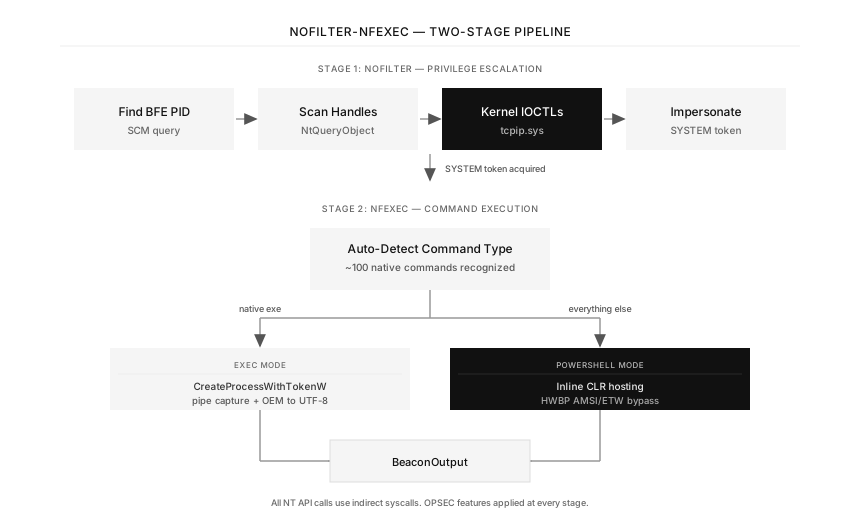
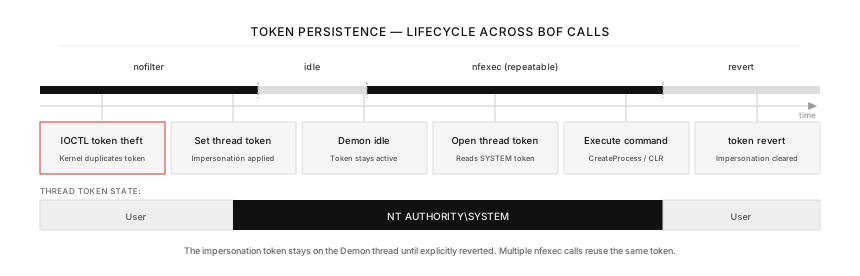
NOFILTER-NFEXEC operates in two stages. The operator runs nofilter to escalate to SYSTEM, then runs nfexec <command> to execute commands under that elevated context. The separation is deliberate — the token theft and command execution are independent concerns, and keeping them in separate BOFs means the operator can reuse the stolen token across multiple nfexec calls without re-running the escalation.
An important detail to understand is how the token persists between the two BOF executions. When NOFILTER attaches an impersonation token to the Demon’s thread via NtSetInformationThread, that token remains on the thread until explicitly reverted with token revert. Subsequent BOF executions (like nfexec) run on the same Demon thread, so they inherit the impersonation context automatically. NFEXEC’s NtOpenThreadToken retrieves this persisted token for use in process creation or PowerShell execution. This is why the two-stage design works without any shared state or IPC (Inter-Process Communication — mechanisms like pipes, shared memory, or sockets that let separate processes exchange data) between the BOFs.
Stage 1: Kernel-Space Token Duplication
NOFILTER implements Attack #1 from Ron Ben-Yizhak’s DEF CON 31 presentation. The flow has six phases:
Phase 1 — Find the BFE service PID. The BFE (Base Filtering Engine) service is the user-mode counterpart of WFP. It holds an open handle to the \Device\WfpAle device, which is needed to issue the IOCTLs. NOFILTER queries the Service Control Manager to find BFE’s process ID.
Phase 2 — Find a SYSTEM target process. We need a process running as SYSTEM that has a token handle with TOKEN_DUPLICATE access. NOFILTER defaults to lsass.exe (Local Security Authority Subsystem Service — the process responsible for enforcing the security policy on the system) and falls back to services.exe if lsass is not found.
Phase 3 — Enable SeDebugPrivilege. Administrator tokens include SeDebugPrivilege (a Windows privilege that allows opening any process on the system regardless of its security descriptor) but it is disabled by default. RtlAdjustPrivilege enables it so that NtOpenProcess will succeed on SYSTEM processes. The code also attempts thread-level adjustment as a fallback for impersonation contexts.
Phase 4 — Scan the system handle table. NOFILTER needs to find two specific handles somewhere on the system: the \Device\WfpAle File handle in the BFE process (so we can duplicate it and send IOCTLs), and a Token handle in the SYSTEM target process (so we can tell the kernel which token to duplicate). To find them, NOFILTER scans every open handle across all processes.
Windows maintains a global handle table that tracks every open handle in the system. NtQuerySystemInformation (a general-purpose NT API for retrieving various pieces of system-wide information; the specific information returned depends on the SystemInformationClass value passed to it) with class 64 (SystemHandleInformationEx) dumps this entire table into a caller-supplied buffer. Each entry contains the owning process ID, the handle value, the granted access mask (a bitfield that records which operations — read, write, delete, duplicate — are permitted on this handle), and an object type index (a number that distinguishes File handles from Token handles, Process handles, and so on). The returned buffer can be very large — a typical system has tens of thousands of open handles — so the code allocates progressively larger buffers (starting at 1MB, doubling up to 8 times) until the call succeeds.
An important implementation detail here is the type index caching optimization. The first time a File-type handle is identified (via NtQueryObject — an NT API that returns metadata about a handle, such as its type name like “File” or “Token”, or its full object name path — with ObjectTypeInformation), its type index is cached in file_type_idx. For all subsequent handles, the code can skip the NtQueryObject call entirely and compare the type index directly — turning an O(n×syscall) operation into an O(n) integer comparison for the vast majority of handles. The same caching is applied for Token handles via token_type_idx. This reduces the handle scanning time from minutes to seconds on systems with large handle tables.
The reason this caching matters is performance. Each NtQueryObject call is a round trip into the kernel — the CPU switches from user-mode to kernel-mode, the kernel locks internal data structures to safely read the handle metadata, copies the result back to user-mode memory, and returns. On a system with 30,000 open handles, making one kernel call per handle would mean 30,000 round trips, which can take minutes. With caching, the first few hundred handles require kernel calls (until the type indices for “File” and “Token” are discovered), but the remaining tens of thousands can be filtered by a simple integer comparison in user-mode — no kernel call needed. This brings the total scan time down to a few seconds.
Another important implementation detail is the deadlock-safe handle scanning. The original NoFilter PoC used NtQueryObject(ObjectNameInformation) to identify handles — but this call can deadlock on named pipes, ALPC ports (Advanced Local Procedure Call — a high-performance IPC mechanism in Windows), and synchronous file objects. NOFILTER avoids this by first querying ObjectTypeInformation (which never deadlocks) to confirm a handle is of type “File” before querying its name. This was one of the early fixes I had to make when the BOF would occasionally hang indefinitely during handle enumeration.
Phase 5 — Kernel IOCTLs. With the WfpAle device handle duplicated into the BOF’s process, two IOCTLs are issued via NtDeviceIoControlFile (a kernel API that sends a control code and an input buffer to a device driver, and receives an output buffer back — think of it as a function call to a kernel driver, where the control code specifies which operation to perform):
- IOCTL 0x128000 (Token Insert) — Takes a process ID and token handle value as input. The kernel (
tcpip.sys) internally duplicates the token and stores it in WFP’s hash table, returning a LUID (Locally Unique Identifier — a 64-bit value that uniquely identifies the token within the hash table). - IOCTL 0x124008 (Token Query) — Takes the LUID and returns a primary token handle. The kernel internally calls
DuplicateTokenwithTOKEN_DUPLICATEaccess hardcoded — this access right is not configurable by the caller.
The IOCTL input/output structures are straightforward:
- IOCTL 0x128000 input:
{ ULONG_PTR ProcessId; ULONG_PTR TokenHandle; }— the PID of the process that owns the token, and the handle value (not a duplicated handle — just the raw numeric value from the target process’s handle table). - IOCTL 0x128000 output:
{ LUID TokenLuid; }— the kernel-generated unique identifier for the stored token. - IOCTL 0x124008 input:
{ LUID TokenLuid; }— the LUID received from the insert call. - IOCTL 0x124008 output:
{ ULONG_PTR TokenHandle; }— a new handle in the calling process’s handle table, pointing to the duplicated token.
Two details about IOCTL 0x128000 deserve separate attention.
First, as Ron Ben-Yizhak noted, the caller can specify any (PID, handle value) pair — there is no check that the caller actually owns the handle in the target process. The catch is that you still need to know what the target’s handle value is. NOFILTER obtains it by enumerating every handle on the system via NtQuerySystemInformation (Phase 4 above) and picking out the entry that belongs to the SYSTEM target process and is of type Token.
Second, the kernel performs the token duplication entirely internally. It attaches to the target process’s address space (each process has its own private virtual address space — the same virtual address 0x1000 in Process A and Process B maps to entirely different physical memory; the kernel can temporarily switch to another process’s page tables to access its memory), reads the token, creates a copy, and inserts it into the WFP hash table. No user-mode API is called during this process.
Note that these structures use natural alignment. In simple terms, this means the compiler may insert invisible gaps (called “padding”) between fields in a C struct so that each field starts at a memory address that is a multiple of its size. For example, an 8-byte field like ULONG_PTR will always start at an address that is divisible by 8. If a previous field ends at address 12, the compiler silently skips addresses 12–15 and places the next field at address 16. The #pragma pack directive (a compiler setting that some developers use to remove this padding and pack fields tightly together) must NOT be used here, because the kernel expects the fields to be at their naturally-aligned positions. If the struct layout in your BOF does not match what the kernel expects, the kernel reads field values from the wrong byte positions, producing opaque STATUS_* error codes with no indication of what went wrong.
This is the core of the technique: the token duplication occurs entirely within kernel space. No user-mode NtDuplicateToken or DuplicateHandle call is made, so user-mode hooks placed on these APIs have no visibility into the operation.
Phase 6 — Impersonate. The retrieved token is duplicated as an impersonation token (using NtDuplicateToken with TokenImpersonation type and SecurityImpersonation level), and applied to the current thread via NtSetInformationThread(ThreadImpersonationToken). The thread now runs as NT AUTHORITY\SYSTEM.
One subtle detail: the original token retrieved from the IOCTL is a primary token (the type associated with a process’s identity), but NtSetInformationThread requires an impersonation token (the type that can be attached to individual threads). Passing a primary token fails with STATUS_BAD_TOKEN_TYPE. This is why the extra NtDuplicateToken step is needed.
A natural question is: why not replace the entire process’s primary token instead of impersonating on a single thread? The answer is a Windows kernel restriction. NtSetInformationProcess with the ProcessAccessToken information class can only be called on a process that has no running threads — typically a process created with CREATE_SUSPENDED (a flag passed to CreateProcess that creates the process and its primary thread but immediately suspends the thread before any code runs; the caller can then perform setup and call ResumeThread later) that has not yet been resumed. The Demon process is already running with active threads, so replacing its primary token is not possible. The standard mechanism Windows provides for elevating privileges inside an already-running process is to attach an impersonation token to individual threads via NtSetInformationThread(ThreadImpersonationToken). This is not a limitation of the tool — it is an intentional Windows design constraint that ensures security checks can be reasoned about per-thread rather than changing under the feet of code already executing.
There is an additional subtlety related to the access rights. Ron Ben-Yizhak’s research found that tcpip.sys hardcodes TOKEN_DUPLICATE as the desired access when it internally calls DuplicateToken during the query IOCTL (0x124008). This means the returned token handle only has TOKEN_DUPLICATE permission — not enough to directly use for impersonation or process creation. The NtDuplicateToken call in NOFILTER serves two purposes simultaneously: it converts the token type from Primary to Impersonation, AND it requests TOKEN_ALL_ACCESS (0xF01FF) on the new handle, giving it the full permissions needed for NtSetInformationThread.
Another subtle detail: after BeaconUseToken(), the token handle must not be closed. Havoc stores the raw handle internally for token revert. Closing it creates a dangling handle that causes issues on revert.
OPSEC Properties of NOFILTER
All NT API calls in NOFILTER go through Havoc’s NtApi[] table, which means they automatically use indirect syscalls when the Demon’s SysIndirect setting is enabled. IOC (Indicator of Compromise — artifacts that security analysts look for to identify malicious activity) strings like \Device\WfpAle, BFE, lsass.exe, services.exe, File, and Token are XOR-encoded with key 0x37 and decoded on the stack at runtime. After use, the decoded strings are zeroed with memset to prevent recovery from memory dumps. The COFF symbol table has 20 symbols sanitized via objcopy to remove identifiable function names. Error messages use opaque codes (E01–E11, S1–S9) with no descriptive text in the binary — the mapping is only in source code comments, visible only to the operator.
Part 3: How NFEXEC Works
NFEXEC has two execution modes, selected automatically based on the command:
Auto-Detection
The Python handler (nfexec.py) maintains a list of approximately 100 native Windows commands — whoami, ipconfig, net, sc, reg, netstat, tasklist, systeminfo, and others. When the operator types nfexec whoami /priv, the handler recognizes whoami as a native command and routes to exec mode. Anything not in the list — Get-Process, dir, [Environment]::UserName — goes to PowerShell mode. The operator can override with -exec or -ps flags.
Exec Mode (mode=1)
Exec mode launches a native executable under the SYSTEM token. The flow is:
- NtOpenThreadToken — Opens the current thread’s impersonation token (set by NOFILTER). This is an indirect syscall via Havoc’s NtApi[] table.
- NtDuplicateToken — Duplicates it as a primary token (
TokenPrimary), becauseCreateProcessWithTokenW(a Windows API that creates a new process running under a specified token) requires a primary token. Also indirect syscall. - CreateProcessWithTokenW — Creates the process. This function is resolved at runtime via PEB walk and FNV-1a hash lookup instead of using a DFR import. A PEB walk works like this: every Windows process has a data structure called the Process Environment Block (PEB), which the OS creates when the process starts. Inside the PEB is a list of every DLL that has been loaded into the process —
ntdll.dll,kernel32.dll,advapi32.dll, and so on. Each entry in this list includes the DLL’s name and its base address (the memory location where the DLL was loaded). To find a specific function, the code reads this list to locate the target DLL by name, then parses that DLL’s export table (a section inside every DLL that lists the names and addresses of all functions the DLL makes available to other programs) to find the function’s address. The advantage of doing this manually is that no import record appears in the compiled BOF file — an analyst examining the BOF’s symbols withobjdumpwould see no reference toADVAPI32orCreateProcessWithTokenW. FNV-1a hash lookup (FNV-1a — Fowler-Noll-Vo 1a, a fast non-cryptographic hash function commonly used to map function name strings to small integers; a 32-bit hash constant is embedded in the binary instead of the function name string itself) (FNV-1a — Fowler-Noll-Vo 1a, a fast non-cryptographic hash function commonly used to map function name strings to small integers; a 32-bit hash constant is embedded in the binary instead of the function name string itself), eliminating theADVAPI32$CreateProcessWithTokenWDFR import that would appear as a symbol in the COFF file. The process is created withCREATE_NO_WINDOWto avoid a visible console window. - Pipe capture — Output is captured via an anonymous pipe. The pipe buffer is set to 1MB (rather than the default 4KB) to prevent deadlock — more on this in Part 5.
- OEM to UTF-8 conversion — Native Windows commands output text in the system’s OEM codepage (codepage — a mapping between byte values and characters; for example, Japanese Windows uses Shift-JIS as its OEM codepage, English Windows uses CP437). Havoc’s console expects UTF-8. Without conversion, non-ASCII output appears as mojibake (garbled text). The conversion goes OEM → UTF-16 → UTF-8.
PowerShell Mode (mode=0)
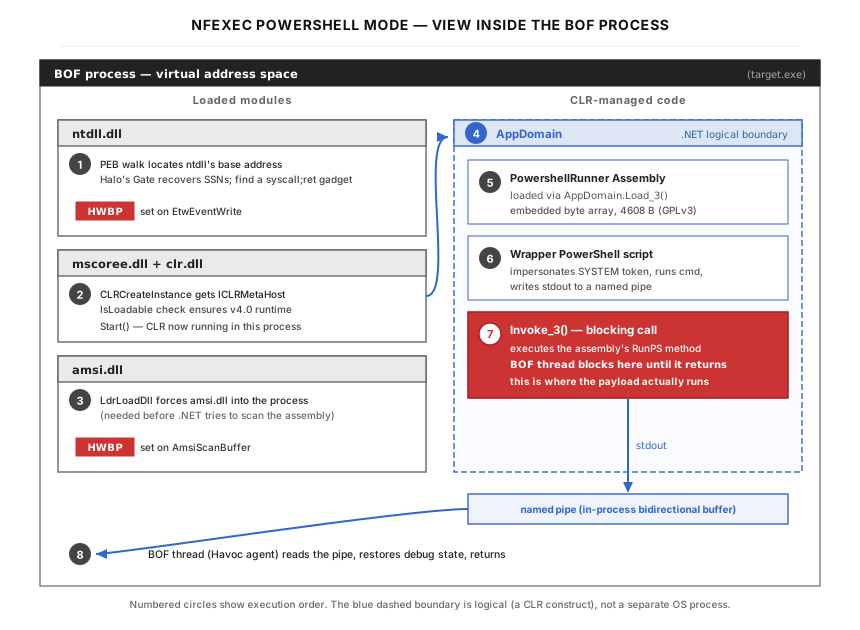
PowerShell mode uses inline CLR (Common Language Runtime — the .NET execution engine) hosting to run PowerShell within the BOF thread, without spawning powershell.exe or pwsh.exe. The reason for this complexity (rather than simply calling CreateProcessWithTokenW with powershell.exe as the executable) is OPSEC: spawning powershell.exe creates a new process that defenders typically subject to enhanced monitoring — script block logging, AMSI scanning, and command-line argument inspection — and the parent-child relationship Demon → powershell.exe is itself a common detection signal. By hosting the CLR inside the existing Demon process, the PowerShell engine runs as a library call within an already-running process, removing those particular signals (a managed-code memory region inside the Demon and a loaded clr.dll are still observable, so this is not detection-free — it just shifts the surface that needs to be analyzed). The tradeoff is implementation complexity: inline CLR hosting requires manually walking COM vtables, managing AppDomains (an AppDomain is a logical isolation boundary inside a single CLR instance — like a “sub-process” within the .NET runtime that lets you load and unload assemblies without affecting the rest of the process), and handling the many quirks of the .NET runtime. The flow is:
- Syscall infrastructure init —
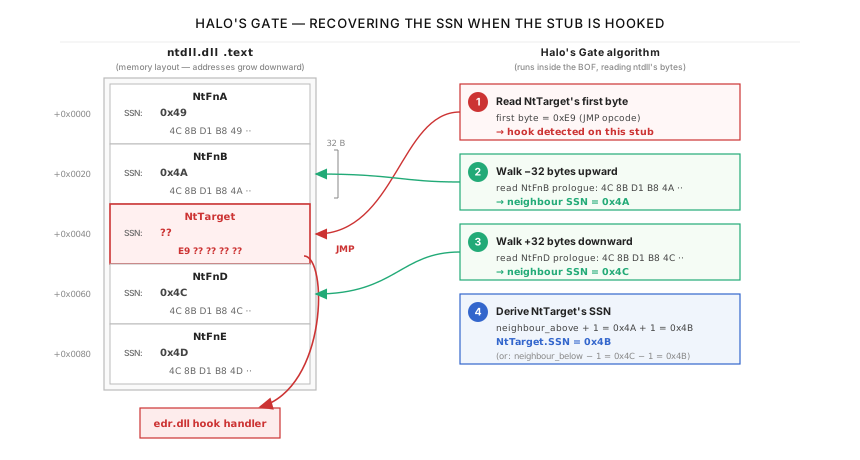
ScInit()performs a PEB walk to findntdll.dll’s base address, resolves the SSN (System Service Number — the index that identifies a specific kernel syscall; for example,NtDelayExecutionmight be SSN 0x34 on a given Windows build) via Halo’s Gate (a technique that, if the target function’s prologue has been overwritten by an EDR hook, walks neighboring syscall stubs at 32-byte intervals (in ntdll, each Nt* function’s stub is exactly 32 bytes long and they are laid out consecutively, so moving 32 bytes forward or backward lands exactly at the next or previous function’s stub) to find an unhooked one. Once an unhooked neighbor is found, the target’s SSN is calculated by simple arithmetic: if the neighbor 3 positions away has SSN 0x50, then the target’s SSN is 0x50 ± 3), and locates asyscall;retgadget (a “gadget” — borrowed from the term used in Return-Oriented Programming — is a short sequence of machine instructions that already exists somewhere in legitimate code and that the attacker wants to jump to and execute as-is; here the gadget is0F 05 C3— raw CPU opcodes where0F 05is the machine code for thesyscallinstruction, andC3isret) in ntdll’s.textsection (the section of the DLL that contains executable code).
To understand what this step is doing at a practical level: inside ntdll.dll, every NT function (like NtOpenProcess, NtDuplicateToken, NtDelayExecution) is implemented as a tiny block of code called a “stub.” Each stub is exactly 32 bytes long, and they are laid out one after another in memory — like numbered slots in a parking garage. In an unhooked stub, the first few bytes always follow the same pattern: 4C 8B D1 (which means “copy the first argument into a safe register”) followed by B8 XX XX 00 00 (which means “put the number XX into the register that tells the kernel which function to run”). The XX number is the SSN — it is different for each function and can change between Windows versions, so the code cannot hardcode it.
When an EDR product hooks a function, it overwrites the beginning of that stub with a JMP instruction (E9 ...) — a 5-byte jump that redirects the CPU into the EDR’s own monitoring code. This means the original 4C 8B D1 B8 ... pattern is no longer there. Halo’s Gate handles this situation: if the target function’s stub starts with E9 (meaning it is hooked), the code walks to the neighboring stubs — 32 bytes forward, 32 bytes backward, 64 bytes forward, and so on — checking whether each neighbor is unhooked. Once it finds an unhooked neighbor, it reads that neighbor’s SSN, and calculates the target’s SSN using simple addition or subtraction based on how many stubs apart they are. For example, if the unhooked neighbor is 3 stubs forward and has SSN 0x50, then the target’s SSN is 0x50 minus 3, which is 0x4D.
The syscall;ret gadget is the other half of this technique. Instead of executing the syscall instruction from inside the hooked stub (which the EDR is watching), the code finds a syscall instruction somewhere else inside ntdll.dll — typically in the body of some other function. It executes the system call from that location. This way, if the EDR examines the call stack to see where the syscall came from, it sees an address inside ntdll.dll (which looks normal) rather than an address inside the BOF’s memory (which would be suspicious).
- HWBP setup — After CLR
Start()loadsamsi.dll, hardware breakpoints (explained in Part 4) are set onAmsiScanBufferandEtwEventWrite— before any AMSI scanning occurs. - CLR hosting —
CLRCreateInstance→GetRuntime("v4.0.30319")→IsLoadablecheck →GetInterface(ICorRuntimeHost)→Start(). A randomized AppDomain name (generated via LCG — Linear Congruential Generator, a simple pseudo-random number algorithm of the formnext = (a × prev + c) mod m, fast and tiny enough to inline — with the pipe handle as seed) is used for each execution to avoid IOC patterns (Indicator of Compromise — any artifact, string, or behavior that defenders can write a detection rule against; a fixed AppDomain name across runs would be exactly such a fingerprint).
If you have used Cobalt Strike’s execute-assembly or similar tools, you have already used CLR hosting — but the tool hid all the details from you. Here is what each step in the chain is doing and why it is necessary. CLRCreateInstance is the entry point: it asks Windows “give me access to the .NET runtime management layer.” This returns an object that can list which versions of .NET are installed on the machine. GetRuntime("v4.0.30319") says “I want to use .NET Framework version 4.0” — this is the version that includes PowerShell support. IsLoadable is a safety check that asks “can this version of .NET actually run in this process, or is another version already loaded that would conflict?” If the check passes, GetInterface(ICorRuntimeHost) retrieves the actual runtime controller — the object that lets you create and manage .NET execution environments. Finally, Start() activates the runtime inside the current process: after this call, the Demon process has a fully functioning .NET engine running inside it, ready to load and execute .NET code.
The reason this is done through a chain of separate API calls (rather than a single “start .NET” call) is that Microsoft designed the CLR hosting API to be flexible — different programs might need different .NET versions, or might need to configure the runtime before starting it. For a BOF, this flexibility is unnecessary overhead, but the API requires going through each step regardless.
- Assembly loading — A pre-compiled .NET assembly (
PowershellRunner.h, from the HavocFramework/Modules PowerPick project, licensed under GPLv3) is loaded viaAppDomain.Load_3. Its entry point is invoked with the PowerShell script as a BSTR argument (a BSTR — Basic STRing — is the COM string type: a length-prefixed Unicode string whose pointer points to the first character but whose length lives in the 4 bytes immediately before that pointer; this format is what every .NET-facing COM API expects). - Token forwarding — CLR Runspace threads (a Runspace is PowerShell’s execution environment — the in-memory state plus the worker thread that actually runs each pipeline; PowerShell creates fresh Runspace threads as needed and these inherit only what PowerShell itself decides to propagate) do not inherit the BOF thread’s impersonation token. To ensure PowerShell runs as SYSTEM, the thread token handle is passed into the PowerShell wrapper script, which calls
WindowsIdentity.Impersonate()inside the Runspace thread. - Pipe output capture — PowerShell’s
Console.Outcannot be used for output because the Demon is a GUI process (not a console process), soConsole.Outpoints to aNullStreamWriter— anything written to it is silently discarded. Instead, the BOF creates an anonymous pipe, passes the write handle as a rawIntPtr(a .NET type that holds a pointer-sized integer — 8 bytes on x64; it lets managed code carry around native handles and pointers without converting them) into the PowerShell script, and the script constructs aFileStream→StreamWriterchain from it. This is also whyConsole.SetOut()is avoided: it affects all threads in the process, which could interfere with other Demon operations. - Invoke_3 — blocking call —
MethodInfo.Invoke_3calls the assembly’sRunPSentry point. This is a blocking call: the BOF thread pauses at this point and does not continue until the PowerShell script finishes executing. InsideRunPS, the wrapper script impersonates the SYSTEM token (step 5), runs the operator’s command, and writes stdout through the pipe’sStreamWriter(step 6). This is where the payload actually runs — everything before this step was setup. - BOF reads pipe and returns — After
Invoke_3returns, the BOF waits 100ms (viaNtDelayExecutionwith return address spoofing) to allow any remaining buffered pipe data to flush, then reads the pipe contents into the output buffer. The debug registers are restored (clearing the hardware breakpoints set in step 2 so the Demon thread returns to its normal state), the AppDomain is unloaded viaUnloadDomainto prevent assembly accumulation across multiple executions, and the captured output is sent back to the operator viaBeaconOutput.
Part 4: OPSEC Engineering
Indirect Syscall Infrastructure
To understand indirect syscalls, it helps to know what a syscall is at the CPU level. User-mode code (applications, BOFs, even the Demon process) runs in a restricted CPU mode that cannot directly access kernel memory or call kernel functions. To request a kernel operation — opening a file, querying process information, duplicating a token — user-mode code must execute the syscall CPU instruction, which switches the CPU from user-mode to kernel-mode. The kernel looks at the value in the EAX register (the SSN — System Service Number) to determine which kernel function to run.
In normal operation, applications never execute syscall directly. Instead, they call functions in ntdll.dll (a DLL — Dynamic Link Library — is a shared code file that Windows loads into processes). ntdll.dll specifically is the lowest-level user-mode DLL — the user-mode entry point to NT kernel services, plus runtime support code such as the heap manager, the image loader, and the RTL helper functions. The OS loads it into every process. Each NT system-service function in ntdll (like NtOpenProcess, NtDuplicateToken) is a tiny stub that does three things: put the SSN in EAX (a register — a tiny, fast storage slot built directly into the CPU; the CPU has about 16 general-purpose registers, each holding one 64-bit value, and specific registers have specific roles), put the first argument in R10, and execute syscall. EDR products exploit this by hooking these stubs — “hooking” here means writing into another program’s executable code at runtime to redirect control flow: the EDR overwrites the first few bytes of each function with a JMP instruction that jumps to its own monitoring code, so every call to that function silently detours through the EDR before reaching the original implementation. The EDR inspects the arguments, logs the call, and then either allows or blocks it.
Indirect syscalls bypass this by executing the syscall instruction from a different location — not from the hooked stub, but from elsewhere in ntdll’s code — so the EDR’s inline JMP hook on the stub’s prologue is not traversed.
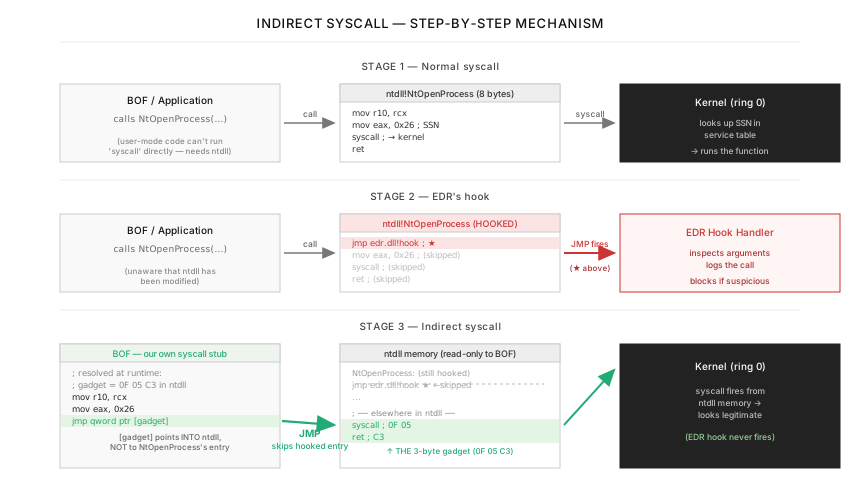
NFEXEC uses two layers of indirect syscalls:
Layer 1: Havoc NtApi[] auto-routing. Six NT functions (NtOpenThreadToken, NtDuplicateToken, NtWaitForSingleObject, NtGetContextThread, NtSetContextThread, NtClose) are declared via DFR as NTDLL$NtXxx. Havoc’s CoffeeLdr detects these declarations, matches them against its NtApi[] hash table (34 pre-registered functions in ObjectApi.c lines 91–126), and routes them through its SysNtXxx indirect syscall stub automatically.
Layer 2: Manual PEB-based resolution. Functions NOT in Havoc’s NtApi[] table — NtDelayExecution, LdrLoadDll, RtlAddVectoredExceptionHandler, RtlRemoveVectoredExceptionHandler — are resolved entirely at runtime via PEB walk and PE (Portable Executable — the binary file format that Windows uses for .exe and .dll files) export table parsing. No DFR, no IAT entries (the Import Address Table is a per-binary table that the Windows loader fills with the resolved addresses of imported functions; an analyst inspecting the binary can read the IAT to see exactly which DLLs and functions the binary depends on, so leaving entries here is an OPSEC tell). Function names never appear as strings in the binary; they are resolved by FNV-1a hash constants (for example, NtDelayExecution is 0xD856E554).
For the manually resolved NT syscalls (currently just NtDelayExecution), NFEXEC builds its own indirect syscall stub:
- PEB Walk —
GS:0x60→ PEB → Ldr →InMemoryOrderModuleList→ second entry = ntdll base. Zero API calls. - FNV-1a hash resolution — Walk ntdll’s PE export table, hash each export name, compare against the target hash.
- SSN extraction (Halo’s Gate) — Read the function prologue. Unhooked pattern:
4C 8B D1 B8 XX XX XX XX(mov r10, rcx; mov eax, SSN) — themov eax, imm32opcodeB8is always followed by a 32-bit (4-byte) immediate, so the SSN occupies all 4 bytes; on Windows the SSN typically fits in the low 16 bits, so the high two bytes are zero in practice. If hooked, the first byte is0xE9(the opcode for an unconditional 32-bit relativeJMP, which most EDR products use to splice their detour into the stub’s prologue). When the prologue does not match the unhooked pattern, the code scans neighboring stubs at ±32-byte intervals — each stub inntdllis laid out 32 bytes apart and the SSNs increase by 1 between adjacent stubs — until an unhooked one is found, then calculates the target SSN by offset (the technique is Reenz0h’s Halo’s Gate, an evolution of Hell’s Gate by smelly__vx and am0nsec).
- Gadget search — Scan ntdll’s executable code for the byte sequence
0F 05 C3(thesyscallinstruction immediately followed byret). When the BOF’s syscall stub redirects execution to this address, the actualsyscallinstruction executes from ntdll’s.textsection — not from the BOF’s memory — so a stack walker that tries to attribute the syscall to its caller seesntdll, which is a backed module like any other.
Return Address Spoofing
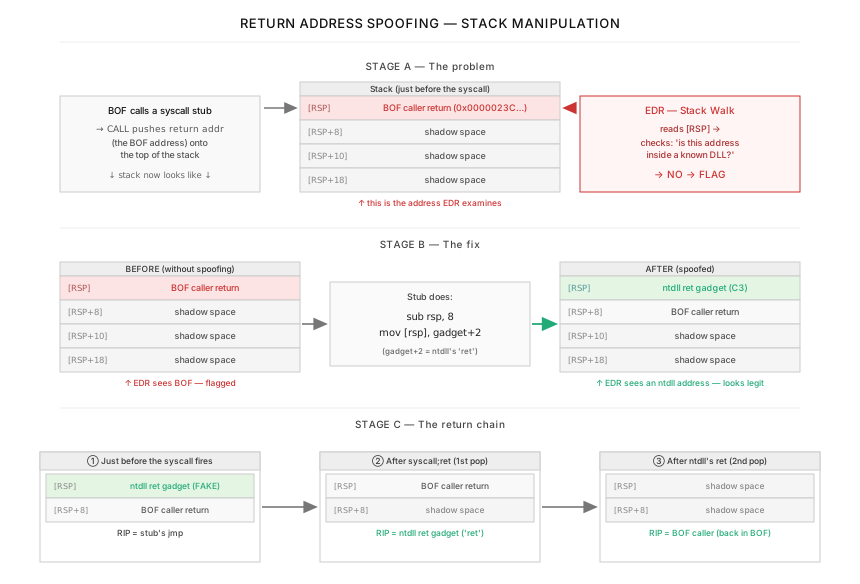
To follow the return address spoofing mechanism, a brief recap of how function calls work at the CPU level is needed. When the CPU executes a CALL instruction, it pushes the address of the instruction immediately after the CALL onto the stack (a region of memory that grows downward, tracked by the RSP register — the 64-bit Stack Pointer; the “R” prefix in x64 register names just denotes the 64-bit form, the way EAX is the 32-bit form of AX, so RSP is “Stack Pointer (64-bit)” rather than anything more elaborate. RSP always points to the top of the stack). This pushed address is the return address — where execution should continue after the called function finishes. When the called function executes RET, the CPU pops the value at [RSP] (the top of the stack), loads it into RIP (the 64-bit Instruction Pointer — same naming convention; this register holds the address of the next instruction to execute), and continues from there. EDR stack-walking works by reading these return addresses from the stack to reconstruct the chain of callers — if a return address points to memory that does not belong to any loaded module, that frame can be flagged as anomalous, which is one of the signals defenders use to spot unbacked code such as a BOF.
The ScStub function implements return address spoofing for the manually resolved syscalls. During a syscall, an EDR stack walker examining [RSP] (the return address on the stack) looks at where the syscall came from. Without spoofing, [RSP] points to the BOF’s memory — an unbacked address that does not correspond to any loaded module, which is one of the signals defenders use to spot unbacked code. With spoofing, ScStub pushes an additional stack frame:
sub rsp, 8— Makes room for one extra return address.[RSP]= ntdllretgadget (theC3byte at offset +2 from thesyscall;retgadget).[RSP+8]= real BOF caller return address.
The return chain becomes: syscall;ret → pops ntdll ret gadget → executes ret in ntdll → pops real caller address → returns to BOF. A stack walker examining the frame at this point sees a return address inside ntdll, which is a backed module like any other, so the unbacked-frame signal that would otherwise stand out is no longer present.
There is a limitation: sub rsp, 8 shifts all stack-based arguments by 8 bytes. This is safe for functions with 4 or fewer arguments (under the x64 calling convention — the rules that the Windows x64 ABI defines for how function arguments are passed: the first 4 integer/pointer arguments go in registers RCX, RDX, R8, R9, and only the 5th argument and beyond are placed on the stack). Since the first 4 arguments live in registers, not on the stack, shifting the stack does not affect them. For functions with 5+ arguments, the stack offset would corrupt argument passing. In NFEXEC, only NtDelayExecution (2 arguments) uses this stub, so the limitation does not apply.
Patchless AMSI and ETW Bypass
Traditional AMSI/ETW bypasses patch the target function’s code in memory — for example, writing xor eax, eax; ret (return zero immediately) at the start of AmsiScanBuffer. This works but leaves modified .text section pages that integrity scanners (software that compares in-memory code against the on-disk original to detect tampering) can detect.
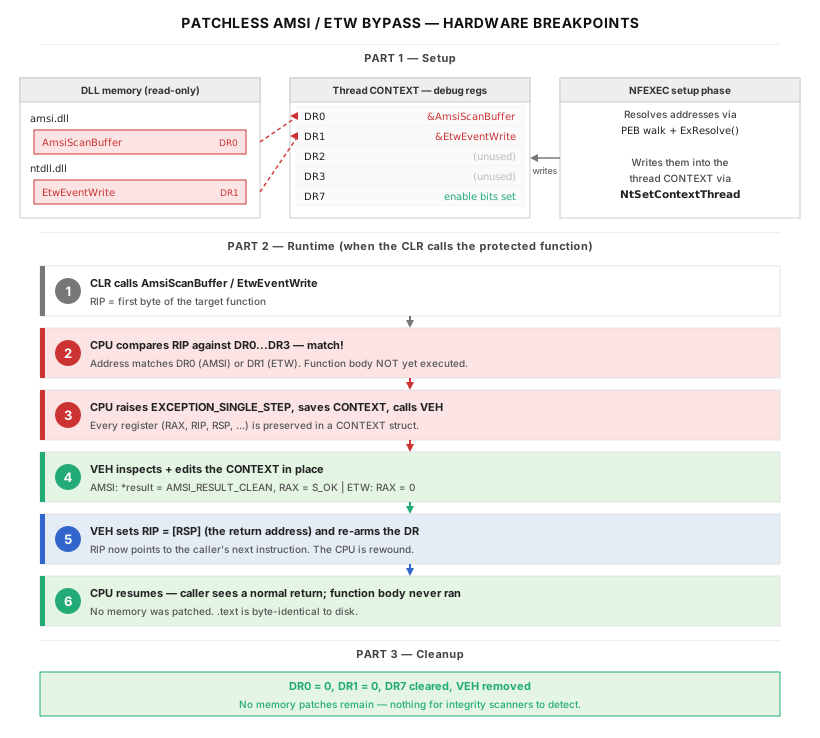
NFEXEC uses hardware breakpoints (HWBP) — a CPU feature where debug registers (DR0–DR3) can be programmed with addresses that trigger an EXCEPTION_SINGLE_STEP (the Windows exception code, 0x80000004, that the OS raises whenever the CPU hits a hardware breakpoint or completes a single-stepped instruction; despite the “SINGLE_STEP” name, this is the same exception code used for HWBP hits) when executed. No memory is modified. One important property: debug registers are per-thread, set via NtSetContextThread, so the bypass applies only to the BOF thread that installs it. Threads spawned afterward (for example, via PowerShell Start-Job) do not inherit the breakpoints and run without the bypass.
AMSI bypass (DR0): When AmsiScanBuffer (a function that AMSI calls to scan PowerShell scripts, .NET assemblies, and other content for malicious patterns) is called by the CLR, the hardware breakpoint fires. Here is what happens step by step:
(1) The CPU is about to execute the first instruction of AmsiScanBuffer. Because DR0 contains that function’s address, the CPU raises an exception instead of executing the instruction. The exception code is EXCEPTION_SINGLE_STEP (0x80000004).
(2) Before the exception reaches the normal Windows error-handling chain, the VEH (Vectored Exception Handler — a callback that the BOF registered earlier with AddVectoredExceptionHandler) is called first. The VEH receives a pointer to a CONTEXT structure — a snapshot of every CPU register at the moment the exception fired: the instruction pointer (RIP, which currently points at AmsiScanBuffer), the stack pointer (RSP, which points at the top of the stack where the return address is stored), the general-purpose registers (RAX, RCX, RDX, etc.), and the debug registers themselves.
(3) The VEH modifies three things in the CONTEXT. First, it writes 0 (meaning “clean, no threat found”) into the memory location that AmsiScanBuffer’s caller passed as the result pointer — telling the caller the scan completed and found nothing malicious. Second, it sets RAX to S_OK (0) — the return value that AmsiScanBuffer would normally produce on success. Third, it sets RIP to the return address (read from [RSP]) — this is the address of the instruction that comes after the caller’s CALL AmsiScanBuffer.
(4) The VEH returns EXCEPTION_CONTINUE_EXECUTION. The CPU loads the modified CONTEXT back into its registers. Because RIP now points past the call site, execution continues as if AmsiScanBuffer had already run and returned “clean.” The function body never executes — not a single instruction of it.
The DR0 enable bit is re-armed inside the handler because some CPUs automatically clear the breakpoint after it fires. Without re-arming, only the first AMSI scan would be bypassed.
An important OPSEC detail: the VEH does NOT set RAX = E_INVALIDARG (which would cause the function to return E_INVALIDARG to its caller) as some public implementations do. E_INVALIDARG as the return value of AmsiScanBuffer is itself a known IOC that EDR products flag. Setting RAX = S_OK together with writing AMSI_RESULT_CLEAN to the result pointer makes the call appear as a normal scan that found nothing.
ETW bypass (DR1): The same mechanism is applied to EtwEventWrite (the function that .NET and PowerShell use to emit telemetry events that EDR can consume). The VEH sets RAX = 0 and skips the function, suppressing the ETW events that flow through this single API. (The CLR has additional telemetry paths — for example, direct EtwWriteUMSecurityEvent calls and ETW manifest-based providers — that are not silenced by this hook alone; this bypass targets the most heavily monitored entry point, not every ETW path the runtime can use.)
Both target functions are resolved via PEB walk and PE export table hash lookup — AmsiScanBuffer from amsi.dll (loaded via LdrLoadDll — the lower-level NT API that the higher-level LoadLibrary ultimately calls; using LdrLoadDll directly avoids the kernel32!LoadLibraryW import that would appear in the IAT, itself resolved from the PEB), and EtwEventWrite from ntdll. The bypass setup happens after CLR Start(), not before — because amsi.dll is loaded during CLR initialization, and the breakpoint address cannot be resolved until the DLL is in memory. This is safe because Start() itself does not trigger AMSI scanning; scanning only occurs later during CreateDomain, assembly loading (Load_3), and script invocation (Invoke_3). By the time any scanning happens, the hardware breakpoints are already in place.
After execution, all debug registers are cleared and the VEH is removed. No artifacts remain.
Additional OPSEC Measures
The following measures all aim at the same goal: shrink the analyst’s signal. Each one removes a specific thing that standard binary-inspection tools (strings, objdump) would otherwise reveal at a glance. The figure below shows the same binary inspected with the same commands, with and without these measures applied.
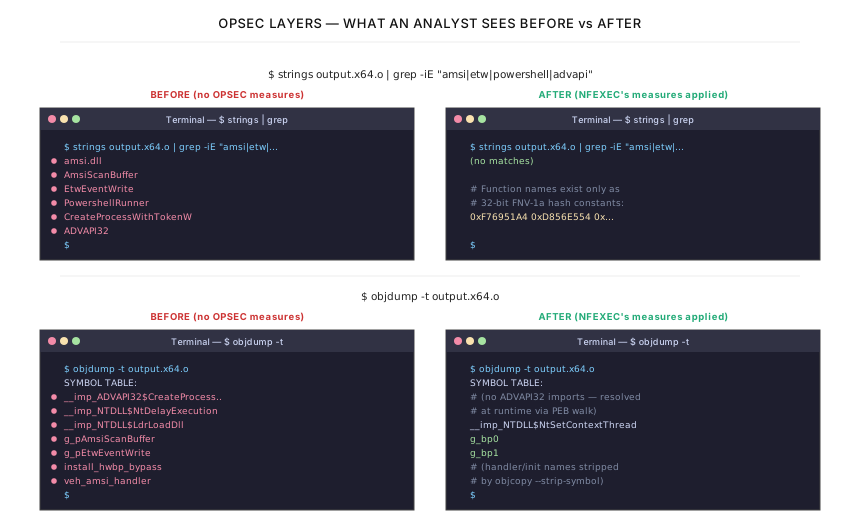
The first scene (strings with grep) shows the effect of three measures combined: XOR-encoding of function-name strings, FNV-1a hash-only resolution (function names exist only as 32-bit hash constants), and the elimination of all ADVAPI32 imports. Together they reduce the grep result from a list of incriminating identifiers to no matches at all.
The second scene (objdump -t) shows the symbol-table effect of three more measures: zero ADVAPI32 imports (resolved at runtime via PEB walk), objcopy --strip-symbol removing handler and initialization function names, and opaque variable renames (g_pAmsiScanBuffer → g_bp0, g_pEtwEventWrite → g_bp1).
Zero ADVAPI32 imports in NFEXEC. CreateProcessWithTokenW is resolved at runtime via PEB walk + FNV-1a hash. This eliminates the __imp_ADVAPI32$CreateProcessWithTokenW symbol from the COFF file (ADVAPI32.dll — short for Advanced API — is the Windows DLL that provides security, registry, service-control, and event-log functions; an import from this DLL is a strong analyst signal that the binary is doing privileged or security-sensitive work), which would be an obvious indicator in the object’s symbol table (a list of function and variable names embedded in the compiled binary — security analysts can read these names with tools like strings or objdump to identify what the binary does).
XOR-encoded function names. Strings like amsi.dll are XOR-encoded in the binary. The sentinel-terminated encoding (d[i] ^= 0x41 until d[i] == KEY) means the decoder is a simple loop with no separate length constant. Decoded strings are zeroed on the stack after use via memset.
FNV-1a hash-only resolution. For PEB-resolved functions, no function name strings exist in the binary at all. Each function is identified by a 32-bit hash constant (H_AmsiScanBuffer = 0xF76951A4, etc.). Even with the binary in hand, an analyst would need to brute-force or rainbow-table (a rainbow table — a precomputed lookup of input → hash pairs, generated once and reused — would let an analyst quickly look up which function a given hash constant corresponds to, but only if they happen to have already hashed that name beforehand) the hashes to determine which functions are being called.
Symbol sanitization. objcopy --strip-symbol (objcopy is a GNU binutils command-line tool that copies an object file while transforming it — stripping symbols, renaming sections, removing debug info, and so on; the companion tool objdump reads the same files for inspection) removes 34 symbols from the NFEXEC COFF file (20 from NOFILTER). Global variable names like g_bp0 and g_bp1 are already opaque — they were originally named g_pAmsiScanBuffer and g_pEtwEventWrite, which would be instantly identifiable.
Memory scrubbing. ScScrub() zeroes the ntdll base address, gadget pointers, and last SSN from globals at the end of go(). STARTUPINFO (the Windows struct passed to CreateProcess/CreateProcessWithTokenW to specify how the new process should start: window placement, standard-handle redirection, and similar parameters — relevant here because we point its hStdOutput at our pipe), command line buffers (both narrow and wide), and pipe output buffers are all zeroed before being freed. This makes post-execution memory forensics significantly harder.
No .bss section. All global and static variables use __attribute__((section(".data"))) to force placement in the .data section. The reason is explained in Part 5.
Part 5: Lessons from Havoc BOF Development
| Pitfall | Symptom | Fix |
|---|---|---|
| BeaconFormatAlloc bug | LocalAlloc args reversed: 1 byte alloc | Use calloc + vsnprintf + BeaconOutput |
| .bss section not mapped | Static/global = 0 causes crash | __attribute__((section(".data"))) |
| Pipe buffer deadlock | Default 4KB fills, child + BOF block | CreatePipe with 1MB buffer size |
| OEM codepage mojibake | ipconfig output garbled in console | OEM → UTF-16 → UTF-8 conversion |
| COM vtable slot miscount | Wrong slot → call wrong method → crash | Count IUnknown+IDispatch+all base slots |
| RegisterCommand 7 args | Docs say 8 args, 5th is str (wrong) | 7 args, 5th arg is int (0) |
| __file__ undefined | NameError crash in embedded Python | Use config variable for BOF path |
| GC eats callbacks | Segfault on button click in GUI | Keep references in _prevent_gc list |
| ConsoleWrite last-only | Multiple calls, only last one shows | Combine all text in one call |
Behaviors verified by reading Havoc source code (ObjectApi.c, CoffeeLdr.c, PyWidgetClass.cc).
Havoc is an actively developed open-source framework, and like any large project, some implementation details are not yet reflected in the documentation. Below are the behaviors I encountered while building NOFILTER-NFEXEC, along with the solutions I used. All of these were resolved by reading Havoc’s source code directly, which is one of the great advantages of working with an open-source framework.
Each lesson follows the same structure: what the symptom looks like to the operator, what background knowledge is needed to understand the problem, what the root cause is, and how to fix and verify the fix. The goal is that someone encountering these issues for the first time can follow the reasoning from symptom to solution without needing to read the Havoc source code themselves — though doing so is always recommended.
BeaconFormatAlloc Argument Order
What you see: You write a BOF that uses BeaconFormatAlloc and BeaconFormatPrintf to build output text. The BOF compiles without errors. When you run it, the output is garbled, truncated, or — more often — the Demon silently crashes with no error message. There is nothing in the Havoc console that tells you what went wrong.
Background: how BOFs produce output. In a normal C program, you can use printf to print text to the screen. In a BOF, you cannot — the C runtime library is not available because the BOF is a raw object file loaded into memory by CoffeeLdr, not a full executable linked against the C runtime. Instead, Havoc provides a set of output functions: BeaconFormatAlloc allocates a buffer to hold text, BeaconFormatPrintf writes formatted text into that buffer (similar to sprintf in normal C), and BeaconFormatToString retrieves the final string. These functions are modeled after the Cobalt Strike Beacon API, and BOF developers coming from Cobalt Strike examples will naturally reach for them.
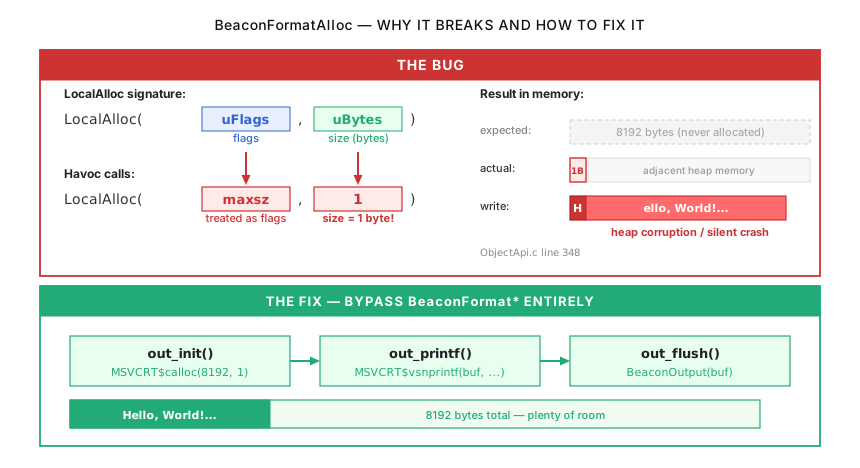
Root cause: reversed arguments in LocalAlloc. BeaconFormatAlloc internally calls LocalAlloc — a Windows API that allocates memory from the process heap. LocalAlloc takes two arguments in this order: LocalAlloc(uFlags, uBytes). The first argument is a set of flags that control allocation behavior (for example, whether to zero-fill the memory). The second argument is the number of bytes to allocate.
In Havoc’s implementation (ObjectApi.c, line 348), these two arguments are swapped: LocalAlloc(maxsz, 1). What was intended as “allocate maxsz bytes with flags=0” becomes “allocate 1 byte with flags=maxsz.” The uFlags value of maxsz (typically 8192 or similar) happens to include flag bits that do not cause an error — LocalAlloc simply ignores unrecognized flag bits and proceeds. But it only allocates 1 byte, because uBytes is 1.
The result: BeaconFormatAlloc returns a buffer that is exactly 1 byte long. The first BeaconFormatPrintf call writes formatted text into this 1-byte buffer. Since the text is almost certainly longer than 1 byte, the write immediately overflows past the end of the allocated memory and into the adjacent heap region. This is a classic heap buffer overflow. Depending on what lives in the adjacent memory, the symptoms range from garbled output text (if the overflow corrupts another string buffer) to a silent crash (if the overflow corrupts heap metadata, which Windows detects and terminates the process for).
This bug affects the entire BeaconFormat* family: BeaconFormatPrintf, BeaconFormatAppend, BeaconFormatToString, BeaconFormatInt, and any other function that writes into the buffer allocated by BeaconFormatAlloc.
The fix: bypass BeaconFormat* entirely. Instead of using Havoc’s BeaconFormat* functions, allocate your own buffer using MSVCRT$calloc (the C runtime’s calloc function, called through DFR — Dynamic Function Resolution, the BOF convention for calling external library functions), format text into it with MSVCRT$vsnprintf, and send the result back to the operator with BeaconOutput. BeaconOutput works correctly as a standalone function — it does not depend on BeaconFormatAlloc.
This is what NOFILTER and NFEXEC do. Three helper functions wrap the pattern:
How to verify the fix. After compiling, run objdump -t output.x64.o | grep BeaconFormat. If any BeaconFormat* symbols appear, your code is still using the broken API. The output should show zero matches.
The .bss Section Behavior
What you see: You declare a global or static variable in your BOF — for example, static HANDLE g_token = NULL; — and the BOF compiles without warnings. When you load and run it in Havoc, the Demon either crashes immediately with no error message, or runs for a while and then crashes in an unrelated location. There is no indication that the crash has anything to do with the variable you declared.
Background: how compiled C code is organized into sections. When you compile a .c file, the compiler does not just produce a single blob of machine code. It organizes the output into named sections, each with a different purpose:
The .text section contains the actual machine code — the CPU instructions that make up your functions. When you write void go(char *args, int alen) { ... }, the compiled instructions for that function go into .text.
The .data section contains variables that are initialized with a non-zero value. If you write static int counter = 42;, the compiler stores the value 42 in the .data section, because the program needs this specific value to be present when it starts.
The .bss section (historically “Block Started by Symbol”) contains variables that are initialized to zero or left uninitialized. If you write static int counter = 0; or just static int counter;, the compiler places counter in .bss. Here is the key insight: the .bss section does not actually contain any data in the compiled file. The compiler just records how many bytes of zero-filled memory the program needs. The normal operating system loader (the code that runs when you double-click an .exe) is responsible for allocating that zero-filled memory at startup. This optimization saves file size — instead of storing thousands of zero bytes in the file, the loader creates them on the fly.
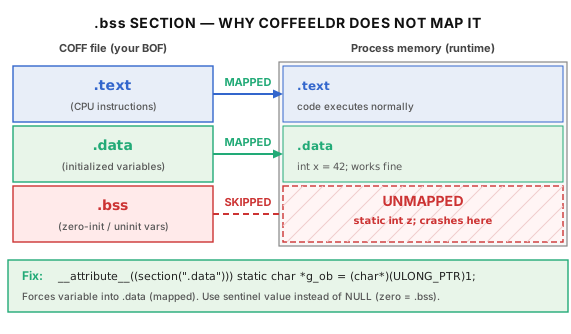
Root cause: CoffeeLdr does not map the .bss section. Havoc’s COFF loader, CoffeeLdr (CoffeeLdr.c), reads the .text and .data sections from the BOF file and copies them into freshly allocated memory. However, it does not process the .bss section. This means that no memory is allocated for .bss variables.
When your code accesses a .bss variable, the compiler has already assigned it an address based on the assumption that the .bss section will be mapped at some offset. But since CoffeeLdr never allocated that memory, the address points to… something else. It might point to:
(a) Unmapped memory — the address falls outside any allocated region. The CPU raises an access violation (the “you touched memory you don’t own” error), Windows terminates the thread, and the Demon crashes. No error message is produced.
(b) Someone else’s memory — the address happens to fall within a region that was allocated for a different purpose (CoffeeLdr’s internal metadata, another heap allocation, or unrelated process memory). Reads return garbage values. Writes silently corrupt that other data. The corruption may not cause a visible problem until much later, when the corrupted data is used — producing a crash whose stack trace points to code that has nothing to do with the .bss variable. This is the harder case to debug.
In C, variables are placed in .bss under any of these common conditions: static int x; (uninitialized static), static int x = 0; (initialized to zero — zero is the .bss default), int g_count = 0; (global initialized to zero), or static char *ptr = NULL; (pointer initialized to NULL, which is zero). This last case is particularly common in BOF code — almost every global pointer starts as NULL.
The fix: force every variable into .data. The solution is to ensure no variable ends up in .bss. This requires two things: (1) initialize every variable to a non-zero value, and (2) use the GCC section attribute to explicitly place it in .data.
For pointer variables where you would normally initialize to NULL (which is zero), use a sentinel value like (PVOID)1. A sentinel value (a special marker that means “not yet initialized” — distinct from any valid pointer value) tells your code that the variable has not been set yet. Before using the pointer, check whether it still holds the sentinel:
How to verify the fix. After compiling, run:
The output should show .bss with Size of 00000000. If the size is non-zero, at least one variable is still being placed in .bss, and you need to find and fix it.
Pipe Buffer Sizing
What you see: You run nfexec ipconfig /all (or any command that produces more than a few kilobytes of output). The command appears to start — no error is returned — but the Demon never responds. The Havoc console shows the command as “running” indefinitely. No crash, no error, no output. The operator has no way to diagnose what happened, because the Demon is not dead — it is alive but stuck.
Background: what a pipe is and how it works. A pipe is a communication channel that connects a writer and a reader. One process writes data into one end of the pipe, and another process (or another thread in the same process) reads data from the other end. Pipes have a fixed-size internal buffer — a region of memory managed by the kernel that temporarily holds data between the write and the read. Think of it like a physical pipe with limited capacity: water (data) flows in from one end and out from the other, but if the pipe is full and no one is draining the other end, the source must stop and wait.
This waiting behavior is critical: when a process calls WriteFile on a pipe whose buffer is already full, the call blocks — the writing thread pauses and does not return until the reader drains enough data from the pipe to make room. Similarly, when a process calls ReadFile on an empty pipe, the call blocks until the writer puts data in.
Windows creates a pipe with CreatePipe(hReadPipe, hWritePipe, lpPipeAttributes, nSize). The nSize parameter specifies the buffer size in bytes. If you pass 0, Windows uses a system default. The MSDN documentation notes that “the size is only a suggestion; the system uses the value to calculate an appropriate buffering mechanism.” In practice, a value of 0 typically results in a buffer of approximately 4KB (4096 bytes).
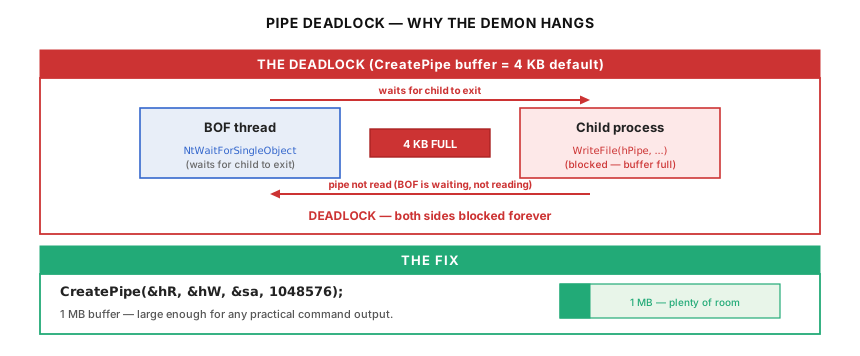
Root cause: a classic deadlock between the BOF and the child process. In exec mode, the BOF creates a pipe, launches a child process (whoami, ipconfig, etc.) with the pipe’s write handle attached to the child’s stdout, and then calls NtWaitForSingleObject to wait for the child process to exit. After the child exits, the BOF reads the pipe. The intended sequence is:
(1) BOF creates pipe (4KB buffer). (2) BOF launches child process. (3) Child writes output to pipe. (4) Child exits. (5) BOF detects that child has exited. (6) BOF reads output from pipe.
This works perfectly when the child’s output fits within the 4KB buffer. But when the output exceeds 4KB — and ipconfig /all on a system with multiple network adapters easily produces 8–15KB — the sequence breaks:
(1) BOF creates pipe (4KB buffer). (2) BOF launches child process. (3) Child writes output to pipe. After 4KB, the pipe buffer is full. (4) Child’s WriteFile blocks — the kernel suspends the child’s thread until someone reads from the pipe to make room. (5) BOF is blocked in NtWaitForSingleObject, waiting for the child to exit. But the child cannot exit because it is blocked trying to write. (6) Deadlock — the BOF waits for the child, the child waits for the BOF. Neither can proceed.
In PowerShell mode, the same problem manifests differently. The BOF thread calls Invoke_3 (the COM method that runs the PowerShell script), and the PowerShell script writes output through a StreamWriter connected to the pipe. If the pipe buffer fills, WriteFile blocks inside the PowerShell Runspace thread. Invoke_3 does not return until the script finishes, and the script cannot finish because it is blocked on the pipe. The BOF thread — which is the one that would read the pipe — is itself blocked waiting for Invoke_3.
The fix: specify a large pipe buffer. Replace CreatePipe(&hR, &hW, &sa, 0) with CreatePipe(&hR, &hW, &sa, 1048576). A 1MB buffer is large enough for any practical command output (the vast majority of commands produce far less than 1MB) without consuming a meaningful amount of memory on modern systems. The child can write its entire output into the buffer without blocking, finish, and exit. The BOF then reads the completed output.
How to verify the fix. Run a command known to produce large output: nfexec ipconfig /all on a multi-adapter system, or nfexec systeminfo which often produces 5–10KB. If the output returns completely without hanging, the fix is working. For an explicit test, nfexec powershell -c "1..500 | ForEach-Object { 'Line ' + $_ }" generates approximately 5KB of output.
OEM Codepage and Mojibake
What you see: You run nfexec ipconfig on a Japanese (or Korean, Chinese, Russian, etc.) Windows system. The command succeeds, but the output text is garbled — characters appear as random symbols, question marks, or completely wrong letters. On an English Windows system, the same command works perfectly. This is mojibake (文字化け — literally “character transformation” in Japanese), a term for text that has been decoded with the wrong character encoding.
Background: why different Windows systems produce text in different formats. Every piece of text on a computer is stored as a sequence of numbers (bytes). A character encoding is the mapping between those numbers and the characters they represent. The letter “A” is byte 0x41 in almost every encoding, but beyond basic ASCII (the 128 characters of the English alphabet, digits, and common punctuation), different encodings assign different characters to the same byte values.
Windows has two separate encoding systems that coexist within the same machine. Unicode (specifically UTF-16, where each character is 2 or more bytes) is the modern encoding used by the Windows kernel and by most modern applications. OEM codepages are a legacy system inherited from DOS. Each Windows installation has an OEM codepage that defines how command-line programs (the “console” environment) encode text. On English Windows, this is typically CP437 (the original IBM PC character set). On Japanese Windows, it is Shift-JIS (CP932). On Russian Windows, it is CP866.
When a native Windows command like ipconfig or systeminfo writes text to its standard output, it uses the system’s OEM codepage — not Unicode, not UTF-8. This is because these commands were designed to work with the traditional Windows console, which uses OEM codepages. The bytes that represent “ネットワーク” (Japanese for “network”) in Shift-JIS are a completely different sequence than the bytes that represent the same characters in UTF-8.
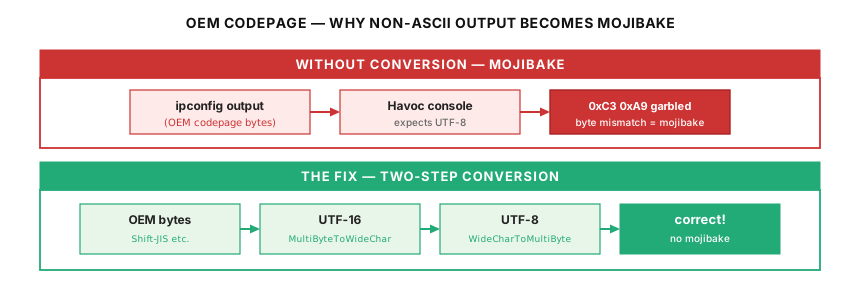
Havoc’s operator console displays text as UTF-8 (the universal encoding used by modern applications and the web). When a BOF captures command output as raw bytes (in the OEM codepage) and sends those bytes directly to the Havoc console (which interprets them as UTF-8), every non-ASCII character is misinterpreted. The byte 0x83 might mean “ネ” in Shift-JIS but is an invalid or different character in UTF-8.
The reason many developers never encounter this: on English Windows, native commands produce output that is entirely within the ASCII range (bytes 0x20–0x7E). ASCII is the same in every codepage and in UTF-8, so no conversion is needed. The bug only manifests when the output contains non-ASCII characters — which is guaranteed on non-English systems.
The fix: a two-step conversion through UTF-16. Windows does not provide a direct API to convert from an OEM codepage to UTF-8. Instead, the conversion must go through UTF-16 as an intermediate step:
Step 1: OEM codepage → UTF-16. Call MultiByteToWideChar with CP_OEMCP (a special constant that means “use whatever OEM codepage this system is configured for”). This converts the raw bytes from the command output into proper Unicode (UTF-16) characters.
Step 2: UTF-16 → UTF-8. Call WideCharToMultiByte with CP_UTF8. This converts the Unicode characters into the UTF-8 byte sequence that Havoc’s console expects.
Both API calls need to be called twice — first with a NULL output buffer to get the required buffer size, then with an allocated buffer to perform the actual conversion.
COM Vtable Slot Counting
What you see: Your BOF attempts to host the .NET runtime (CLR) to run PowerShell inline. The code compiles without errors. When you run it, the Demon crashes instantly — not with a helpful error message, but with an access violation at a seemingly random address. If you are lucky, the crash happens consistently. If you are unlucky, it crashes at different addresses on different runs, because the wrong function that gets called may behave differently depending on heap state.
Background: what a vtable is and why COM uses one. In normal C code, when you call a function, the compiler knows the function’s address at compile time (or at link time). You write DoSomething(), and the compiler emits a CALL instruction to a known address.
COM (Component Object Model — Microsoft’s standard for letting software components written in different languages talk to each other at the binary level) works differently. COM interfaces do not expose function names in the binary. Instead, every COM object contains a vtable (virtual function table) — a contiguous array of function pointers, where each function occupies a specific numbered slot. To call a method, you look up its slot number in the vtable array and call whatever function pointer is stored at that position.
For example, imagine a COM interface with three methods: Alpha at slot 0, Beta at slot 1, and Gamma at slot 2. The vtable in memory looks like this:
vtable[0] = address of Alpha vtable[1] = address of Beta vtable[2] = address of Gamma
To call Beta, your code reads vtable[1] and calls that address. If you accidentally use slot 2 instead, you call Gamma — a completely different function that expects different arguments. The CPU does not know you made a mistake. It just calls whatever function is at that address, passes your arguments (which are wrong for that function), and the result is almost always a crash.
In C++, the compiler handles vtable slot counting automatically. But in a BOF written in C (not C++), you must do it manually: cast the interface pointer to an array of function pointers, index into it, and call the result. If your index is wrong by even 1, you call the wrong function.
Root cause: undercounting event handler slots in the AppDomain interface. The .NET CLR exposes its functionality through several COM interfaces. NFEXEC calls methods on three of them:
AppDomain.Load_3 — loads a .NET assembly (the PowerShell runner DLL) into the AppDomain Assembly.EntryPoint — retrieves the entry point method from the loaded assembly MethodInfo.Invoke_3 — invokes the entry point, which runs the PowerShell script
To call Load_3, you need to know its exact slot number. Every COM interface begins with the 3 methods of IUnknown (QueryInterface, AddRef, Release — the base interface that all COM objects implement), followed by the 4 methods of IDispatch (GetTypeInfoCount, GetTypeInfo, GetIDsOfNames, Invoke — the interface that enables dynamic method invocation, used by scripting languages). After these 7 inherited methods come the methods specific to the AppDomain interface itself.
The correct slot counts, verified against the actual COM interface definitions:
AppDomain: 3 (IUnknown) + 4 (IDispatch) + 4 + 2 + 1 + 14 (event handlers) + 9 + 6 + 2 = 45 → Load_3 is slot 45 (zero-indexed) Assembly: 3 + 4 + 4 + 5 = 16 → EntryPoint is slot 16 MethodInfo: 3 + 4 + 4 + 4 + 3 + 1 + 4 + 1 + 4 + 4 + 4 + 1 = 37 → Invoke_3 is slot 37
The most common mistake is the event handler count in AppDomain. The AppDomain interface defines 7 events: DomainUnload, AssemblyLoad, ProcessExit, TypeResolve, ResourceResolve, AssemblyResolve, and UnhandledException. In .NET’s COM projection, each event exposes two vtable methods: add_EventName (to register a handler) and remove_EventName (to unregister it). That makes 7 × 2 = 14 vtable slots for events alone. It is easy to undercount this — for example, by counting only the 7 event names (giving 7 slots instead of 14), or by counting only the events that are commonly used. Either mistake shifts every subsequent slot number by 7, meaning Load_3 at what you think is slot 38 actually calls a completely different method, which crashes.
The fix: verify slot counts against the interface definitions. The only reliable way to get the slot numbers right is to read the actual interface definition (in the .NET reference source or the Windows SDK headers) and count every method, including inherited base interface methods, event add/remove pairs, and property get/set pairs. Do not rely on documentation or examples from other projects — they may have been written for a different version of the interface.
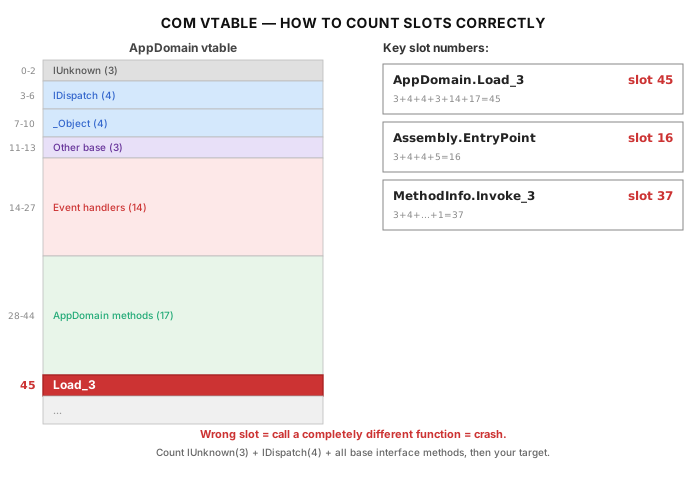
RegisterCommand Signature
What you see: You write a Havoc extension (a Python script that adds custom commands to Havoc’s console) and use RegisterCommand to register your BOF command. You follow the documentation’s function signature. The extension loads without error. The command appears in the console. But when you try to use it, the behavior is subtly wrong — arguments may not be passed correctly, or the help text does not display as expected. There is no error message that points to the function signature as the problem.
Background: what RegisterCommand does. When you build a Havoc extension, you write a Python script that Havoc loads at startup. This script tells Havoc about new commands by calling RegisterCommand, which adds an entry to Havoc’s command table: the command name, a callback function to execute when the operator types the command, help text, and usage examples. It is the bridge between the operator typing nfexec whoami in the Havoc console and the Python code that packs the arguments and sends the BOF to the Demon.
Root cause: the documentation describes a different signature than the code implements. Havoc’s official documentation describes RegisterCommand as taking 8 arguments, with the 5th argument being a string. However, the actual implementation in core/Havoc.py takes 7 arguments, with the 5th argument being an integer. The actual expected call is:
The 7 arguments are: (1) the callback function, (2) an empty string (module name, typically unused), (3) the command name, (4) a description string, (5) an integer 0 (internal parameter), (6) a usage string, (7) an example string.
Using 8 arguments, or passing a string where the integer is expected, does not cause an obvious crash — Python is dynamically typed, so the interpreter does not reject the wrong type. The command registers, but internal fields may be assigned incorrectly, leading to subtle issues that are difficult to trace back to the registration call.
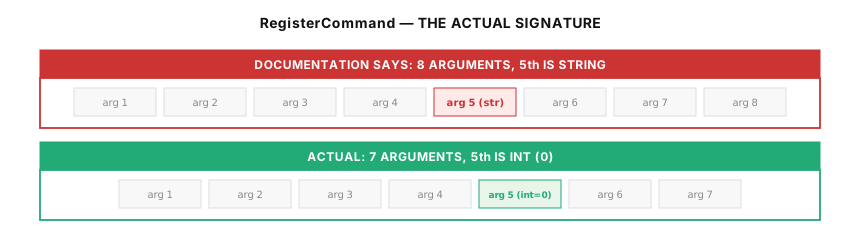
file in Havoc’s Embedded Python
What you see: Your Havoc extension script uses __file__ to determine its own location on disk — for example, to find the BOF .o file that lives in the same directory as the script. When the extension loads, Havoc crashes with a NameError: name '__file__' is not defined.
Background: what __file__ is. In the standard Python interpreter (the one you run from a terminal with python3 script.py), every script has a built-in variable called __file__ that contains the file path of the script itself. Developers commonly use it to locate files relative to the script: os.path.dirname(__file__) gives the directory the script lives in, and os.path.join(os.path.dirname(__file__), "nfexec.x64.o") gives the full path to a file in the same directory.
Root cause: Havoc’s embedded Python does not set __file__. Havoc embeds a Python interpreter directly into its C++ application using CPython’s embedding API. When scripts are loaded this way, the __file__ variable is not automatically set — it is a feature of the standard Python script loader, not of the Python language itself. Havoc’s loader executes the script content directly without going through the standard import machinery that would set __file__.
The fix: Do not use __file__. Instead, hardcode the BOF path based on the extension’s known installation location, or use a configuration variable that the operator sets. For NOFILTER-NFEXEC, the BOF path is constructed from a known base directory.
ConsoleWrite Output Behavior
What you see: Your Havoc extension’s command handler calls demon.ConsoleWrite(type, msg) multiple times — for example, once to print a header, once to print the main result, and once to print a summary. When you run the command, only the last message appears. The first two messages are silently discarded.
Background: what ConsoleWrite does. demon.ConsoleWrite(type, msg) is the Python-side API for sending text from a command handler back to the Havoc console. The type argument controls formatting (e.g., 0x10 for informational output). Developers who are used to Python’s print() function naturally assume that multiple ConsoleWrite calls will produce multiple lines of output, the way multiple print() calls would in a normal script.
Root cause: only the last call takes effect. Internally, ConsoleWrite does not append to an output buffer — it replaces whatever was previously stored. Each call overwrites the previous one. When the command handler returns and Havoc sends the output to the console, only the most recent text is available.
The fix: combine all output into a single call. Build the complete output string in Python first, then send it in one ConsoleWrite call. Alternatively, use the BOF-side output path: have the BOF call BeaconOutput(CALLBACK_OUTPUT, data, dataLen), which correctly handles multiple calls and preserves newlines. The Python handler’s CALLBACK_OUTPUT type (mode=2) echoes this data to the console as it arrives.
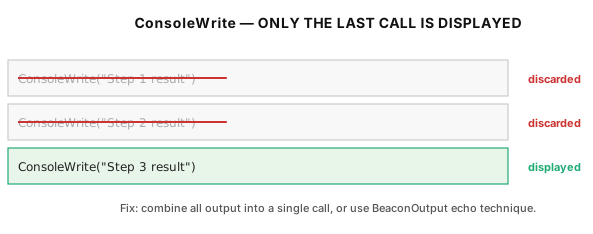
Preventing Garbage Collection of GUI Callbacks
What you see: You build a GUI tab for Havoc using havocui.Widget, add a button with a callback function, and test it. The button works perfectly the first time. You click it again — still works. You leave the client idle for a few minutes, then click the button again. The entire Havoc client crashes with a segfault (segmentation fault — an error raised by the operating system when a process tries to access memory it does not own). The crash happens inside Qt’s event loop (Qt is the C++ GUI framework Havoc is built on), with no stack trace pointing to your Python code. This makes it extremely difficult to diagnose.
Background: how Python manages memory. Python uses garbage collection — an automatic system that tracks which objects in memory are still being used and frees those that are not. An object is considered “still in use” if there is at least one variable, list, dictionary, or other data structure that references it. When the last reference to an object disappears, the garbage collector can reclaim that object’s memory at any time.
A closure is a function defined inside another function that captures variables from the enclosing scope. In Python:
The inner function handler is a closure. When make_handler returns, the closure handler is the return value. If the caller stores it in a variable, it stays alive. If the caller does not store it — or if the variable goes out of scope — the garbage collector can free the closure.
Root cause: Python’s garbage collector frees the callback, but C++ still holds a pointer to it. When you call widget.addButton("Run BOF", handler), Havoc’s C++ code (in PyWidgetClass.cc) creates a Qt button and connects it to a C++ lambda that calls the Python function. The C++ lambda stores a raw pointer to the Python function object. But Havoc does not increment the Python object’s reference count — meaning Python’s garbage collector does not know that C++ is still using the function.
If the Python function was created as a closure inside a function that has since returned, and no Python-side variable holds a reference to the closure, then from Python’s perspective, nobody is using the closure anymore. The garbage collector frees it. The C++ lambda’s pointer now points to freed memory (a dangling pointer). The next time the operator clicks the button, the C++ lambda dereferences the dangling pointer, which causes a segfault.
The timing makes this bug deceptive: the button works fine for the first few clicks because the garbage collector has not yet run. It only crashes after Python’s cyclic garbage collector runs (which happens periodically, or under memory pressure), freeing the closure that nobody on the Python side is holding.
The fix: keep an explicit reference to every callback. Create a module-level list and append every callback closure to it. This ensures Python always has a reference to the callback, preventing the garbage collector from freeing it.
The list _prevent_gc lives at the module level, so it persists for the entire lifetime of the Havoc process. Every closure appended to it stays alive indefinitely. The memory cost is negligible — each closure is a few hundred bytes.
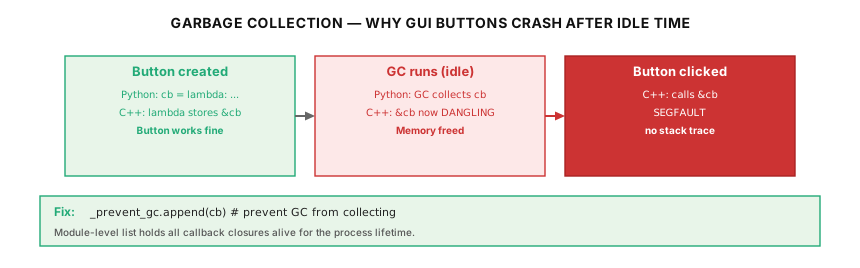
The NtQueryObject Deadlock
What you see: During NOFILTER’s handle scanning phase, the BOF hangs indefinitely. The Demon stops responding with no error message. Unlike the pipe buffer deadlock (which hangs when running a specific command), this hang occurs during the initial token theft — before any command is executed. It does not happen on every run; it depends on what handles happen to exist on the system at the time.
Background: what NtQueryObject does and why NOFILTER needs it. NOFILTER’s handle scanning phase (Phase 4 in Part 2) iterates through every open handle on the system — potentially tens of thousands — looking for two specific handles: a File handle to \Device\WfpAle in the BFE process, and a Token handle in the SYSTEM process. The system-wide handle table (NtQuerySystemInformation with class 64) returns each handle’s owning process, handle value, access mask, and an object type index — a numeric identifier like “28” or “37” that distinguishes File handles from Token handles, Process handles, and so on. But the type index is not self-explanatory; to know that index 28 means “File”, you must query the handle with NtQueryObject(ObjectTypeInformation), which returns the string “File” or “Token”.
NtQueryObject supports two information classes relevant to handle scanning: ObjectTypeInformation returns the type name (e.g., “File”, “Token”) and ObjectNameInformation returns the full object name (e.g., \Device\WfpAle).
Root cause: ObjectNameInformation blocks indefinitely on synchronous pipe handles. This is a well-documented issue in the Windows kernel community. When NtQueryObject is called with ObjectNameInformation on a handle to a synchronous named pipe (or ALPC port, or certain other synchronous I/O objects), the kernel internally needs to query the file system for the object’s name. For synchronous objects, this query must wait for any pending I/O operation on that handle to complete. If the handle is currently blocked in a ReadFile or ConnectNamedPipe call (waiting for data or a connection that may never come), the NtQueryObject call blocks too — and since there is nothing to unblock the pending I/O, the call waits forever.
This is a kernel-level deadlock that cannot be recovered from within the same thread. The thread that called NtQueryObject is permanently stuck. Some tools (like Process Hacker) work around this by making the NtQueryObject call on a separate thread with a timeout — if the thread does not return within a few seconds, it is killed and the handle is skipped. But spawning threads in a BOF is an OPSEC concern (new threads are observable), and killing threads mid-syscall can leak kernel resources.
The fix: query type before name, and cache type indices. NOFILTER avoids the deadlock by never calling ObjectNameInformation on a handle whose type has not been verified first. ObjectTypeInformation never deadlocks — it reads metadata that is always available without performing I/O. So the scanning logic is:
(1) For each handle in the system table, first call NtQueryObject(ObjectTypeInformation). This returns the type name (“File”, “Token”, etc.) and never blocks. (2) Cache the type index. The first time a handle of type “File” is found, record its type index (e.g., 28) in file_type_idx. For all subsequent handles, compare the type index directly — no more NtQueryObject calls needed for type checking. (3) Only call ObjectNameInformation on confirmed File handles. Since the WfpAle device is a File object, the name query is only needed for File handles. These File handles point to device objects, not synchronous pipes, so the name query completes immediately.
This approach dramatically reduces the number of NtQueryObject calls — from one call per handle (tens of thousands on a typical system) down to just the first few hundred needed to discover the type indices. After those indices are cached, all remaining handles are filtered by a fast integer comparison with no kernel call at all. More importantly, it completely eliminates the possibility of hitting a synchronous pipe handle with ObjectNameInformation, because that call is only ever made on confirmed File handles.
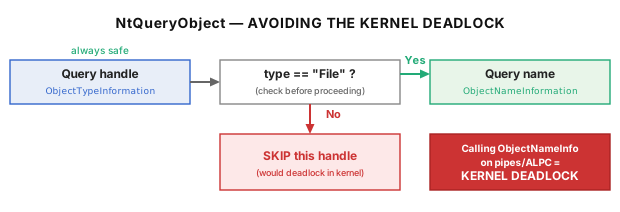
DFR Declaration Rules
What you see: Your BOF compiles and links without errors. When you run it in Havoc, the Demon crashes — sometimes with an access violation, sometimes with a silent exit. The crash occurs at the point where the BOF calls a Windows API function. There is no error message indicating which function call failed or why.
Background: what DFR is and why BOFs need it. In a normal C program, when you call a Windows API like NtOpenProcess, the compiler and linker work together to resolve the function: the compiler emits a reference to the function name, and the linker finds the function in the corresponding .lib file and records the dependency. When Windows loads the .exe, the OS loader reads these dependencies and fills in the actual function addresses.
A BOF is not an .exe — it is a raw .o (object) file that CoffeeLdr loads manually. CoffeeLdr does not use the OS loader, so the normal dependency resolution does not happen. Instead, BOFs use DFR (Dynamic Function Resolution) — a convention where each external function is declared with a special name format: LIBRARY$Function. For example, NTDLL$NtOpenProcess tells CoffeeLdr “this function is called NtOpenProcess and it lives in the DLL named NTDLL.” CoffeeLdr parses this compound name, loads the DLL (if not already loaded), and resolves the function address at runtime.
The three key decorators that must appear on every DFR declaration are:
DECLSPEC_IMPORT (expands to __declspec(dllimport)) — tells the compiler “this function lives in another binary.” Without this decorator, the compiler treats the function as a local symbol (defined somewhere in your own code), emits a direct call instruction instead of an indirect call through an import slot, and CoffeeLdr cannot patch the address. The result: the call jumps to whatever bytes happen to be at the unresolved address, which is an immediate crash.
WINAPI (equivalent to __stdcall) — specifies the calling convention (the agreement between caller and callee about how arguments are passed and who cleans up the stack). On 64-bit Windows, all calling conventions collapse to the single Microsoft x64 ABI, so __stdcall vs __cdecl does not affect generated code. However, using the wrong keyword can cause type-mismatch warnings if your code also includes Windows SDK headers, and on 32-bit builds the wrong calling convention will corrupt the stack. WINAPI is correct for all Win32 and NT API functions.
__cdecl — the C standard calling convention, used for C runtime functions (MSVCRT$vsnprintf, MSVCRT$calloc, etc.). On 32-bit Windows, __cdecl differs from __stdcall in that the caller (not the callee) is responsible for cleaning up the stack. This distinction is what makes __cdecl suitable for variadic functions (functions with ... arguments like printf), because only the caller knows how many arguments were actually passed. On 64-bit Windows it again collapses to the same ABI, but the keyword should match the SDK declaration for correctness and portability.
Correct DFR declaration examples:
DECLSPEC_IMPORT LONG WINAPI NTDLL$NtOpenProcess(PHANDLE, ACCESS_MASK, PVOID, PVOID);
DECLSPEC_IMPORT void * __cdecl MSVCRT$calloc(size_t, size_t);
The DLL name must also be exact. InetNtopW lives in WS2_32, not WSOCK32. Using WSOCK32$InetNtopW compiles and links without error, but at runtime CoffeeLdr resolves the function from the wrong DLL — and since WSOCK32 does not export InetNtopW, the resolution fails and the Demon crashes with no error message indicating which symbol failed.
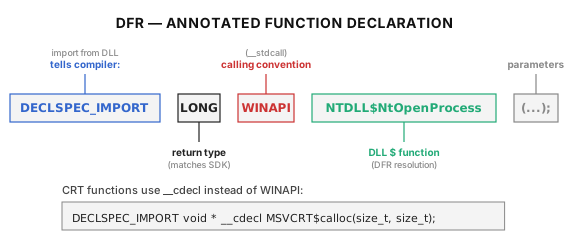
The NtApi[] Table: What Gets Indirect Syscall and What Does Not
Havoc’s CoffeeLdr maintains a hardcoded table of 34 NT API functions in ObjectApi.c (lines 91–126) that are eligible for automatic indirect syscall routing. When a BOF declares NTDLL$NtXxx via DFR, CoffeeLdr hashes the function name and checks it against this table. If it matches, the call is routed through Havoc’s SysNtXxx indirect syscall stub — meaning the call bypasses any EDR hooks on the function’s normal entry point in ntdll.dll. If it does not match, the call goes through the normal ntdll export — a direct call into the function’s prologue, which is exactly where EDR products place their inline hooks.
This distinction matters for OPSEC: functions routed through the indirect syscall stub are invisible to user-mode EDR hooks, while functions that go through the normal export are fully hookable. A BOF developer who assumes all NTDLL$NtXxx calls are automatically protected may unknowingly expose sensitive calls to EDR monitoring.
The 34 functions in the table are: NtOpenThread, NtOpenProcess, NtTerminateProcess, NtOpenThreadToken, NtOpenProcessToken, NtDuplicateToken, NtQueueApcThread, NtSuspendThread, NtResumeThread, NtCreateEvent, NtCreateThreadEx, NtDuplicateObject, NtGetContextThread, NtSetContextThread, NtQueryInformationProcess, NtQuerySystemInformation, NtWaitForSingleObject, NtAllocateVirtualMemory, NtWriteVirtualMemory, NtFreeVirtualMemory, NtUnmapViewOfSection, NtProtectVirtualMemory, NtReadVirtualMemory, NtTerminateThread, NtAlertResumeThread, NtSignalAndWaitForSingleObject, NtQueryVirtualMemory, NtQueryInformationToken, NtQueryInformationThread, NtQueryObject, NtClose, NtSetInformationThread, NtSetInformationVirtualMemory, and NtGetNextThread.
Functions not in this table — notably NtDeviceIoControlFile (used for the WFP IOCTLs), NtOpenKey, NtQueryValueKey, NtDelayExecution, and NtQuerySystemTime — will go through normal ntdll exports even when declared as NTDLL$NtXxx. This is why NFEXEC implements its own PEB-based indirect syscall infrastructure for NtDelayExecution: the Havoc NtApi[] table does not cover it. If you are writing a BOF that calls an NT function with OPSEC-sensitive arguments (such as NtDeviceIoControlFile with an IOCTL code that reveals what you are doing), verify whether that function is in the table before assuming it is protected.
CLR Loading Is Irreversible
Once the CLR (Common Language Runtime — the .NET execution engine) is loaded into a process via CLRCreateInstance + Start(), it cannot be unloaded — it remains resident in the process until the process exits. Individual AppDomains (logical isolation boundaries within the CLR, similar to “sub-processes” within the .NET runtime) can be unloaded, and NFEXEC does this after each execution via UnloadDomain to prevent assembly accumulation. But the CLR runtime itself — including clr.dll, clrjit.dll, and the associated managed heap — stays loaded permanently.
This means the first nfexec PowerShell command permanently changes the Demon process: a forensic examiner or EDR product that lists loaded modules will see clr.dll and related .NET DLLs in a process that would not normally have them. This is a known OPSEC tradeoff that all inline CLR hosting tools (not just NFEXEC) accept. The alternative — spawning a separate powershell.exe process — creates a different and typically more visible set of detection signals (new process creation, parent-child relationship, command-line arguments). The operator should be aware of both options and choose based on the engagement’s threat model.
CommandLineToArgvW Must Never Be Used for Script Passing
CommandLineToArgvW is a Windows API that takes a single command-line string (the kind you pass to CreateProcess) and splits it into a C-style argv[] array — an array of individual argument strings. It applies the same quoting and backslash-escaping rules that the C runtime uses when it parses main’s arguments. These rules include: backslashes before double-quotes are treated as escape characters, unescaped double-quotes toggle “inside a quoted string” mode, and sequences of backslashes followed by a quote are subject to a particularly unintuitive halving rule.
PowerShell scripts frequently contain both double-quotes and backslashes — for example, $path = "C:\Users\Admin" or Get-Process | Where-Object { $_.Name -eq "svchost" }. If the script text is passed through CommandLineToArgvW before being fed to the PowerShell engine, the quoting rules silently mangle the text: closing quotes get removed or paired incorrectly, backslash sequences get shortened, and the resulting script may still be syntactically valid PowerShell but produce completely different results than the operator intended. This is a particularly dangerous category of bug because there is no error message — the script runs, it just does the wrong thing.
NFEXEC avoids this entirely by transmitting the raw script bytes through Havoc’s binary packing protocol: Packer.addstr() on the Python side serializes the script as a length-prefixed byte array, BeaconDataExtract() on the BOF side deserializes it, and MSVCRT$memcpy concatenates the prefix/suffix wrappers. The result is converted to a BSTR (COM’s length-prefixed Unicode string type) via SysAllocString for the CLR. At no point does the script text pass through any argument-parsing logic.
The Packer and BeaconData Protocol
Havoc’s Python-side Packer class (available globally in extension scripts, no import needed) serializes arguments into a binary format that the BOF can parse. The operator-side Python code packs the arguments — strings, integers, raw byte arrays — into a buffer, and the BOF-side C code unpacks them in the same order. Packer.getbuffer() prepends a 4-byte little-endian size header (pack("<L", size)) to the serialized data. On the BOF side, BeaconDataParse expects this header and automatically skips past it to reach the actual data.
The datap structure used by BeaconDataParse must exactly match Havoc’s internal layout: { char *original; char *buffer; int length; int size; }. This is important because if your BOF includes a datap definition copied from another framework’s headers — Cobalt Strike examples in particular use a similar but not identical struct — the fields will be at different byte offsets. BeaconDataParse will read the length and size fields from the wrong positions and silently produce garbage values. There is no error message; the BOF simply receives wrong arguments. String pointers may point to the wrong offsets within the packed data, integers may have random values, and the resulting behavior is unpredictable.
The safe approach: use Havoc’s own datap definition from its header files, not a definition copied from Cobalt Strike documentation or examples.
Build Verification Checklist
After compiling a BOF with x86_64-w64-mingw32-gcc -c source.c -o output.x64.o -w, the following checks catch the most common issues before loading the BOF into Havoc. Each check takes a few seconds with standard command-line tools, but skipping them can mean hours of runtime debugging with no error messages:
Check 1 confirms the file is the right format — it should say COFF x86-64 object (or pe-x86-64), not ELF (wrong OS), not PE32 (32-bit), and not PE32+ (an executable, meaning you accidentally passed -o output.exe instead of -c).
Check 2 confirms that the go entry point symbol is present and exported. CoffeeLdr looks for this symbol to know where to start execution. If it is missing (for example, because you named the function main instead of go), CoffeeLdr fails silently.
Check 3 catches any variables that accidentally ended up in .bss (see the .bss section above). The size should be 00000000.
Checks 4–7 catch common mistakes that would not cause a crash but would compromise OPSEC or use broken APIs.
Conclusion
Building NOFILTER-NFEXEC involved three distinct challenges. First, correctly implementing a well-documented kernel technique (Ron Ben-Yizhak’s NoFilter) while handling the edge cases that a PoC does not need to worry about — deadlock-safe handle scanning, proper token type conversion, handle lifetime management. Second, designing an OPSEC stack that avoids detection not just at one layer but across the entire execution path — from function resolution to syscall invocation to memory cleanup. Third, working with a framework where reading the source code (rather than relying solely on documentation) is essential for understanding the precise behavior of each API.
The source code is available at https://github.com/y637F9QQ2x/NOFILTER-NFEXEC. It is intended for authorized penetration testing and red team operations only.
References
- Ron Ben-Yizhak, #NoFilter: Abusing Windows Filtering Platform for Privilege Escalation, DEF CON 31, August 2023
- Deep Instinct, NoFilter — Abusing Windows Filtering Platform for Privilege Escalation (blog post)
- deepinstinct/NoFilter — Original proof-of-concept
- HavocFramework/Havoc — Havoc C2 framework
- HavocFramework/Modules — PowerPick (PowershellRunner.h source, GPLv3)