CoughDrop: Extreme OPSEC Hardening for BOF Loaders
A walkthrough of building CoughDrop, an OPSEC-hardened COFF loader that achieves zero IOCs against Moneta and PE-Sieve through 19 hardening techniques including Module Shifting, indirect syscalls, and PEB-based API resolution.
Introduction
Beacon Object Files (BOFs) have become a staple of modern red team operations. They run inside the C2 agent’s process, avoid creating new processes or loading reflective DLLs (a technique where a DLL is loaded entirely from memory, bypassing the standard Windows loader — this avoids file-based detection but leaves detectable memory artifacts), and finish in milliseconds. The tradeoff is that the loader — the code that parses the COFF object, resolves symbols, applies relocations, and calls the entry point — becomes a permanent fixture in the agent’s memory. If the loader leaves forensic traces, every BOF execution becomes a detection opportunity.
TrustedSec’s COFFLoader is the foundational open-source BOF loader that most implementations in the community are built upon. It provides a clean, well-structured reference for how in-memory COFF loading works: parsing headers, allocating sections, resolving symbols, applying relocations, and dispatching the go() entry point. It is the starting point for anyone building their own loader, and CoughDrop is no exception.
CoughDrop builds on top of this foundation by adding a layer of OPSEC (operational security) hardening — 19 specific techniques designed to reduce the loader’s visibility to modern memory scanners. The goal is not to replace COFFLoader, but to extend the approach with evasion techniques that a reference implementation deliberately leaves out of scope. Same BOFs, same Beacon API, same go(char *args, int alen) entry point — with additional hardening applied to the loading pipeline.
This post walks through what CoughDrop adds, why each technique matters, and the development problems that came up along the way. The final result — zero IOCs (Indicators of Compromise — any artifact that a memory scanner can use to determine something suspicious happened, such as memory with unusual permissions, modified DLL code, or executable regions that don’t correspond to any file on disk) against both Moneta and PE-Sieve — is verified automatically via a scan loop that runs after every code change.
Part 1: Background
What Is a BOF?
For a detailed walkthrough of BOF internals — including how they interact with a C2 agent’s memory space, how DFR symbols are resolved, and how the NtApi[] indirect syscall table routes calls — see the BOF deep dive in the NOFILTER-NFEXEC post. This section provides a shorter overview.
A Beacon Object File is a compiled C object file (.o). It is not a full executable, and it is not a DLL (Dynamic Link Library — a .dll file that contains reusable code and data; Windows loads DLLs into a process’s memory when the process starts or when it explicitly requests one, and system DLLs like kernel32.dll, ntdll.dll, and advapi32.dll are present in virtually every Windows process). A BOF contains machine code in a .text section, data in .data and .rdata sections, and a symbol table that tells the loader which external functions the BOF needs. The BOF exposes a single entry point called go(), which receives a byte buffer of packed arguments and its length.
The key advantage of BOFs over other code execution methods is that they run inside the existing agent process. There is no CreateProcess call (which would create a new process that EDR can see in its process-creation callback). There is no CreateRemoteThread (which would inject code into another process, triggering thread-creation telemetry). There is no reflective DLL injection. The agent’s COFF loader simply reads the .o file bytes, allocates memory for the sections, writes the resolved function addresses into the right places, and calls go(). When go() returns, the memory is freed. From the operating system’s perspective, all that happened was some memory allocations and deallocations inside a process that was already running.
What Is a COFF Loader?
A COFF loader is the component inside a C2 agent (Cobalt Strike’s Beacon, Havoc’s Demon, Sliver’s implant, or a standalone test harness like CoughDrop) that takes a raw .o file and makes it executable in memory. The process has five stages:
-
Parse the COFF headers to find sections (
.textfor code,.datafor writable globals,.rdatafor read-only data,.bssfor zero-initialized variables), the symbol table (which lists every function and variable the BOF references), and the relocation table (which lists every place in the code that needs to be patched with an actual memory address). -
Allocate memory for each section and for a Global Offset Table (GOT). The GOT is a block of memory that holds the resolved addresses of functions the BOF calls — when the BOF’s code needs to call
Sleep, it reads the address from a slot in the GOT and jumps to it. -
Copy each section’s raw bytes from the
.ofile into the allocated memory, then walk the relocation table and patch every reference. A relocation entry says “at byte offset X in section Y, there is a reference to symbol Z — replace it with Z’s actual address.” On x86-64, the most common relocation type isIMAGE_REL_AMD64_REL32, which encodes addresses as 32-bit signed offsets relative to the instruction’s own address. This is the relocation type that imposes the 2 GB distance limit discussed later in the Module Shifting section. -
Resolve Dynamic Function Resolution (DFR) symbols. When a BOF declares
KERNEL32$Sleepin its source code, the compiler emits a symbol named__imp_KERNEL32$Sleep. The loader parses this name to extract the DLL name (KERNEL32) and the function name (Sleep), finds the function’s address inside the loaded DLL, and writes that address into the GOT. This is what connects the BOF’s code to actual Windows API functions. -
Execute the BOF by calling
go()through a function pointer. Whengo()returns, the loader scrubs the allocated memory and frees it.
What Do Memory Scanners Look For?
Two tools define the state of the art in usermode memory analysis. Understanding what they check for is essential to understanding why each of CoughDrop’s hardening techniques exists.
Moneta (by Forrest Orr) scans a live process and looks for memory regions that should not be there. Specifically, it flags three things:
First, private executable memory — memory allocated by VirtualAlloc (or its NT equivalent NtAllocateVirtualMemory) that has execute permissions. When Windows loads a DLL through its normal loader (LdrLoadDll), the resulting memory pages are “backed” by the DLL file on disk. The OS records which file the bytes came from, and can verify at any time that the in-memory bytes match the file. Memory allocated by VirtualAlloc has no such backing — it is “private” memory that exists only in RAM. Legitimate applications rarely allocate private executable memory. Code injection techniques almost always do. This is the single strongest indicator that code has been injected into a process.
Second, modified code in loaded DLLs — pages within a legitimately loaded DLL whose bytes no longer match the file on disk. This catches Module Stomping (overwriting a DLL’s .text section with malicious code) and inline API hooking (overwriting the first few bytes of a function to redirect it).
Third, threads with suspicious start addresses — threads whose starting instruction pointer points into private memory rather than into a loaded module.
PE-Sieve (by hasherezade) performs a similar analysis but goes further: it scans private memory regions for byte patterns that look like PE headers or shellcode, detects PE implants (full executables hidden in private memory), and identifies inline hooks in loaded modules.
Both tools work by comparing what they see in memory against what a clean process should look like. Every deviation is a potential IOC. CoughDrop’s goal is to leave zero deviations after a BOF has executed and cleaned up.
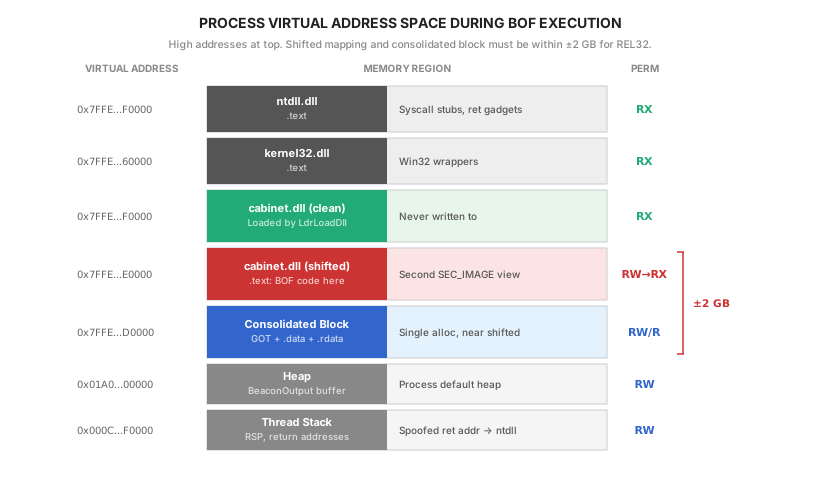
The following diagram shows where each component lives in the process’s virtual address space during a BOF execution with CoughDrop:
Part 2: What CoughDrop Adds
CoughDrop applies 19 hardening techniques on top of the standard COFF loading pipeline. They fall into five categories. Each technique addresses a specific detection surface — a behavior or memory artifact that scanners use to identify injected code.
Category 1: Memory Permissions
The most fundamental detection surface in any code injection technique is the permissions assigned to memory pages. Windows divides memory permissions into three independent flags: Read (R), Write (W), and Execute (X). These flags are enforced by the CPU’s page table entries — the hardware itself checks permissions on every memory access and raises an exception if a program tries to execute code in a non-executable page, or write to a read-only page.
Legitimate code loaded by Windows’ own DLL loader gets precise permissions: the .text section (executable code) is marked RX (read + execute, no write), .rdata (read-only data like string constants) is marked R (read only), and .data (writable global variables) is marked RW (read + write, no execute). This principle — giving each memory region the minimum permissions it needs — is called W^X (“write XOR execute”), and it is a strong signal of legitimate code. Memory that is simultaneously writable AND executable (RWX) is a red flag because it means code can be written and then immediately executed in place, which is exactly what code injection does.
Hardening 1: Section-level permission isolation. A standard COFF loader allocates all sections with PAGE_EXECUTE_READWRITE (RWX) because this is the simplest approach — you need write access during loading (to copy section data and apply relocations) and execute access afterward (to run the BOF’s code). CoughDrop instead allocates everything as PAGE_READWRITE (RW, no execute) during the loading phase. After all sections are copied and all relocations are applied, CoughDrop walks each section and sets its final permissions based on the COFF section header’s Characteristics flags: .text gets PAGE_EXECUTE_READ (RX), .rdata gets PAGE_READONLY (R), .data stays PAGE_READWRITE (RW). At no point does any memory region have both Write and Execute permissions simultaneously.
The permission transitions use NtProtectVirtualMemory — the NT-native equivalent of the Win32 VirtualProtect function — invoked through an indirect syscall. This is covered in more detail in the indirect syscall section below.
Hardening 2: GOT permission separation. The GOT (Global Offset Table) holds function pointer values — 8-byte addresses on x64. It is pure data and is never executed. CoughDrop allocates the GOT as PAGE_READWRITE during loading, then optionally flips it to PAGE_READONLY after all symbols are resolved. This removes an entire RWX region that would otherwise be visible to scanners.
Hardening 3: Removing MEM_TOP_DOWN. The MEM_TOP_DOWN allocation flag tells the OS to place the allocation at the highest available virtual address. Legitimate applications rarely use this flag. Multiple high-address allocations in rapid succession create a pattern that is unusual in normal program behavior. CoughDrop removes this flag and lets the OS choose natural addresses.
Hardening 4: Using COFF section characteristics. The COFF section header contains bitfield flags (IMAGE_SCN_MEM_EXECUTE, IMAGE_SCN_MEM_WRITE, IMAGE_SCN_MEM_READ) that specify exactly what permissions each section needs. CoughDrop reads these flags and uses them to determine the final page protection for each section, rather than applying a blanket RWX to everything.
Category 2: API Resolution
When a BOF declares NTDLL$NtOpenProcess, the loader needs to find the address of NtOpenProcess inside ntdll.dll and write it into the GOT. The standard approach is to call two Windows APIs: LoadLibraryA to get a handle to the DLL, and GetProcAddress to look up the function by name. This works, but it creates two problems.
The first problem is that LoadLibraryA and GetProcAddress are among the most heavily monitored Win32 functions. EDR products intercept these calls by overwriting the first few bytes of each function’s machine code with a JMP instruction that redirects execution into the EDR’s own inspection code. This technique is called “hooking.” When the EDR’s hook fires, it sees the arguments — which DLL is being loaded, which function is being looked up — and logs them. An EDR seeing a rapid sequence of GetProcAddress calls for NtOpenProcess, NtAllocateVirtualMemory, and NtProtectVirtualMemory from unbacked memory is a strong signal of suspicious activity.
The second problem is that the DLL and function name strings exist in plaintext in the loader’s memory during resolution. A memory dump or forensic snapshot reveals every API the BOF resolved, providing a clear picture of what the BOF was designed to do.
Hardening 5: PEB-based module enumeration and manual export table parsing. CoughDrop bypasses LoadLibraryA and GetProcAddress entirely. Instead, it reads the list of loaded modules directly from the kernel’s own data structures.
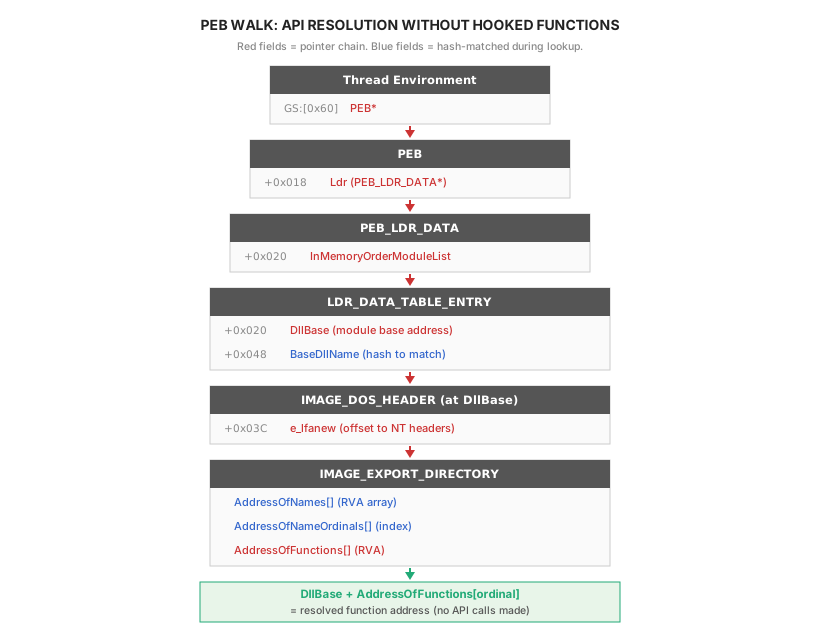
Every Windows process has a structure called the Process Environment Block (PEB). On 64-bit Windows, the CPU’s GS segment register (a hardware register that the OS reserves for per-thread data) points to the Thread Environment Block (TEB), and at offset 0x60 within the TEB sits a pointer to the PEB. The assembly instruction mov rax, [gs:0x60] reads the PEB address directly from the CPU in a single instruction — no API call, no function pointer, nothing that can be hooked.
Inside the PEB is a field called Ldr (at offset 0x018), which points to a PEB_LDR_DATA structure. This structure contains a doubly-linked list called InMemoryOrderModuleList (at offset 0x020) that links together every DLL currently loaded into the process. Each entry in the list is a LDR_DATA_TABLE_ENTRY structure that contains the DLL’s base address in memory (DllBase at offset 0x020) and its name (BaseDllName at offset 0x048).
CoughDrop walks this linked list, computes a FNV-1a hash (a fast, non-cryptographic hash function that produces a 32-bit value from an input string) of each module’s name, and compares it against precomputed hash constants embedded in the binary. Hash comparison instead of string comparison means the target DLL names never appear as readable strings in CoughDrop’s memory.
Once the target DLL is found, CoughDrop has its base address — the location in memory where the DLL’s PE (Portable Executable) file is mapped. Every PE file begins with a DOS header, which contains a field called e_lfanew at offset 0x03C that points to the NT headers. The NT headers contain the export directory, which is the part of a DLL that lists which functions it makes available to other programs.
The export directory uses three parallel arrays to map function names to addresses. AddressOfNames is an array of pointers to function name strings. AddressOfNameOrdinals is a parallel array of index numbers — for each name in AddressOfNames, the corresponding entry in AddressOfNameOrdinals gives the index into the third array. AddressOfFunctions is the array of actual function addresses (encoded as RVA — Relative Virtual Address, meaning the offset from the DLL’s base address). To find a function, CoughDrop searches AddressOfNames for a hash match, reads the corresponding ordinal from AddressOfNameOrdinals, and uses that ordinal as an index into AddressOfFunctions. Adding the RVA to the DLL’s base address gives the final absolute function address. No LoadLibraryA. No GetProcAddress. No hookable API call at any point.
Hardening 6: Symbol string scrubbing. After each symbol is resolved, CoughDrop zeros the buffer that held the symbol name using cd_secure_zero(). This is a function specifically designed to resist compiler optimization. The problem it solves: when you write memset(buffer, 0, size) to zero sensitive data, and the buffer is never read again after the zeroing, a C compiler is allowed to remove the memset call entirely. The compiler reasons that since nobody reads the buffer after zeroing, the zeroing has no observable effect and is a “dead store” that can be eliminated. This is a legal optimization under the C standard, and modern compilers (GCC, Clang, MSVC) all do it. CoughDrop’s cd_secure_zero() uses a volatile pointer cast — the volatile keyword tells the compiler “every read and write through this pointer has externally observable side effects — do not remove or reorder them.” It is also marked __attribute__((noinline)) to prevent the compiler from inlining the function body, which would allow it to analyze the volatile access in context and potentially optimize it away anyway.
Category 3: Memory Hygiene
Even after a BOF has finished executing and its memory is freed, the physical pages that held the BOF’s code and data may persist until the OS reuses them. A forensic tool that can read physical memory (a kernel driver, a crash dump, or a hibernation file) could recover the BOF’s code, its resolved function addresses, and its output data long after the BOF returned.
Hardening 7: Pre-free memory scrubbing. Before freeing any allocation, CoughDrop zeros every byte using cd_secure_zero(). This includes all section memory (.text, .data, .rdata), the GOT, and all temporary buffers used during loading. Section sizes are tracked in all builds (not only debug builds) so the loader always knows how many bytes to zero.
Hardening 8: COFF data scrubbing. The full COFF file that was passed to the loader — including the symbol table, string table, and raw section data — is zeroed before the loader returns. Without this, the caller would eventually free the buffer, but the COFF data (which contains function names, section names, and raw machine code) would persist in heap memory until the pages are reused by another allocation.
Category 4: Execution Traces
Even with proper memory permissions and scrubbed buffers, the act of executing BOF code leaves traces that a sophisticated EDR can observe.
Hardening 9: Return address spoofing. When the BOF’s go() function calls any Windows API, the CPU automatically pushes a return address onto the stack — the address of the instruction that should execute after the API call returns. This return address points into the BOF’s .text section. An EDR that performs stack walking (traversing the chain of return addresses to reconstruct the call history) will see a return address that belongs to no loaded module — it points into private memory or into a DLL section that has been modified. This is the “unbacked caller” detection.
CoughDrop spoofs the return address by placing a legitimate ntdll address on the stack before transferring control to the BOF. It does this by scanning ntdll’s .text section for the byte pattern 0xC3 0xCC. 0xC3 is the x86-64 opcode for the ret instruction — a single-byte instruction that pops the top value from the stack and jumps to it. 0xCC is the int3 instruction — a debugger breakpoint. The 0xCC after the 0xC3 serves as confirmation that the 0xC3 is a real instruction boundary: the byte 0xC3 can appear accidentally in the middle of a multi-byte instruction (as part of an address constant, for example), but a 0xC3 followed by 0xCC is almost certainly a real ret followed by debug padding.
CoughDrop uses jmp (not call) to transfer control to the BOF. This distinction matters: the call instruction automatically pushes the caller’s real return address onto the stack, which would overwrite the spoofed address. The jmp instruction simply transfers control without pushing anything. Since CoughDrop has already placed the spoofed ntdll address on the stack manually, using jmp preserves it.
Hardening 10: Consolidated allocation. A standard loader makes a separate VirtualAlloc call for each section and one for the GOT — typically 5 to 8 calls in rapid succession from a single thread. This burst of memory allocation events is visible through ETW (Event Tracing for Windows — a kernel-level telemetry system that EDR products subscribe to). CoughDrop consolidates everything into a single allocation: it computes the total size needed, adds page-aligned padding between sections (each section starts at a multiple of 4,096 bytes, because VirtualProtect operates on whole 4 KB pages — you cannot set different permissions on two regions that share the same page), allocates one contiguous block, and partitions it internally. One allocation event instead of many.
Hardening 11: Complete .bss handling. The .bss section holds uninitialized and zero-initialized static variables. CoughDrop checks the IMAGE_SCN_CNT_UNINITIALIZED_DATA flag in the section header and allocates at least one full page (4,096 bytes), zero-filled, for any .bss section — even if SizeOfRawData is zero.
Category 5: Telemetry and Advanced Evasion
Hardening 12: Indirect syscalls. Every Win32 API function (like VirtualAlloc, VirtualProtect, VirtualFree) is a thin wrapper around an NT-native function (NtAllocateVirtualMemory, NtProtectVirtualMemory, NtFreeVirtualMemory). The Win32 wrapper validates parameters and then calls into ntdll.dll, which contains the actual system call stub. The stub loads the System Service Number (SSN — a numeric identifier that the kernel uses to look up which function to execute) into a register and executes the syscall instruction, which transitions the CPU from user mode to kernel mode.
EDR products hook the Win32 wrappers (and sometimes the ntdll stubs themselves) to intercept these calls. CoughDrop bypasses both layers by executing system calls through the indirect syscall technique:
-
SSN resolution via Halo’s Gate. Every NT system call stub in ntdll.dll starts with the same byte sequence:
4C 8B D1(mov r10, rcx— saves the first argument because the kernel usesrcxfor something else) followed byB8 xx xx 00 00(mov eax, <SSN>— loads the System Service Number as a 32-bit value; actual SSN values are small, typically under0x200). CoughDrop reads these bytes to extract the SSN. If the first bytes of the stub do not match this pattern — because an EDR has overwritten them with aJMPinstruction to its own handler — the stub has been hooked. In that case, CoughDrop examines neighboring stubs at 32-byte intervals (NT stubs are laid out sequentially in memory with a fixed stride). If a neighbor one stub above has SSN0x4A, the target’s SSN must be0x4B, because SSNs are assigned sequentially. -
Syscall gadget. Rather than executing the
syscallinstruction from CoughDrop’s own code, CoughDrop scans ntdll’s.textsection for the byte pattern0F 05 C3— the encoding ofsyscallfollowed byret. This two-instruction sequence, called a “gadget” (a term from Return-Oriented Programming — the technique of reusing existing instruction sequences inside trusted modules instead of executing your own), already exists inside ntdll as part of its legitimate stubs. CoughDrop jumps to this gadget to execute the system call. The result is that during the kernel transition, the CPU’s instruction pointer points into ntdll — a legitimate, expected location that EDR kernel callbacks will not flag.
Hardening 13-17: Module Shifting, Smart Target Selection. These are covered in detail in the dedicated section below, as they represent the most significant engineering challenge in the project.
Hardening 18: Smart stomp target selection. CoughDrop maintains an internal candidate list for the Module Shifting target DLL and automatically selects the first one whose .text section is large enough for the BOF:
No operator configuration is needed. The selection happens automatically at load time.
Hardening 19: COFF metadata erasure and ETW suppression. CoughDrop zeros the COFF symbol table, string table, and section names after loading is complete — removing any metadata that could identify the BOF. ETW telemetry from the loading process is suppressed using hardware breakpoints (debug registers DR0/DR1) and a Vectored Exception Handler that intercepts breakpoint exceptions on EtwEventWrite and NtTraceEvent, simulating a successful return without the event actually being logged.
Part 3: Module Shifting
This section explains the single most important technique in CoughDrop. It is also the most complex. If you understand Module Shifting, the rest of CoughDrop’s design follows logically from it.
Virtual Memory and Physical Memory: Why This Matters
To understand Module Shifting, you first need to understand how Windows manages memory at the hardware level. Every process on Windows believes it has its own private address space — a continuous range of memory addresses from 0x00000000'00000000 to 0x00007FFF'FFFFFFFF (on 64-bit systems). But this is a fiction maintained by the CPU and the OS together.
Your computer has a fixed amount of physical RAM — actual hardware chips on the motherboard. When a process reads or writes memory at some address, the CPU does not go directly to physical RAM at that address. Instead, it consults a data structure called the page table, which is a per-process mapping maintained by the OS. The page table translates virtual addresses (what the process thinks it is accessing) to physical addresses (the actual location in RAM). The translation happens in chunks of 4,096 bytes (4 KB), called pages. Every virtual address belongs to some page, and the page table maps each virtual page to a physical page (or marks it as not present).
This means two different processes can have the same virtual address — say, 0x7FFE0000 — but have their page tables map it to completely different physical RAM. Process A’s 0x7FFE0000 might point to physical RAM at offset 0x1A340000, while Process B’s 0x7FFE0000 points to 0x2B780000. They see the same virtual address, but they are reading different bytes.
How DLLs Share Physical Memory
Here is where it gets interesting. When Windows loads a DLL like kernel32.dll, it does not copy the entire file into a fresh chunk of RAM for each process that uses it. Instead, it maps the DLL’s file on disk into physical RAM once, and then points every process’s page table at the same physical pages. Process A and Process B both have kernel32.dll loaded at (possibly different) virtual addresses, but their page table entries for the .text section point to the same physical RAM. This is efficient: a 500 KB DLL shared across 50 processes uses 500 KB of physical RAM, not 25 MB.
The OS can do this safely because .text sections are read-only and executable (RX) — no process can modify the shared code. But what happens if a process needs to write to a shared page?
Copy-on-Write: What Happens When You Write to Shared Pages
This is the Copy-on-Write (COW) mechanism. Windows marks the DLL’s shared pages with a special protection flag: PAGE_EXECUTE_WRITECOPY. As long as a process only reads or executes these pages, everyone shares the same physical RAM. But the moment a process writes to one of these pages — even a single byte — the following happens:
- The CPU detects the write attempt and raises a page fault (an exception) because the page is marked as write-protected.
- The OS catches the page fault. It sees that this is a COW page.
- The OS allocates a brand new physical page from free RAM.
- The OS copies the entire 4 KB of the original shared page into the new physical page.
- The OS updates this process’s page table to point to the new private copy instead of the shared original.
- The OS marks the new page as writable so future writes succeed without faulting.
- The write that caused the fault is retried. This time it succeeds, because the page table now points to the private copy.
After this sequence, the process has its own private version of that page. The other processes’ page table entries still point to the original shared physical page — they are completely unaffected. This is why it is called Copy-on-Write: the copy only happens when someone actually writes.
The critical detail for CoughDrop is this: once a page has been privately copied, Windows records this fact in its internal tracking data (specifically, in the Working Set metadata — the OS’s bookkeeping of which physical pages each process is currently using and how they got there). This record is permanent. Even if you write the exact original bytes back into the private copy, making it byte-for-byte identical to the shared original, the OS still knows this page was privately copied. It does not compare the bytes and merge the page back into the shared pool. The private copy flag stays set forever.
This is exactly what Moneta checks. Moneta queries the Working Set for each DLL page and asks: “Is this page still shared with the on-disk file, or has it been privately copied?” If the answer is “privately copied,” Moneta reports it as “Modified code” — regardless of whether the actual bytes match the file.
Module Stomping: What CoughDrop Tried First (and Why It Was Not Enough)
Before arriving at Module Shifting, CoughDrop used a simpler technique called Module Stomping. The idea is straightforward: load a real DLL (like cabinet.dll) through the normal Windows loader, then overwrite its .text section with the BOF’s code. The BOF runs from the DLL’s memory space, which is file-backed — solving the “private executable memory” problem.
After the BOF finishes, CoughDrop reads the original .text bytes from the DLL file on disk and writes them back, restoring the .text section to its original content. The idea was that Moneta would compare the restored bytes against the file and find them identical.
But as explained above, the bytes are not what Moneta checks. Moneta checks the COW page metadata. The act of writing the BOF code into the DLL’s .text triggered COW, creating private copies of those pages. Writing the original bytes back made the private copies byte-identical to the originals, but the pages were still marked as “privately committed.” Moneta flagged them. After seven iterations of testing different restoration strategies (reading from disk, using DiscardVirtualMemory to hint the OS that the pages can be reclaimed, restoring only the pages the BOF actually touched, restoring entire page-aligned ranges), the flag persisted. The conclusion was clear: if you write to the loaded DLL’s pages, COW is triggered, and no amount of restoration can undo it.
Module Shifting: Never Write to the Loaded DLL
Module Shifting is the technique that eliminated the last IOC. The core idea is simple: instead of writing BOF code into the loaded DLL’s .text section (which triggers COW on the loaded DLL’s pages), CoughDrop creates a completely separate mapping of the same DLL file and writes to that instead. The loaded DLL’s pages are never touched.
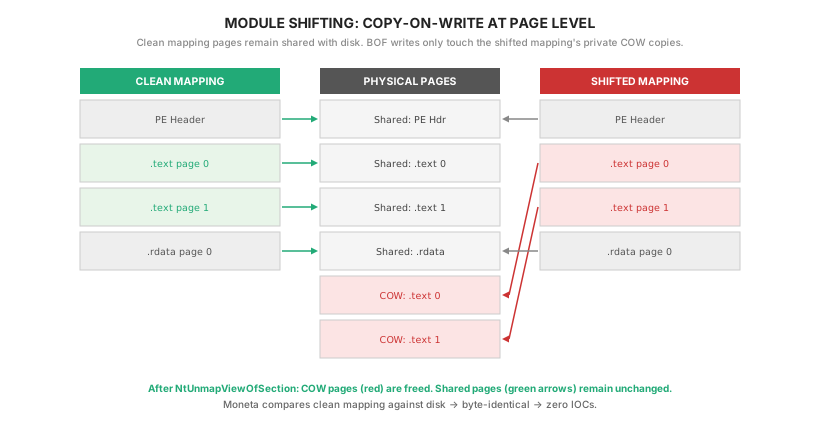
Here is how it works in detail:
Step 1: Load the DLL normally. CoughDrop calls LdrLoadDll (the NT-native function that the Windows loader uses internally to load DLLs) to load the target DLL — for example, cabinet.dll. This creates what we call the “clean mapping.” It appears in the process’s PEB module list, which means any tool that lists loaded modules (Process Hacker, Task Manager, etc.) will see cabinet.dll as a normally loaded DLL. CoughDrop will never write a single byte to this mapping.
Step 2: Find the DLL’s path on disk. CoughDrop walks the PEB Ldr linked list (the same module list described in the PEB Walk section above) and looks for the entry whose DllBase field matches the address returned by LdrLoadDll. That entry’s FullDllName field contains the full file path — something like C:\Windows\System32\cabinet.dll. CoughDrop saves this path because the next steps need to open the same file directly.
Step 3: Open the DLL file directly with NtCreateFile. This is where Module Shifting diverges from Module Stomping. Instead of modifying the already-loaded DLL, CoughDrop opens the DLL file on disk as a regular file. NtCreateFile is the NT-native function for opening files (it is what CreateFileW internally calls). The file is opened with read-only access and shared mode (so the OS does not complain that the file is already in use by the loader). The path must be in NT format (\??\C:\Windows\System32\cabinet.dll instead of the Win32 C:\Windows\System32\cabinet.dll), which CoughDrop converts using RtlDosPathNameToNtPathName_U.
Step 4: Create a section object with NtCreateSection. A section object is a kernel-level object that represents a memory-mappable view of a file. Every time Windows loads a DLL, it creates a section object internally — it is the mechanism by which a file on disk becomes accessible as memory. NtCreateSection creates a new section object over the file handle from Step 3 with the SEC_IMAGE flag. SEC_IMAGE is important: it tells the kernel “treat this file as a PE image” — meaning the kernel parses the PE headers inside the file and sets up per-section permissions (RX for .text, R for .rdata, RW for .data) just like it would for a normal DLL load. Without SEC_IMAGE, the kernel would map the raw file bytes without any PE processing, and the page permissions would not be correct.
Step 5: Map a second view with NtMapViewOfSection. NtMapViewOfSection takes the section object from Step 4 and maps it into the process’s virtual address space — creating a new set of page table entries that point to the file’s contents. The key argument is BaseAddress = NULL, which tells the kernel to choose an available virtual address range automatically. This new mapping is entirely independent from the clean mapping created by LdrLoadDll in Step 1. They map the same underlying file, but they occupy different virtual address ranges and have separate sets of page table entries.
This second mapping is the “shifted” mapping. The shifted mapping’s .text section starts at a completely different virtual address from the clean mapping’s .text. CoughDrop changes the shifted mapping’s .text permissions from RX to RW (so it can write BOF code into it), which triggers COW — but only on the shifted mapping’s pages. The clean mapping’s pages are completely unaffected because they have separate page table entries.
Step 6: Write the BOF code and execute it. CoughDrop copies the BOF’s .text bytes into the shifted mapping’s .text section, applies relocations, and calls go() — all within the shifted mapping. The BOF runs from a virtual address that belongs to a legitimate, file-backed image mapping of cabinet.dll. The pages that contain the BOF code are private copies (because COW was triggered by the write), but they belong to the shifted mapping, not the clean mapping.
Step 7: Unmap and clean up. After go() returns, CoughDrop calls NtUnmapViewOfSection to completely remove the shifted mapping from the process’s address space. This releases all the virtual addresses, all the page table entries, and all the private COW copies associated with the shifted mapping. It is as if the shifted mapping never existed. CoughDrop then calls NtClose to close the section object handle and the file handle.
The clean mapping remains in the process, untouched. Its page table entries still point to the original shared physical pages. Moneta compares the clean mapping’s in-memory bytes against the file on disk and finds zero differences, because nobody ever wrote to those pages. PE-Sieve scans the process and finds no modified modules, no shellcode implants, no anomalous private executable memory. Both scanners report zero IOCs.
The REL32 Distance Problem
There is one important constraint that makes Module Shifting tricky to implement correctly.
When a BOF’s .text code needs to call a function (say, Sleep), the compiled machine code contains a call instruction with a 32-bit relative offset. “Relative” means the offset is measured from the instruction’s own address, not from the beginning of the process’s address space. So if the call instruction is at address 0x7FFE0000'1000 and Sleep’s address is at 0x7FFE0000'5000, the offset stored in the instruction would be 0x4000 (the difference).
A 32-bit signed integer can represent values from -2,147,483,648 to +2,147,483,647 — approximately plus or minus 2 GB. This means the target of the call must be within 2 GB of the instruction itself. If the two addresses are further apart than that, the offset does not fit in 32 bits, the value wraps around, and the call jumps to a completely wrong address.
The BOF’s .text runs from the shifted mapping (at an address the kernel chose — say, 0x7FFE'A086'1000). The GOT (which holds the resolved address of Sleep and every other function the BOF calls) lives in CoughDrop’s consolidated allocation block (at a separately allocated address — say, 0x0000'01A0'0000). The distance between these two addresses is about 0x7FFE'9EE6'1000 — approximately 140 terabytes. This is far beyond the 2 GB limit.
CoughDrop solves this with cd_valloc_near(), a function that allocates memory close to a given address. It works by calling NtAllocateVirtualMemory repeatedly, each time passing a different base address hint — the first try is at the shifted mapping’s address, the next try is 64 KB higher, the next is 64 KB lower, then 128 KB higher, and so on. The 64 KB step size is the Windows allocation granularity — the minimum distance between two separate allocations. For each attempt, CoughDrop checks whether both endpoints of the allocation fall within 2 GB of the shifted mapping’s .text. If not, the allocation is freed and the next offset is tried. Eventually, a free region is found close to the shifted mapping, and the GOT lands within REL32 range.
Part 4: Scan Results
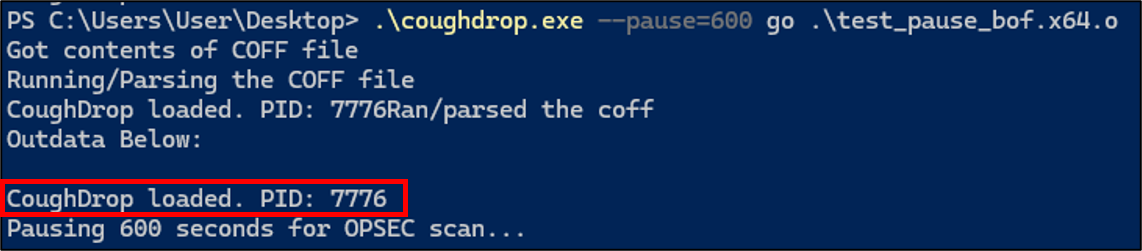
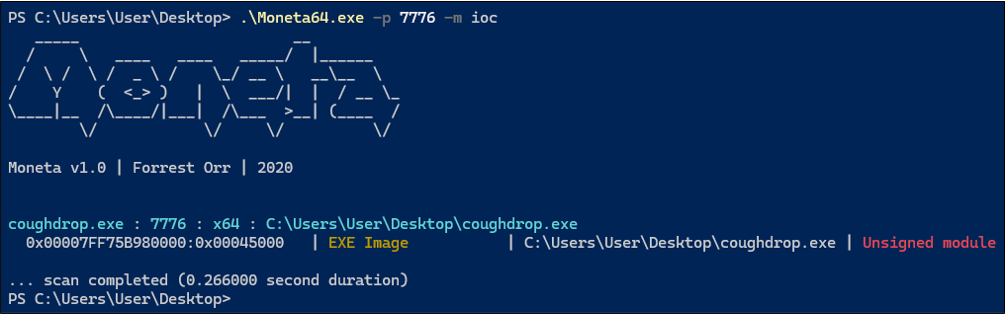
The following screenshots show CoughDrop’s scan results on a real Windows system. The loader was run with --pause=600 to pause for 10 minutes after BOF execution and cleanup, giving time to run Moneta and PE-Sieve against the live process.
BOF execution with PID output and post-cleanup pause:
Moneta scan — only “Unsigned module” on the exe itself:
PE-Sieve scan — Total suspicious: 0 across all categories:
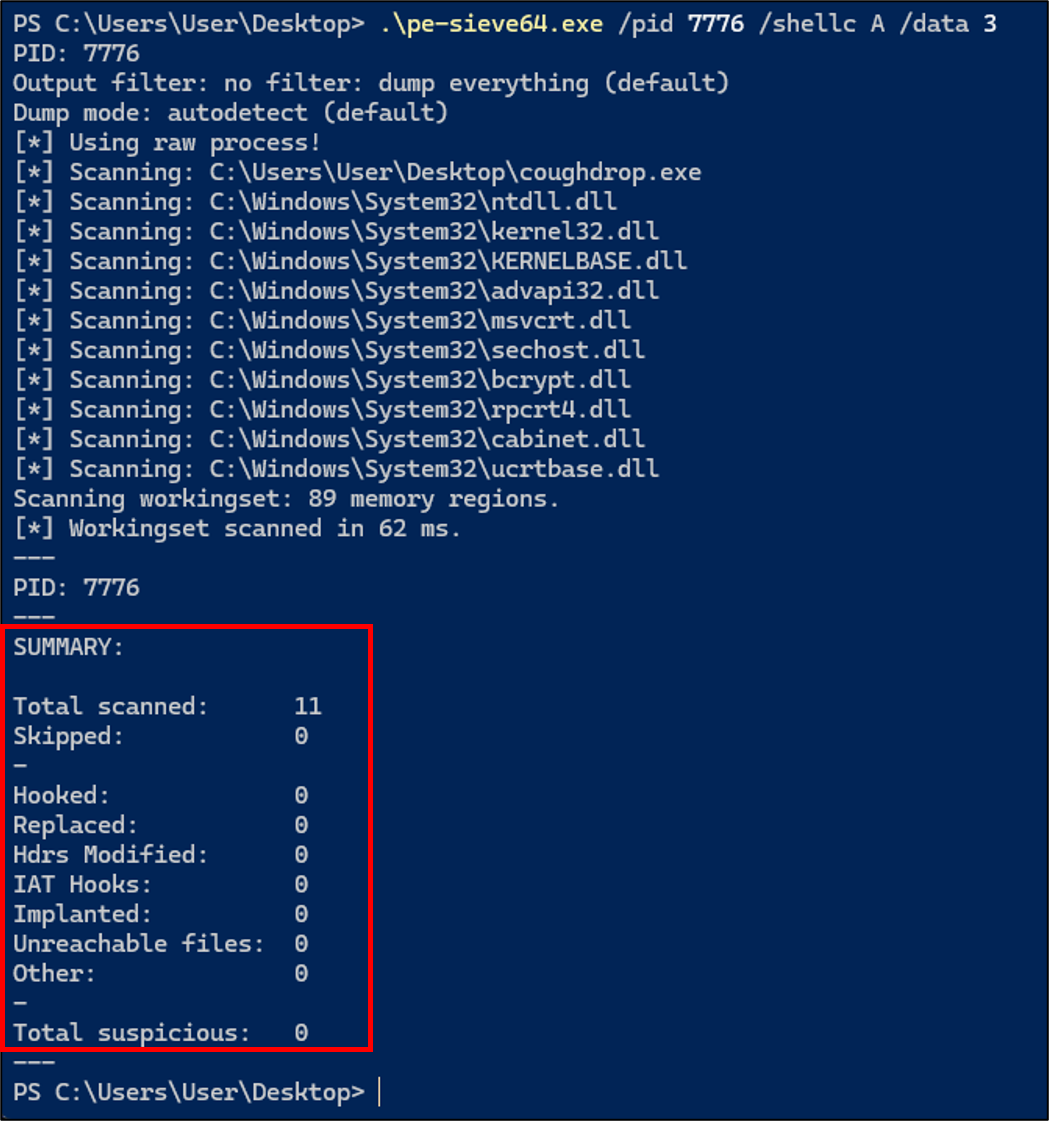
One thing to explain about the Moneta output: it flags coughdrop.exe as an “Unsigned module.” Every .exe and .dll file on Windows can optionally carry a digital signature (called Authenticode) that cryptographically proves who compiled the file and that it has not been tampered with since signing. Moneta checks for this signature and flags binaries that do not have one, because unsigned binaries are unusual in environments where application whitelisting or code integrity policies are enforced. CoughDrop’s development build is not code-signed, so Moneta correctly reports it as unsigned. This is not a loader issue — it is a build/deployment concern. In a real engagement, the loader code would be embedded inside a signed agent binary or running inside an already-trusted process. The important result is everything else: no “Modified code” on any DLL, no “Abnormal private executable memory,” no shellcode implants detected. PE-Sieve reports zero in every detection category: Hooked 0, Replaced 0, Hdrs Modified 0, IAT Hooks 0, Implanted 0.
Part 5: Development Lessons
This section covers the most instructive problems encountered during development. These are not theoretical — they are issues that produced real debugging sessions, and understanding them clarifies why CoughDrop’s architecture ended up the way it did.
The BeaconPrintf Silent Failure
The very first functional test of CoughDrop — loading a minimal BOF whose go() function does nothing but call BeaconPrintf to print the message “CoughDrop BOF executed successfully!” — produced no output. The loader ran without crashing, it reported that the BOF was loaded and executed successfully, but the message never appeared.
There was no error message. There was no crash. The loader exited cleanly with a success code. Without debug output, this kind of failure is nearly impossible to diagnose by reasoning about the code. Here is what was actually happening under the hood:
CoughDrop was using Module Stomping at this point in development (before Module Shifting was implemented). It loaded amsi.dll through the Windows loader, which placed amsi.dll at a high virtual address — around 0x7FFE'A086'0000. The BOF’s .text was written into amsi.dll’s .text section at this address. Meanwhile, the consolidated block containing the GOT was allocated by a standard VirtualAlloc call, which placed it at a low virtual address — around 0x0000'01A0'0000.
The distance between the BOF code (high address) and the GOT (low address) was about 140 TB. When the relocation code tried to patch the call BeaconPrintf instruction in the BOF with a REL32 offset pointing to the GOT slot for BeaconPrintf, the offset did not fit in 32 bits. The code detected this overflow — but the error path had a bug: it jumped to the cleanup label without setting retcode = 1. So the loader continued as if nothing went wrong. It called go() at the correct entry point address (which was inside amsi.dll’s .text). The BOF’s code tried to execute the call instruction with the garbage offset. The call jumped to an invalid address. On Windows, this would normally trigger an access violation, but CoughDrop’s Structured Exception Handler caught the crash silently.
The result: the loader reported success, go() technically ran (it entered the function), but BeaconPrintf was never called because the call instruction jumped to the wrong place. The BeaconOutput buffer remained empty. The output function returned NULL. No message appeared.
The fix was simple — adding retcode = 1; to the overflow error path — but the lesson was important: every single error path in the relocation loop must explicitly set the failure flag. A silent fallthrough in this code produces symptoms that are indistinguishable from success.
The secondary lesson was that testing under Wine (wine ./coughdrop.exe go test/test_bof.x64.o) enabled rapid iteration. Without Wine, each test cycle would have required: rebuild on Linux, copy the .exe to a Windows VM (either via shared folder or USB), open a command prompt on Windows, run the test, observe the result, switch back to Linux to edit the code. With Wine, the cycle was: edit, make, wine ./coughdrop.exe go test/test_bof.x64.o, observe, repeat — all within the same terminal in under two seconds.
Copy-on-Write and the Last IOC
After Module Stomping was working — the BOF ran from amsi.dll’s .text section, and the original bytes were restored from disk after go() returned — the expectation was that Moneta would report zero IOCs. The bytes in memory matched the file on disk, so there should be nothing to flag.
Instead, Moneta reported a single 4 KB page of “Modified code” on amsi.dll. One page out of the entire .text section. PE-Sieve, notably, reported zero — it performs a pure byte comparison and found no differences. But Moneta flagged it.
To confirm this was not a byte mismatch issue, a debug build was created that dumped the first 32 bytes of the .text section after restoration and compared them against the saved snapshot from before the stomp. They were identical — not a single byte differed. A hex comparison of the entire restored range (4,096 bytes) also showed zero differences.
A control experiment was then run: a separate test program that loaded amsi.dll, changed its .text permissions from RX to RW and back to RX (using VirtualProtect), but did not write any bytes to the section. Moneta did not flag this. So the flag was not caused by the permission change itself.
The conclusion was the COW page metadata issue described in the Module Stomping section: when CoughDrop wrote BOF code into amsi.dll’s .text, the OS created a private copy of the page via Copy-on-Write. Even though CoughDrop later wrote the original bytes back, the page remained privately committed in the working set. Moneta checks this metadata, not the bytes themselves.
Seven iterations of the automated scan loop were run, each trying a different strategy to clear the COW flag:
- Disk-based restoration — reading the original bytes from
C:\Windows\System32\amsi.dllviaCreateFileW+ReadFileand writing them back. Result: bytes matched, but Moneta still flagged the page. - Snapshot-based restoration — restoring from the in-memory snapshot taken before the stomp. Same result.
- Page-aligned restoration — restoring exactly one page (4,096 bytes) aligned to a page boundary, so the restored region matched the OS’s page granularity exactly. Still flagged.
- Restoring only the BOF’s footprint — only restoring the exact bytes the BOF wrote to (the BOF’s
.textwas much smaller than the full page). Still flagged — because COW operates on whole pages, not byte ranges. - DiscardVirtualMemory — calling
DiscardVirtualMemoryon the restored page, which is a Windows API that tells the OS “I no longer need the contents of these pages; you may discard them and re-fetch from the backing store.” The hope was that the OS would drop the private copy and re-map the shared original. It did not work —DiscardVirtualMemoryis designed forMEM_RESET-style scenarios, not for reverting COW on image-backed pages. - Full-extent restoration — restoring the entire mapped extent of
.text(including trailing alignment padding), not just the virtual size. Still flagged. - Combined disk read + DiscardVirtualMemory — both strategies at once. Still flagged.
None of these strategies worked. The COW metadata is set permanently when the first write occurs, and no usermode API can clear it.
This is what led directly to the Module Shifting architecture. The realization was: the only way to avoid the COW tracking flag is to never trigger COW on the loaded DLL’s pages in the first place. Module Shifting achieves this by creating a second, independent mapping of the DLL file and writing only to the second mapping. The loaded DLL’s pages are never written to, so COW is never triggered, and Moneta finds nothing to flag.
Wine as a Development Environment
CoughDrop is developed on Linux (specifically WSL — Windows Subsystem for Linux) and cross-compiled for Windows using MinGW. MinGW (Minimalist GNU for Windows) is a version of the GCC compiler that runs on Linux but produces native Windows .exe and .dll files. The specific compiler binary is x86_64-w64-mingw32-gcc, which you install on Ubuntu with sudo apt install gcc-mingw-w64-x86-64. You write standard C code, run make, and get a .exe file that Windows can run natively — Windows cannot tell it was compiled on Linux.
Early in development, testing was painful. Every code change required: edit the source, compile, copy the .exe to a shared folder or USB, switch to the Windows VM, navigate to the folder, open a terminal, run the test, read the output, switch back to Linux, make another edit. Each cycle took several minutes.
Wine (an open-source compatibility layer that allows Linux to run Windows executables) eliminated this overhead. Running wine ./coughdrop.exe go test/test_bof.x64.o executes the loader on Linux, including all the COFF parsing, memory allocation, symbol resolution, relocation patching, and BOF execution. The output appears in the same terminal. The edit-compile-test cycle dropped to under two seconds.
There is one important difference between Wine’s implementation and real Windows. On real Windows, every NT system call function in ntdll.dll starts with a specific byte sequence called the NT stub prologue:
4C 8B D1— this is the machine code formov r10, rcx. Thesyscallinstruction on x86-64 uses thercxregister internally (the CPU overwrites it with the return address), so the stub saves the first function argument fromrcxintor10before thesyscallfires.B8 xx xx 00 00— this ismov eax, <number>. The number is the System Service Number (SSN), which tells the kernel which function to execute. Each NT function has a unique SSN (for example,NtAllocateVirtualMemorymight be SSN0x18,NtProtectVirtualMemorymight be0x50).
CoughDrop’s Halo’s Gate implementation reads these bytes to extract the SSN. Wine’s ntdll.dll does not use this byte pattern — Wine implements its NT functions differently because Wine’s kernel interface is completely different from the real Windows kernel. On Wine, the Halo’s Gate SSN extraction fails because the expected bytes are not there.
CoughDrop handles this gracefully. During initialization, it attempts to extract the SSN for NtAllocateVirtualMemory. If this fails, it permanently disables the indirect syscall path and falls back to calling the NT functions through normal function pointers (resolved via PEB walk, as described in the API resolution section). All loader functionality works identically — the only difference is that on Wine, system calls go through ntdll.dll’s functions via a normal call instruction rather than through the indirect syscall gadget. On real Windows, where the byte pattern matches, the full indirect syscall path is used.
Limitations and Future Work
Havoc Integration. CoughDrop currently runs as a standalone executable. Integrating it into Havoc’s Demon agent requires adapting the output pipeline (CoughDrop writes to stdout; Demon sends output through the C2 transport) and reconciling the syscall infrastructure (Demon has its own NtApi[] table). This is planned as a separate blog post.
Sleep-time Encryption. CoughDrop loads, executes, and cleans up in a single synchronous call. For long-running BOFs or sleep-time obfuscation (encrypting the agent’s memory between C2 callbacks to avoid memory scanning during idle periods), additional work is needed.
Code Signing. The “Unsigned module” flag on coughdrop.exe is inherent to any unsigned binary. In a real engagement, the loader code would be embedded in a signed agent or running inside a process that is already trusted.
Conclusion
CoughDrop demonstrates that systematic OPSEC hardening of a COFF loader is achievable, measurable, and automatable. Building on top of the well-established COFF loading approach that TrustedSec’s COFFLoader provides, CoughDrop adds 19 hardening techniques spanning permission isolation, PEB-based resolution, indirect syscalls, memory scrubbing, return address spoofing, consolidated allocations, and Module Shifting. The result is zero IOCs against both Moneta and PE-Sieve, verified automatically via a scan loop.
The loader maintains full backward compatibility with existing BOFs: same entry point, same DFR convention, same Beacon API.
CoughDrop is available at github.com/y637F9QQ2x/CoughDrop under the BSD 3-Clause License.
Disclaimer: For authorized security testing and defensive research only.
References
- TrustedSec COFFLoader — The reference implementation CoughDrop builds upon
- TrustedSec: COFFLoader Blog Post — Building your own in-memory loader
- Moneta — Live usermode memory analysis tool by Forrest Orr
- PE-Sieve — Memory scanner by hasherezade
- naksyn/ModuleShifting — The Module Shifting technique
- Naksyn: Improving the Stealthiness of Memory Injections — Deep dive into injection IOCs
- Forrest Orr: Masking Malicious Memory Artifacts Part II — How Moneta detects injected code
- am0nsec/HellsGate — Hell’s Gate SSN extraction
- klezVirus/SysWhispers3 — Indirect syscall tooling