
Contents
A note on disclosure and MSRC’s view. This finding was reported to the Microsoft Security Response Center (MSRC). MSRC reviewed the submission and concluded that, because the demonstrated path is administrator→SYSTEM, it does not cross a serviceable security boundary under their Windows servicing model — so no fix is planned. I am publishing the technical analysis anyway, because the gap between the documented model and the implemented code path (Microsoft’s docs say admin and consent; the SYSTEM background path enforces neither) is interesting on its own terms — as a study in how documentation and implementation drift apart, and as a chain-sink for any other arbitrary-write primitive that lands a file in that folder. Everything below was reproduced on a lab machine I own. Proof-of-concept code is for reproduction and defense, not for use against anyone else. The single-file proof-of-concept (
RogueProvision.cs) is published at github.com/y637F9QQ2x/RogueProvision.
Introduction
This post documents a privilege-escalation finding in the Windows Provisioning Engine (provengine.dll) — a background service that runs as SYSTEM (the highest-privilege account on Windows, more powerful than a normal administrator) and silently applies configuration packages it discovers in a folder on disk, with no signature check and no consent prompt. I call the technique — and the single-file proof-of-concept that demonstrates it end to end — RogueProvision.
One thing up front, because it shaped everything below: this was not found by hand. The whole investigation — choosing the target, reverse-engineering the binary, forming and discarding hypotheses, proving it on a VM, and even the self-correction in Part 6 — was carried out by an AI agent running autonomously, following the research methodology I wrote up in Rebuilding a Security Researcher’s Mind in an AI — the Method, the Rig, and What It Cannot Do Yet. I keep that process in the background here so this post can stay focused on the bug; the methodology post covers that part in detail. One practice from it applies directly here — measure, don’t infer — and Part 6 is the clearest example of it I have.
Here is the one fact to take away before anything else. There is a folder on a normal Windows client that Microsoft’s own documentation says should require an administrator and a consent prompt before anything in it is applied. There is also a SYSTEM task that scans that exact folder on a schedule and applies everything in it — and that task asks for neither.
I need to be honest about the impact up front, because the honesty is half of why I am writing this. In practice, on a normal home or Pro PC, this is administrator→SYSTEM, not standard-user→SYSTEM. The analysis first concluded it was the stronger, standard-user case. That was wrong, and the only reason it got caught is that the agent stopped trusting the name of a Windows flag and measured its value on two real machines. That correction — the mismatch between what a symbol’s name suggested and what it actually did — is one of the most useful things in this post. The bug itself is a modest chain-sink; the reasons to read on are that correction and the undocumented corner of the Windows access-check evaluator it turned up along the way, more than the admin→SYSTEM primitive it started from.
So this post really covers two separate things, and you can read either one on its own:
- The bug. A SYSTEM service that treats one folder as safe without checking it. Why that is a mistake, proven by reverse-engineering the binary and then by watching it happen on a live machine. → Parts 1–5.
- The methodology lesson. How the wrong hypothesis formed, and the cheap measurement that disproved it. → Part 6.
(Parts 7–9 then cover the prior work, the reusable bug-class it generalizes into, and the defense.) If you only want the bug, jump straight to Part 3; for the lesson, Part 6. I explain every Windows term in plain words as it appears — no internals background needed.
Part 1: Background — the things you need first
This part builds the four ideas the rest of the post stands on. If you already know what a .ppkg is, what SYSTEM is, and how a scheduled task runs, skim to Part 2.
1.1 What is a provisioning package?
A provisioning package (a file with the .ppkg extension) is a bundle that IT administrators use to configure many Windows PCs the same way without re-installing them. One .ppkg can join a Wi-Fi network, create user accounts, set security policies, install applications, and even run commands — all in one shot. They are built with a free Microsoft tool called Windows Configuration Designer (WCD).
In plain terms: a .ppkg is a file that lists configuration steps to run on a brand-new laptop, instead of setting it up by hand. Windows reads the file and carries out every step in it.
That detail matters: every step in it. A .ppkg is not a passive settings file like an .ini. It is closer to a small program of configuration actions. Two of the possible actions — “install this application” and “run this command” — should already make a security-minded reader uneasy. If an attacker can choose which steps go into the file, and something with high privilege carries those steps out, the attacker controls what that high-privilege process does.
1.2 What is a scheduled task — and “who runs as what”?
A scheduled task is a job Windows runs automatically when a trigger fires — at logon, at reboot, on a timer — with no human clicking anything. You can list them in the Task Scheduler.
Provisioning has four of them, and they matter enormously to this story. Under the task folder \Microsoft\Windows\Management\Provisioning sit five built-in tasks, four of which run the provisioning tool (the fifth, MdmDiagnosticsCleanup, does not and is not part of this):
\Microsoft\Windows\Management\Provisioning\
  Logon        -> provtool.exe /turn 5 /source LogonIdleTask
  RunOnReboot  -> provtool.exe /turn 5 /source ContinueSessionTask
  Retry        -> provtool.exe /turn 5 /source ProvRetryTask
  Cellular     -> provtool.exe /turn 7 /source CellStateChangeTask
  ---
  Each task: Principal = SYSTEM, RunLevel = HIGHEST
Each of these runs provtool.exe — the provisioning command-line tool — with a /turn N argument — 5 for three of them, 7 for Cellular — as SYSTEM at the HIGHEST run level (which means “with full administrative power”). The single most important fact about these four tasks: they run on their own. Nobody double-clicks anything. Two of the four are enabled as shipped — Logon and Cellular — and Logon is the one that fires on an ordinary desktop, at every logon. The other two, RunOnReboot and Retry, ship disabled; on the machine I re-checked, RunOnReboot had run at some point anyway, so something enables it, but I did not measure what. The chain in this post needs only Logon. (None of these four tasks are documented by Microsoft; the principal, run level, enabled state and trigger logic — Logon = at logon, and only while the machine is idle, RunOnReboot = at boot, Retry = at boot as well, despite what its /source ProvRetryTask argument suggests, Cellular = on a cellular state change — were extracted directly from the live task XML with schtasks /query /tn "\Microsoft\Windows\Management\Provisioning\<name>" /xml. Microsoft Learn’s “Provisioning packages” page describes only the user-driven flow and never names these four scheduled tasks. And the engine code itself — provengine.dll — is hosted in provtool.exe for the SYSTEM background path; the related WinRT PackageManager.AddPackageAsync surface is hosted in DmEnrollmentSvc instead, but that path is gated by an administrator capability check and is not the one used here. This post is about the provtool.exe/scheduled-task path only.)
So provisioning is not only something an administrator deliberately does by opening a .ppkg. It also happens silently, in the background, as SYSTEM, every time you log on. Keep that split — deliberate vs. silent — in mind. That split is exactly where this finding comes from.
1.3 The documented security model (the promise)
Before looking at any code, it is worth pinning down what Microsoft says the rules are. Its public documentation, “How provisioning works in Windows”, states two guarantees about applying a package at runtime (emphasis mine):
“Applying provisioning packages at device runtime requires administrator privilege. If the package is not signed or trusted, a user must provide consent before the package is applied to the device.”
Read those as the developer’s two locks:
- Lock 1 — privilege. You must be an administrator to apply a package.
- Lock 2 — provenance. If the package is not signed and trusted, a human has to click “yes.”
(A package is signed when its author cryptographically stamps it so Windows can verify who made it and that it has not been altered. Provenance just means “where did this come from, and can the source be trusted.”)
Remember both of those promises. The entire finding in Part 3 is a single code path — a real, shipping, SYSTEM code path — that keeps neither.
Part 2: The folder with two doors
Here is the central point of the whole post. I am stating it before any disassembly, because once you understand it, everything else is detail.
When a package is applied, where does it live on disk? Microsoft’s documentation answers this too:
“After a stand-alone provisioning package is applied to the device, the package is persisted in the
%ProgramData%\Microsoft\Provisioningfolder on the device.”
That folder — C:\ProgramData\Microsoft\Provisioning — is the one to watch. Internally, the engine labels it “PackageLocation 0” (more on that in Part 3). That naming — and the entire HKLM\SOFTWARE\Microsoft\Provisioning\PackageLocations registry tree with its numbered slots — "0".."4" on a stock install, and a machine may carry more: the laptop I re-checked this on has an OEM-added "5" pointing at a single .ppkg under C:\Recovery\Customizations — and the slot-precedence rule that lets "0" be picked first on a running desktop — is undocumented; Microsoft Learn names the on-disk folders the engine reads, but never the registry value tree that wires them together. The blog reconstructs it from provengine.dll in Part 3. And it turns out there are two completely different ways a package in that folder gets applied, guarded completely differently.
-
Door A — the documented, interactive door. A user double-clicks a
.ppkg. Windows shows a UAC prompt (the “do you want to allow this app to make changes?” elevation dialog), and then, if the package is unsigned, a warning the user must accept. Both locks are present: you need to be an admin, and you have to consent. This is the door DTM described in 2020 — tricking an admin into opening a malicious.ppkg. I come back to that prior work in Part 7; for now, note only that it is the interactive door, and it needs admin + a click. -
Door B — the silent SYSTEM door. The scheduled task from §1.2 fires.
provtool.exe /turn Nruns as SYSTEM, scans the folder, finds every*.ppkg, and applies each one. No UAC. No consent. No signature check. This door is the finding.
Stated directly: the same folder is reached by two different code paths, and only one of them checks anything before applying what it finds (Figure 1).
Figure 1 — One folder, two code paths. The documented door (top) enforces both admin and consent; the SYSTEM background door (bottom) enforces neither — yet both reach the same folder.
Notice what the bug is not. It is not “.ppkg files are dangerous” — anyone who works with provisioning knows a package can run commands; DTM documented that in 2020. The new thing is much narrower and much more precise: one specific, undocumented-as-a-trust-boundary code path applies unsigned packages as SYSTEM while skipping both checks Microsoft says are there. That is the gap between what the documentation promises and what the code does. Everything from here is proving that gap is real — first by reading the binary, then by watching it on a live machine.
Part 3: The vulnerability — proving there is no signature gate
3.1 A one-paragraph primer on reverse engineering
To prove a check is missing, you have to read the program that is supposed to contain it. The program ships as compiled machine code, not source. Disassembly is turning those compiled bytes back into low-level CPU instructions. Decompilation goes one step further and reconstructs readable, C-like pseudo-code from those instructions. The tool here is Binary Ninja, whose decompiler view is called HLIL (High-Level IL). When I show pseudo-code below, it is a faithful simplification of that HLIL — the logic and the real function names and addresses are kept, the noise trimmed. Where it matters, I quote the exact condition.
The binary in question is provengine.dll (FileVersion 10.0.26100.8521, on a machine running Windows 11 25H2, build 10.0.26200.8655). Addresses below are for that exact build and will drift on others.
3.2 Following the apply path
The first question to answer: when the SYSTEM task runs, does it actually look in the folder we care about, or is location 0 special-cased away on a normal running desktop? The engine keeps its list of folders to scan in the registry:
HKLM\SOFTWARE\Microsoft\Provisioning\PackageLocations
    "0"  =  %PROGRAMDATA%\Microsoft\Provisioning      <-- the user-writable folder (Location 0)
    "1".."4"  =  C:\Windows\Provisioning\...           <-- admin / TrustedInstaller only
So location "0" is the user-writable folder, and "1" through "4" live under C:\Windows, which only privileged accounts can write. The question becomes: is location 0 included in the scan on a normal desktop?
The decision is made in CMVEngine::HandleStates (at 0x180014380). It reads a value called InstallType from HKLM\...\Setup\OOBE\InstallType (OOBE = Out-Of-Box Experience, the first-boot setup phase before you ever reach the desktop) and branches on it. Here is the exact branch condition — the surrounding block is simplified from the HLIL, but the condition itself is verbatim:
installType = read_reg("...\Setup\OOBE\InstallType");
if (installType != 0x11 || arg4 != 1)   // true on a normal running machine
{
    // the NORMAL path: add every PackageLocation, including "0"
    PackageCollector::AddDefaultSearchPathsWithExclusions( /*exclusions=*/ EMPTY );
}
else
{
    // the ONLY path that excludes location "0"
    PackageCollector::AddDefaultSearchPathsWithExclusions( /*exclusions=*/ { location 0 } );
}
Read it slowly — this is the line the entire finding depends on:
installTypecomes from the registry.- Only when
installType == 0x11and a second argumentarg4 == 1does the engine exclude location 0. - In every other case — the
ifbranch — it callsAddDefaultSearchPathsWithExclusionswith an empty exclusion list, so location 0 is included.
(arg4 is a caller-supplied flag; the point is that excluding location 0 requires both installType == 0x11 and arg4 == 1 at once — and on a normal machine neither holds.)
On the machine this was analysed on, the measured value is InstallType = 0xd. That is not 0x11. So the if branch is taken, the exclusion list is empty, and location 0 — the user-writable folder — is always scanned on a normal running machine. The value itself is not the point, and it is not even constant across hosts: re-measured on a second finished-setup Windows 11 desktop it reads 0. What is load-bearing is that neither value is 0x11, and that 0x11 appears to correspond to a “still in first-boot setup” state — so the one branch that would protect location 0 is scoped to first-boot only, exactly the state a logged-in desktop is not in. (That the code bothers to exclude location 0 in one state suggests its authors knew the folder was sensitive — they just scoped the guard to the wrong state: first-boot, not runtime.)
From there the path is short. Three functions carry it to the apply:
PackageCollector::AddDefaultSearchPathsWithExclusions  @ 0x18003a7f0
    reads PackageLocations from the registry (RegEnumValueW), expands each path,
    adds it as a folder to search.
PackageCollector::Search                               @ 0x18003af70
    globs  <path>\*.ppkg  (FindFirstFileW / FindNextFileW)
    and builds a package object for EVERY match. The only filter is ".ppkg".
CMVEngine::HandleStatesForPackagesInternal             @ 0x180014e90
    the per-package loop -> CMVEngine::HandleStatesInternal @ 0x180015950
    = the actual SYSTEM apply.
Two of those three are quick to state: AddDefaultSearchPathsWithExclusions (0x18003a7f0) reads the PackageLocations list from the registry and turns each entry into a folder to scan, and HandleStatesForPackagesInternal (0x180014e90) is the per-package loop dissected in the next section. The middle one, Search (at 0x18003af70), is worth dwelling on, because it is where “trust” silently becomes “any file.” It calls FindFirstFileW with the pattern *.ppkg and builds a package object for every file that matches. The only filter is the file extension. Not the owner of the file. Not a signature. Not who put it there. If it ends in .ppkg and it is in the folder, it becomes a package the engine will try to apply.
For readers who want the raw Binary Ninja output rather than the simplification, the actual HLIL of the two branches is exactly as below (lightly trimmed of ETW noise; you can reproduce this by opening provengine.dll and pressing G then 180014380 in Binary Ninja):
1800146a4   RegGetValueW(HKEY_LOCAL_MACHINE,
                  u"SOFTWARE\Microsoft\Windows\CurrentVersion\Setup\OOBE",
                  u"InstallType", 0x20000010, nullptr, &pvData, &pcbData)
1800146bf   if (pvData != 0x11 || arg4 != 1)
180014774       __builtin_memset(&var_150, 0, 0x18)       // empty exclusion vector
18001479c       PackageCollector::AddDefaultSearchPathsWithExclusions(
                    &var_88, std::vector::vector(&var_58, &var_150))
1800146cc   else                                          // installType == 0x11 AND arg4 == 1
18001473e       std::basic_string::assign(r14_1,
                    u"%PROGRAMDATA%\Microsoft\Provisioning", 0x24)   // exclusion = location 0
180014769       PackageCollector::AddDefaultSearchPathsWithExclusions(
                    &var_88, std::vector::vector(&var_58, &var_150))
The exact branch condition (pvData != 0x11 || arg4 != 1) is the byte-for-byte test; the literal u"%PROGRAMDATA%\Microsoft\Provisioning" is the string the else branch builds as the one and only excluded path. Both calls to PackageCollector::AddDefaultSearchPathsWithExclusions are visible and the if branch passes an empty exclusion vector — there is no third path.
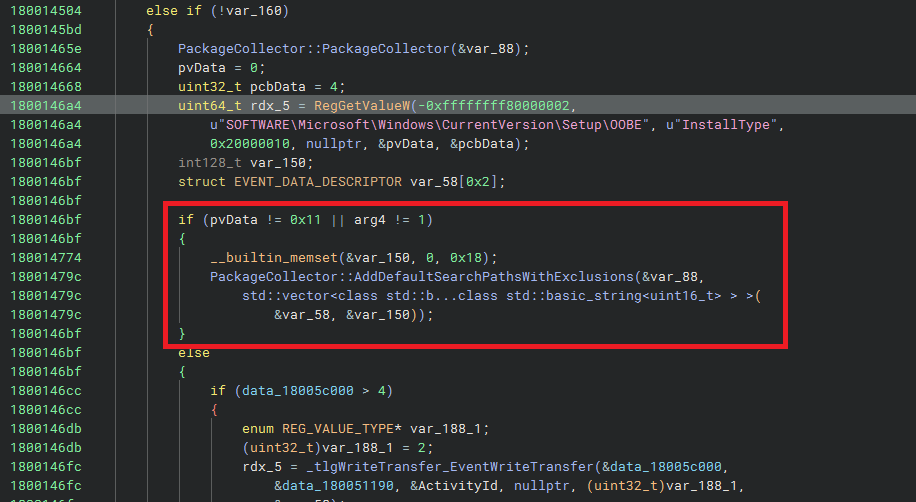
CMVEngine::HandleStates at 0x180014380, the InstallType branch. The condition pvData != 0x11 || arg4 != 1 is taken on every running desktop; the only branch that excludes location 0 lives in the else.And the corresponding HLIL fragment from PackageCollector::Search — the *.ppkg glob and the FindFirstFileW/FindNextFileW loop that turns “anything in this folder with the extension” into a package object:
18003b18e   std::basic_string::assign(&var_2c8, u"*.ppkg", 6)
18003b204   PathCchCombineEx(r12_1, ..., pszPathIn, pszMore, PATHCCH_ALLOW_LONG_PATHS)
18003b236   hFindFile = FindFirstFileW(r12_1, &findFileData)
18003b3dd   ProvPackage* rax_20 = operator new(0xa8)        // one per match, sizeof(ProvPackage)==0xa8
18003b48b   ProvPackage::ProvPackage(rax_20, &var_58, &var_2f0)
18003b4d1   FindNextFileW(hFindFile, &findFileData)         // loop
// (the file-input branch only check, at 18003b0ab):
18003b0ab   if (_wcsicmp(var_328, u".ppkg") != 0) { Throw_Hr(0x80070057) }
Two things are worth holding next to each other from that fragment. The directory glob is literally *.ppkg — the only filter on what file becomes a package is the extension. And the file-input branch, the other way to enter Search, only checks _wcsicmp(extension, ".ppkg"). No WinVerifyTrust, no catalog lookup, no TrustedProvisioners query, no GetSecurityInfo on the owner, no anything. The proof is also negative-search-friendly — searching the binary’s full string table comes up empty for the words a real signature gate would need:
strings containing "Signature"        ->  0 matches
strings containing "Trust"            ->  0 matches
strings containing "TrustedProvisioner" ->  0 matches
strings containing "WinVerify"        ->  0 matches
strings containing ".cat"             ->  0 matches
strings containing "Verify"           ->  0 matches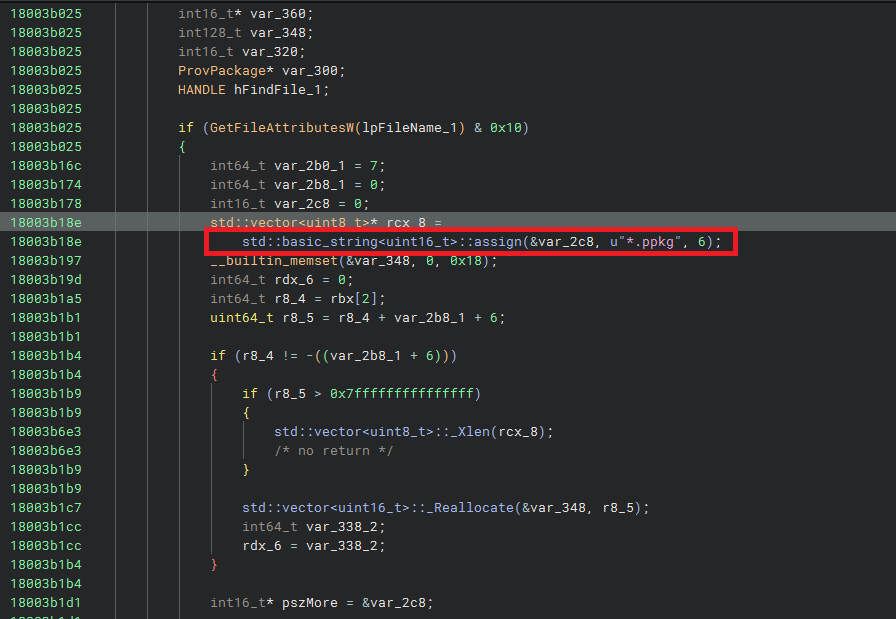
PackageCollector::Search at 0x18003af70. The *.ppkg string assigned at 0x18003b18e, then FindFirstFileW / FindNextFileW over the folder; every match becomes a ProvPackage with no further author or signature check.3.3 The missing check
We have the path. Now the real question: somewhere between “found a file” and “applied as SYSTEM,” is there a check that the package is trustworthy? The per-package loop, HandleStatesForPackagesInternal (0x180014e90), reads — line by line — like this. Here is everything it does to each package before applying it:
for each discovered package:
    ok = package->vtable[0x48]( package );      // ProvPackage::OpenProvPackage
                                                // opens the WIM container; returns bool.
                                                // NOT a signature check.
    if (!ok) continue;
    // ...read the package's identity GUID / name / version via getter methods...
    ResolveServicedPackages(package);           // de-duplicate by GUID/version
    ok = package->vtable[0x58]( package );      // ProvPackage::ValidateProvPackage
                                                // STRUCTURAL ONLY: "can the WIM parts
                                                // be enumerated?"  returns bool. NOT a sig check.
    if (!ok) continue;
    if (package.guid == {eb7d7f2f-3b77-4b87-b301-fd0d336f709a})  // one hardcoded
        continue;                                                // SecureCore GUID, skipped
    PackageInfo::Add(package);                   // collect into the apply list
// after the loop, in a single batch:
CMVEngine::HandleStatesInternal(collected);      // <-- APPLY, as SYSTEM
One line needs translation before the list makes sense: package->vtable[0x48](package) is what a compiled C++ method call looks like after decompilation. vtable is the object’s table of function pointers, and the hex number is the byte offset of the method in that table — so vtable[0x48] and vtable[0x58] are two different methods on the package object. Read vtable[0x48](package) as package.OpenProvPackage() and vtable[0x58](package) as package.ValidateProvPackage(). Now walk the list of what the loop does to each package:
- Two structural gates, no trust gate. First,
OpenProvPackage(thevtable[0x48]call, body at0x180043390) opens the WIM container. Then, after the de-dup step,ValidateProvPackage(thevtable[0x58]call, body at0x180043890) is the only validation, and it is structural only: it asks “can I enumerate the parts inside it?” — i.e. “is this a well-formed file?” — and returns a boolean. Neither call asks “who signed this?” - A hardcoded GUID skip. One specific built-in package, the SecureCore GUID
{eb7d7f2f-3b77-4b87-b301-fd0d336f709a}, is skipped. That is a special case for a Microsoft component, not a trust check. (And even this skip is itself conditionally disabled — see the registry-override note immediately below.) - Deduplication.
ResolveServicedPackagesdrops packages whose GUID/version was already applied. Housekeeping, not security.
And then it applies. There is no signature step anywhere in between. And OpenProvPackage (0x180043390) — the vtable[0x48] call above — was read in full to be sure no check was buried in the file-open: it opens the package via the imported OpenProvisioningPackageForRead(path) and sets up the WIM reader. No inline signature verification.
Here is the actual Binary Ninja HLIL of the per-package loop, lightly trimmed of ETW noise, so the structure is unambiguous:
180014feb   while (i != r13)                              // for each discovered package
180015002       if ((*(**i + 0x48))() != 0)               // vtable[0x48] = OpenProvPackage()
180015031           (*(*rcx_3 + 0x10))(rcx_3, &_String1_1)  // getter: package identity GUID
180015085           CMVEngine::ResolveServicedPackages(...)        // de-dup by GUID/version
1800150eb           if ((*(**i + 0x58))() != 0)               // vtable[0x58] = ValidateProvPackage()
18001512b               if (_wcsicmp(_String1,
                            u"{eb7d7f2f-3b77-4b87-b301-fd0d336f709a}") != 0)  // SecureCore skip
180015169                   RegOpenKeyExW(HKEY_LOCAL_MACHINE,
                                u"SOFTWARE\Microsoft\Provisioning\\", ...)
1800151d4                   RegGetValueW(rcx_10, u"SkipPackages",
                                u"SkipSecureCorePackage", RRF_RT_REG_DWORD, ...)
180015442               PackageInfo::Add(&hKey_2, *i)
180015667   CMVEngine::HandleStatesInternal(this_1, &var_1e8)        // <-- APPLY as SYSTEM (after the loop)
One detail the simplified version glossed over: that SecureCore skip is itself gated by a registry value SkipPackages\SkipSecureCorePackage (read at 0x1800151d4), and an administrator who clears it would make the engine replay even the SecureCore package. It is not a vulnerability — both the key and the apply logic sit behind an admin boundary — but it is the kind of undocumented internal control worth logging in the reverse-engineering record.
![Binary Ninja HLIL of CMVEngine::HandleStatesForPackagesInternal — top of the per-package loop: the vtable[0x48] OpenProvPackage gate, the getters, ResolveServicedPackages (de-dup), and the vtable[0x58] ValidateProvPackage gate. Both gates are structural; neither verifies a signature.](/posts/rogueprovision/bn-per-package-loop-gates.webp)
CMVEngine::HandleStatesForPackagesInternal at 0x180014e90 (1 of 2): the two structural gates. vtable[0x48] at 0x180015002 = OpenProvPackage (open the WIM), then ResolveServicedPackages (de-dup by GUID/version), then vtable[0x58] at 0x1800150eb = ValidateProvPackage (structural check). Neither verifies a signature.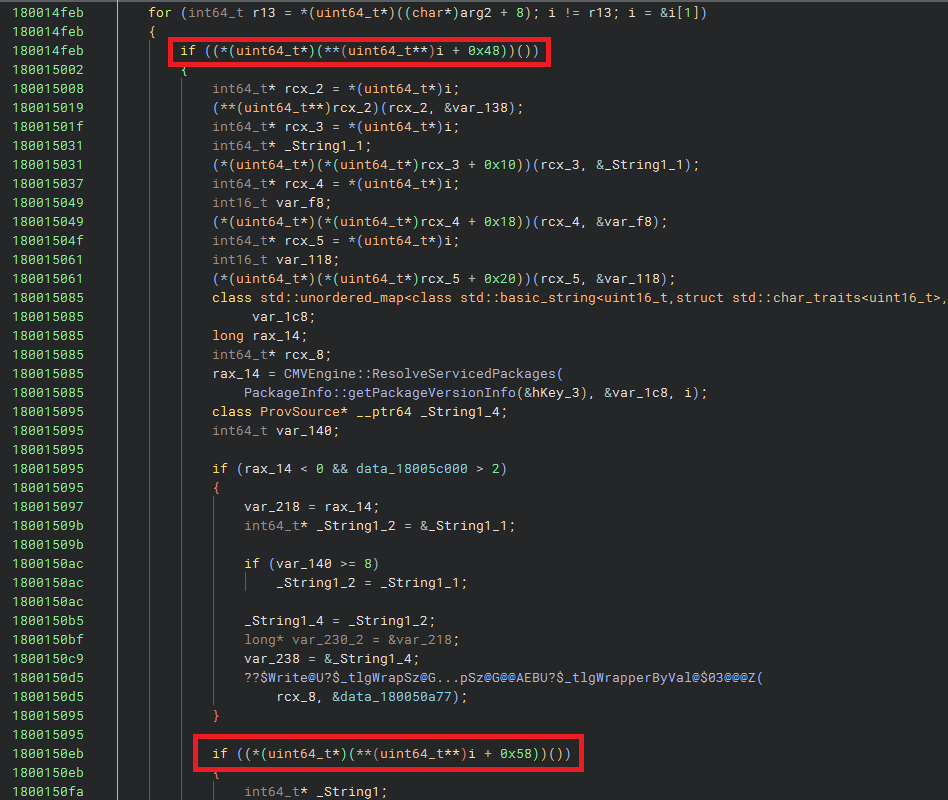
CMVEngine::HandleStatesForPackagesInternal at 0x180014e90 (2 of 2): the hardcoded SecureCore GUID skip at 0x18001512b (itself gated by SkipSecureCorePackage at 0x1800151d4), then straight into PackageInfo::Add at 0x180015442. The apply call, HandleStatesInternal, runs once after the loop. Notice what is not there: any author or signature check.What ValidateProvPackage itself actually does, decompiled, is just as small as the prose claims — the entire body of the “only validation” is below. It calls a method on the underlying WIM-like reader (vtable[0x68] with arg 3) that returns an enumeration object, then walks that enumeration in a while loop, exiting only when the call returns 0x80070103 — the HRESULT for ERROR_NO_MORE_ITEMS. If the enumeration completes without an unexpected error, the function returns true; nothing else.
bool ProvPackage::ValidateProvPackage(this)
{
    rcx = this->m_reader;                              // *(this + 0x68)
    if (rcx == 0) return false;
    rax_4 = (*(*rcx + 0x68))(3, &enumerator);          // open enumeration, kind=3
    if (FAILED(rax_4)) Throw_Hr(...);                  // throws on failure
    while (true) {
        rax = (**enumerator)(enumerator, &item);       // next()
        if (FAILED(rax)) {
            if (rax != 0x80070103) Throw_Hr(...);      // 0x80070103 = ERROR_NO_MORE_ITEMS
            break;
        }
        // (touches/releases the item; no signature check)
    }
    return true;
}
Not a single call to WinVerifyTrust, WTHelperProvDataFromChainContext, CryptCATAdminCalcHashFromFileHandle, CertVerify*, or any other signature/trust API. Not an open of a .cat file. Not a query of any Authenticode chain. The entire body is open-enumerate-close.
Two smaller notes for completeness: this->m_reader (object offset 0x68) is a COM-style interface inside the provisioning subsystem (provprov.dll / provcommon.dll) with an unexported IID and no public header, and OpenProvisioningPackageForRead (called just above) is likewise an undocumented private export — Microsoft ships only the PowerShell wrappers (Install-/Add-/Export-/Get-ProvisioningPackage), never the native C API beneath them. The whole engine sits behind a documentation wall that begins one stack frame below provtool.exe.
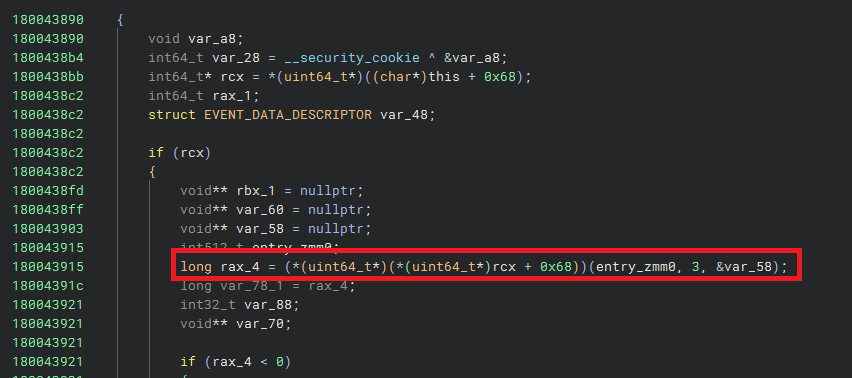
ProvPackage::ValidateProvPackage at 0x180043890, the entirety of "the only validation." A short enumeration loop on a WIM-like reader, exiting on 0x80070103 (ERROR_NO_MORE_ITEMS), returning true. No signature/trust API is called from this function.Then the move that turns “I didn’t see a check” into evidence: look for the check by its absence. If provengine.dll verified signatures, the binary would contain the components that verification needs — the trust-provider imports (WinVerifyTrust, catalog APIs), a TrustedProvisioners lookup, the tell-tale strings — and, searched across the whole binary, none of it is there on the apply path (the documented TrustedProvisioners allowlist itself was empty on the test machine).
The words “Signature” and “Trust” are not referenced anywhere on the apply path. (It does import BCrypt hashing primitives and CryptBinaryToStringW, but the BCrypt calls all sit in a routine named HashDeviceId that hashes a device identifier, and the single CryptBinaryToStringW call sits in FileUtility::GetFullTempFilePath. Neither verifies a package signature.) There is a registry key named TrustedProvisioners that sounds like a trust gate — and it is in fact the official one: Microsoft documents TrustedProvisioners as the certificate-thumbprint allowlist that lets a signed-and-trusted package install silently (paired with the Security CSP RequireProvisioningPackageSignature policy). On the test machine it was empty, and — more importantly — nothing on this path reads it. The documented gate is not bypassed in the dramatic sense; it is simply not wired up to the path the SYSTEM tasks take. Negative evidence is weaker than a positive observation, which is why Part 5 goes and watches an unsigned package apply on a live machine. But as a map of where to look, it is decisive: there is no plausible place in this binary for a signature check on this path to hide.
We can now write the developer’s implicit assumption as a single sentence — the thing they believed so deeply they never wrote the check for it:
“Any
.ppkgdiscovered in a PackageLocation was put there by an administrator or by Setup, so it is trusted to apply with SYSTEM authority — no signature needed.”
That sentence is the bug. It is true for locations 1–4 (under C:\Windows, only admins can write). It is false for location 0, whose folder is — by Microsoft’s own default permissions — meant to be writable by ordinary logged-on users. The check the code skips is exactly the one that would have caught the difference: who authored this package? (Figure 2).
Figure 2 — Every check that runs is structural. The check a trust model actually needs — who authored this package? — is the yellow-dashed empty slot. Because that check does not exist, the attacker’s package passes every check that does and reaches APPLY.
Part 4: Authoring an attacker package — the WIM byte-patch
Reading the code shows a check is missing. To prove it, you have to put a package you authored into the folder, watch SYSTEM apply it, and — crucially — show the engine treated it as a new package and not a copy of an existing trusted one. Proving that second part required a closer look at the file format than expected.
4.1 What is a WIM, and where does identity live?
A .ppkg is not a custom format. It is a WIM — Microsoft’s imaging container, the same format used for Windows install images, identified by the magic bytes MSWIM at the start of the file. Inside, it has metadata (an XML blob) and the actual configuration parts.
Now, a subtlety that cost two failed tests. The engine de-duplicates packages by an identity GUID. Copy a stock package and change nothing, and the engine treats it as already applied and skips it — proving nothing. So the package’s identity has to change. The obvious place to look is a file called customizations.xml inside the package, which has an <ID> element. That got edited twice — once with and once without a byte-order mark, using the official DISM tool to mount and commit the change. The engine reported the same old GUID both times. (Those were tests 5 and 6 in the notes; dead ends are kept, because a dead end is a fact about where identity is not.)
The real identity lives somewhere else: in the WIM’s own XML metadata, in an element called <PACKAGEID>. Finding it requires following a short chain of indirection. The WIM header stores, at fixed offsets, where the XML metadata is and how big it is (Figure 3):
magic            =  "MSWIM"          at file offset 0
xml_offset       =  int64 at file[0x50]
xml_size         = (int64 at file[0x48]) & 0x00FFFFFFFFFFFFFF   // mask off flags byte
xml              =  UTF-16 text at [xml_offset .. xml_offset + xml_size]
inside that xml:   <PACKAGEID>{3742e5e8-....}</PACKAGEID>     // the REAL runtime identity
                   ... SignPackage=False ...                    // the metadata says so itself
So the runtime identity is a GUID inside a UTF-16 XML blob, and the blob’s location is pointed to by a 64-bit number at offset 0x50, with its size at 0x48. (The top byte of that size field is masked off with & 0x00FF...FF because it holds WIM flags, not part of the length — so only the low seven bytes are the real XML size.) These header-field offsets are not new — they come from Microsoft’s Windows Imaging File Format (WIM) specification of October 2007, which is the authoritative public source for the WIM on-disk layout. The direct link to the RTF that this post first carried has since stopped resolving; the Download Center entry above is the one that still does. The undocumented part is that a .ppkg is internally a WIM at all (Microsoft never publishes that bridge), and that the <PACKAGEID> element inside the XML — not the <ID> in customizations.xml — is the identity the engine de-duplicates on. To mint a fresh, attacker-authored package, you replace that GUID with a new one of the same length (a GUID string is always 36 characters), so the byte layout does not shift and you do not have to repack the WIM. The metadata states SignPackage=False directly in the text — and worth noting up front: Microsoft documents Sign package in the Windows Configuration Designer GUI as an explicitly optional choice. The expectation, per the docs, is that unsigned packages still install via the documented Settings/double-click path but trigger a consent prompt. The background folder-pickup path is exactly where that expectation breaks.
Figure 3 — Where a provisioning package’s real identity lives. A header field at offset 0x50 points to the XML metadata; the <PACKAGEID> GUID inside it — not customizations.xml — is the identity the engine reads, and the byte range to patch.
4.2 Three ways to mint one
There are three practical ways to produce a unique, attacker-authored package, in increasing order of effort:
- Same-length byte-patch of
<PACKAGEID>— find the GUID in the XML blob, overwrite it with a fresh one of equal length, write the file back. No repacking. This is what RogueProvision, the proof-of-concept, does in a few lines of C# (source on GitHub). - DISM mount/commit — mount the WIM, edit its parts, commit. Needed if you change the contents (the actual configuration actions), not just the identity.
- Windows Configuration Designer (WCD) — the official Microsoft tool, which mints a fresh GUID for every package it builds.
The point is not which method you use. The point is that forging a unique, unsigned package that the engine will treat as new requires no special access and no Microsoft signing key. The format was never designed to resist it, because the developer assumed only an admin would ever be in a position to drop one.
Part 5: Did it actually work? — the proofs on a live machine
Static analysis tells you what the code is meant to do; only a running machine proves it does. A research claim is worth nothing until you make it happen and watch it. So the work moved to a Windows 11 lab VM, with the provisioning diagnostic log turned on, running a sequence of tests designed not to confirm the belief but to try to break it. Each test answers one objection.
Two things were observed on each run: the ETW log (Event Tracing for Windows — the operating system’s built-in high-speed event log; provisioning emits to a provider named Microsoft-Windows-Provisioning-Diagnostics-Provider, GUID {ED8B9BD3-F66E-4FF2-B86B-75C7925F72A9}, where event id 20 means “Applying package”), and the registry under HKLM\...\Provisioning\Results, where the engine records each package it finishes applying.
One honest note about how the apply was triggered. The natural triggers are the four scheduled tasks, but schtasks /run on the stock Logon/Cellular tasks is blocked by their idle/state conditions, which makes them awkward to fire on demand. So the tests use a one-shot SYSTEM task running the identical command the stock tasks run — provtool.exe /turn 5. This is a convenience of testing, not a privilege the attack needs: in the real world the std/admin attacker just drops the file and waits for the next logon or reboot, and the stock Logon/RunOnReboot/Retry task fires it. No task creation by the attacker is required. That sequence — and the fact that the attacker is already gone before any of it runs — is the timeline in Figure 4 below.
Test 1 — is location 0 scanned, and is a corrupted package rejected? Two files were planted in the folder: an exact copy of a stock package, and the same package with a single payload byte flipped. After the SYSTEM turn, the ETW log showed Applying package 'aaa_clean.ppkg' and Applying package 'aaa_corrupt.ppkg'. Both were discovered in the user-writable folder and opened; the corrupted one was not rejected. So location 0 is really scanned, and there is no whole-file integrity check at open. (Caveat noted at the time: both copies shared the stock GUID, so de-duplication probably made the apply a no-op — this proved “opened without a signature check,” not yet “applied as new.” Hence Test 2.)
Test 2 — does it apply and record an attacker-authored package as new? This is the conclusive one. The <PACKAGEID> was byte-patched to a fresh {cccccccc-...}, dropped as aaa_evil.ppkg, and the SYSTEM turn run:
ETW id=20:   Applying package 'aaa_evil.ppkg'  ID: {cccccccc-6d9d-473b-99a6-8ecc0f43548a}
NEW registry key appeared:
HKLM\SOFTWARE\Microsoft\Provisioning\Results\{cccccccc-6d9d-473b-99a6-8ecc0f43548a}
        file  = aaa_evil.ppkg
        start = 2026-06-19 18:47:43
The SYSTEM engine applied and recorded an attacker-authored, unsigned, content-modified package as a brand-new package. A fresh GUID means it was not the de-dup no-op from Test 1. SignPackage=False was accepted without complaint. The “missed a signed region” objection from Test 1 is gone, because the edit was to the metadata the engine actually reads.
Test 3 — can the attacker control the content SYSTEM applies, with a visible effect? Applying something is good; applying a chosen value is the real demonstration. A fresh-GUID package was authored whose configuration sets one power setting, StandbyTimeout (which surfaces in the power configuration as the STANDBYIDLE attribute), to an unmistakable sentinel value: 13371337 (leet 1337 twice — nothing legitimate would ever produce it). After the SYSTEM turn:
STANDBYIDLE   before = 0x00000000
STANDBYIDLE   after  = 0x00cc07c9      // = 13371337 decimal, the exact value chosen
That excludes coincidence: the chosen value, written by SYSTEM, in the single turn. The attacker controls the configuration content the SYSTEM engine applies.
Test 4 — the honest ceiling. The next test deliberately overreached, to find the limit. A package was authored with a raw <characteristic type="Registry"> action — a direct “write this registry value” instruction. It did not write. The runtime apply path does not honor arbitrary raw registry or command actions; it only routes to registered handlers called CSPs (Configuration Service Providers — registered Windows components that each know how to apply one category of settings: power, policy, app-install, and so on). So the impact is not “write anywhere as SYSTEM.” It is bounded by which CSPs the runtime supports — but that set is still powerful. Enumerated from the stock packages the engine applies, it includes Policy, DeviceGuard, and — the important ones — EnterpriseModernAppManagement / AppInstallation. Application install means code execution as SYSTEM; the policy CSPs mean tampering with security policy (weakening Defender or code-integrity rules). RogueProvision reaches code execution through the ProvisioningCommands CSP, whose Default node takes a single command line. (A small format gotcha, told here to spare you the suspense: that node must carry exactly one CommandLine parameter; adding the extra parameters the offline documentation shows makes the runtime apply fail with 0x86000002 — surfaced in third-party CSP references as Cfmgr_E_NODENOTFOUND, a configuration-manager error. Microsoft Learn does not publish an 0x86000xxx error-code table, so the one-parameter-only constraint was discovered empirically by diffing a passing apply against a failing one.)
Figure 4 — After the plant, Windows does the rest by itself. The only attacker action is dropping the file; the apply and the SYSTEM shell then happen with no further interaction. One qualification, repeating the note above so the figure is not read on its own: the tests fired the apply through a one-shot SYSTEM task running the identical command. The stock Logon and RunOnReboot tasks were not observed firing it. Their triggers were read out of the live task XML, so that step of the timeline is what the configuration says will happen, not something measured here.
elevated admin = True) for the reason Part 6 sets out; the second window is the SYSTEM cmd.exe that Windows spawns in the user’s interactive desktop a moment later. No further attacker action between the two.At this point the bug is proven end to end: an unsigned package, authored by the attacker and placed in the folder, is found and applied by a SYSTEM task with no signature check and no consent, and the attacker controls the configuration it applies, up to a ceiling of “powerful registered CSPs, including application install → code execution.” That is a real privilege-escalation primitive — though, as the next part shows, the question of whose privilege it escalates has an uncomfortable answer.
But whose privilege does it escalate? That question is where the analysis was wrong, and where the most useful part of the post begins.
Part 6: The twist — measure, don’t infer from a name
6.1 The wrong guess
Early on, the conclusion was the strong case: standard-user → SYSTEM. A normal, non-admin user drops a package, SYSTEM applies it, normal user is now effectively SYSTEM. That is a textbook Local Privilege Escalation across the boundary Microsoft actually defends.
The reasoning felt solid. The folder C:\ProgramData\Microsoft\Provisioning carries, in its default permissions, a rule that grants ordinary logged-on users write access. The rule was right there. It was believable. It was very nearly written up that way.
It was wrong. And the only reason that got caught is that the analysis stopped reading the rule and started measuring whether it actually fires. To explain what was measured, the rule has to be unpacked — which is where most of the genuinely new internals in this post live.
6.2 What is an ACL, an ACE, and a conditional ACE?
Every file and folder on Windows carries an ACL (Access Control List — the list of rules saying who may do what to it). Each rule in that list is an ACE (Access Control Entry — one single rule, e.g. “this user may write”). Windows can write an entire ACL down as a compact string in a format called SDDL (Security Descriptor Definition Language).
A normal ACE is unconditional: “INTERACTIVE users may write — always.” But there is a less common kind, a conditional ACE: a rule that grants its access only if a runtime expression is true — for example, a club rule stating “members may enter, but only on weekends.”
Here is the actual rule on the Provisioning folder that grants ordinary users write access. It is a conditional ACE:
(XA;OICI;FA;;;IU;(!(WIN://ISMULTISESSIONSKU)))Let me read it token by token, because every field matters:
XA— this is a conditional “allow” ACE (theXis what makes it conditional).OICI— inheritance flags (“apply to objects and containers inside”). Not important here.FA— the access being granted: Full Access (FullControl).IU— the security identifier it applies to: INTERACTIVE users (S-1-5-4), meaning anyone logged on at the console / interactively. That is an ordinary logged-on user.(!(WIN://ISMULTISESSIONSKU))— the condition. Grant the above only ifWIN://ISMULTISESSIONSKUis false (the!is “not”).
(For completeness: the only other rules that reach an ordinary logged-on user grant BUILTIN\Users and Everyone a value of 0x1200A9 = read-and-execute only. Two further conditional ACEs carry the identical (!(WIN://ISMULTISESSIONSKU)) condition and grant Full Access, but to capability SIDs — an S-1-5-32-… / S-1-15-3-1024-… pair — not to a user, so they are reachable only by a process holding that capability. So a standard interactive user can write only if this one conditional ACE grants it.)
One point of precision, because the wording matters and it is easy to get backwards. There is no deny rule here. When the condition evaluates false, the access check skips this ACE — it simply does not contribute the write permission — and the user is left with whatever the remaining rules grant, which is read-and-execute. A skipped conditional allow and an explicit deny produce the same outcome for this folder, but they are not the same mechanism, and Windows treats them differently elsewhere: a deny ACE is evaluated ahead of allows and overrides them. Nothing overrides anything below. A permission is simply never granted.
So whether a normal user can write to the folder is not a fixed yes or no. It depends, at the moment of the write, on whether something called WIN://ISMULTISESSIONSKU is true or false. The whole “standard-user → SYSTEM” claim rested on that condition coming out a particular way. Nobody had checked which way it actually came out.
6.3 What WIN://ISMULTISESSIONSKU really is
This is the part with the least public documentation — the answer lives only in the kernel and in a shared page, and the routing through the access-check evaluator is written down nowhere. Slowly, then:
WIN://ISMULTISESSIONSKU is not a normal user attribute or an Active Directory claim. It is an undocumented, kernel-managed system security attribute — a fact about the machine that the kernel computes once and stores in a global, separate from any user’s identity. The WIN:// prefix is the tell: when the access-check evaluator encounters it, it routes the lookup to the system attribute path, not the token path. (Internally the evaluator tags each operand with a “kind” number — an implementation enum distinct from the on-wire attribute byte-codes; a system attribute like this one is “kind 7”, a value you only recover by reverse-engineering, not one any spec lists.)
Where does its value come from? The kernel routine RtlIsMultiSessionSku() computes it, and the computation is almost comically small:
bool RtlIsMultiSessionSku(void)
{
    return (KUSER_SHARED_DATA.SharedDataFlags >> 8) & 1;   // bit 8 = "DbgMultiSessionSku"
}
That is the whole computation on the host, which is the case this post is about. (For exactness: the shipped routine first calls a small predicate that asks whether the caller is running inside a server silo — a Windows container — and only reads the global bit when it is not; inside a silo it reads a per-silo value instead. On a normal desktop that predicate is false and the one-liner above is what runs.) It returns a single bit — bit 8 of a field called SharedDataFlags, which lives in a structure called KUSER_SHARED_DATA (a small, read-only page of memory the kernel fills in and maps into every process — a kind of system-wide noticeboard holding facts like timers, version numbers, and flags; user-mode programs can read it at the fixed address 0x7FFE0000). Bit 8 is named DbgMultiSessionSku in Microsoft’s public KUSER_SHARED_DATA declaration (ntddk.h, mirrored on MS Learn) — that name is documented; what is not documented is the semantics of the bit (when it is set, what it gates, why) or the implementation of the RtlIsMultiSessionSku accessor that the same docs page tells you to use to read it.
The chain of how this bit ends up deciding a file write is genuinely hard to follow all at once, so here is the whole pipeline, end to end (Figure 5):
- At boot, the Security Reference Monitor initialization (
SeRmInitPhase1) callsAuthzBasepInitializeSystemSecurityAttributes, which callsRtlIsMultiSessionSku()and caches the resulting boolean into a kernel global namedWindowsSystemAttributes. The value is fixed at boot and does not change while the machine runs. - On every file access check, when the kernel evaluates the folder’s conditional ACE,
AuthzBasepEvaluateAceConditionresolves theWIN://ISMULTISESSIONSKUoperand. Because of theWIN://prefix, it treats it as a system attribute (internally “kind 7”) and reads it back from that cachedWindowsSystemAttributesglobal. The evaluator routine itself is, to be precise, partly documented — [MS-DTYP]‘sEvaluateAceConditionpseudocode handles exactly four operand kinds (Local / User / Resource / Device — the attribute tokens whose byte-codes0xF8–0xFBare defined in [MS-DTYP] §2.4.4.17.8); what is not documented is the fifth,WIN://-style “system attribute” kind that this implementation routes via “kind 7” (an internal operand-type enum value, a separate numbering from those documented0xF8–0xFBtoken byte-codes) against the kernel-cachedWindowsSystemAttributesglobal. The novelty here is exactly that fifth path, not the evaluator as a whole.
Putting the whole thing together, the rule on the folder reduces to one bit:
A standard interactive user can write to
C:\ProgramData\Microsoft\Provisioningif and only ifKUSER_SHARED_DATA.SharedDataFlagsbit 8 (DbgMultiSessionSku) was 0 at boot.
Figure 5 — How one boot-time bit decides a file write. The folder’s conditional ACE resolves WIN://ISMULTISESSIONSKU from a kernel page cached at boot; on every real machine measured, that bit is set, so the rule does not grant the standard user write access, leaving read-and-execute (the right-hand, measured branch).
6.4 The measurement that corrected it
So everything came down to bit 8. The if-and-only-if is exact; there was nothing left to reason about, only to measure. Reading the bit needs no admin rights — it is in that read-only page mapped into every process:
(([Runtime.InteropServices.Marshal]::ReadInt32([IntPtr]0x7FFE02F0)) -shr 8) -band 1
#  0  -> the ACE GRANTS a standard user  (would be std-user -> SYSTEM)
#  1  -> the ACE does not grant          (admin -> SYSTEM only)
In words: read the 32-bit SharedDataFlags at its fixed address 0x7FFE02F0 (that is offset 0x2F0 inside the 0x7FFE0000 shared page), shift it right by 8 so bit 8 lands in the lowest position, then -band 1 keeps only that one bit. It was measured on two real machines:
test VM      Win 11 Pro   SharedDataFlags = 0x010C  bit 8 = 1  no grant
retail host  Win 11 Home  SharedDataFlags = 0x018E  bit 8 = 1  no grant
third host   Win 11 Pro   SharedDataFlags = 0x018E  bit 8 = 1  no grant   (re-checked later)
Bit 8 was set on every one of them. On each, therefore, the conditional ACE does not grant the standard user write access. To make sure the mechanism was being read right and not some unrelated refusal, a control: two folders were created, one with the real condition (!(WIN://ISMULTISESSIONSKU)) and one with the inverted condition (WIN://ISMULTISESSIONSKU), and each was written to as a genuine standard interactive user. The inverted one granted; the real one did not. That proves the access check really does resolve this attribute, and that its value here is “true” — and, by the exact symmetry of the evaluator, that on a machine where the bit were 0, the real ACE would grant. But no such machine turned up.
So the corrected, honest severity is: administrator → SYSTEM in practice. On a normal client Windows, only a principal that can already write the folder (an administrator) can plant the package. That is the verdict in the report and the verdict in this post.
Here is the lesson, and it is the reason Part 6 exists. The flag is named MultiSessionSku. That name sounds like an exotic edge case — multi-user servers, Azure Virtual Desktop — something that wouldn’t apply to a normal PC. Reasoning from the name, “normal PC ⇒ not multi-session ⇒ bit is 0 ⇒ the ACE grants ⇒ standard-user → SYSTEM” is a clean, confident chain. It is also wrong. The measured value shows the bit is set on a plain retail Home laptop. The best explanation is that modern client Windows is always capable of multiple concurrent sessions (Fast User Switching), so the flag is effectively always 1, and the “grant a standard user” branch of that ACE is dead code on real desktops.
A symbol’s name is only a hypothesis about its behavior; the value measured on a real machine is what actually determines it.
The analysis inferred from the name and almost shipped it. The cheap measurement — reading one bit, on a second real machine — disproved the inference. This is the entire discipline of the methodology behind the work compressed into one example: when reasoning and measurement disagree, go with the measurement.
6.5 So what is it still worth?
“Administrator → SYSTEM” is, by Microsoft’s own servicing rules, not a defended security boundary — Microsoft publishes a “Security Servicing Criteria” listing which privilege boundaries it commits to defend with security updates, and because an administrator already effectively controls the machine, admin→SYSTEM is deliberately not on it. So is the finding worthless? No, for three concrete reasons:
- A chain-sink (the strongest residual). The auto-apply path is signature- and SKU-independent. So any other bug that gives a non-admin an arbitrary-file-write — even a weak one, even one that can only create a file with attacker-controlled contents in a fixed place — is upgraded to SYSTEM code execution the moment it can land a
.ppkgin that folder. RogueProvision is a ready-made “stage 2” that turns a minor write primitive into a full escalation. - Stealth execution and persistence. The code runs by way of
provtool.exe— a legitimate, Microsoft-signed Windows binary. That makes it a LOLBIN (a “Living Off the Land Binary” — a trusted signed program an attacker abuses so the malicious action looks like normal system activity). No malware binary is needed for the execution step; the trusted OS service does it. - A real model-vs-implementation gap. Regardless of who can write the folder, the SYSTEM background path enforces neither the signature nor the consent gate that Microsoft’s documentation promises for runtime apply. There is also a quieter gap worth naming:
%PROGRAMDATA%\Microsoft\Provisioningis not declared a security trust boundary in Microsoft’s Windows Security Servicing Criteria, there is no documented DACL contract for it, and no documented write-allowed principal — yet the SYSTEM background path treats it as trusted by location. The trust boundary the implementation relies on is itself undocumented. That gap is worth fixing on its own, and worth knowing about if you defend Windows.
6.6 An honest open question — the INTERACTIVE-user case
One question was put to MSRC directly and did not come back with a clear answer: is there any realistic Windows configuration — a particular SKU, an OEM image, a deliberately-set servicing flag, an enterprise/VDI scenario — on which KUSER_SHARED_DATA.SharedDataFlags bit 8 is cleared at boot, making the (!(WIN://ISMULTISESSIONSKU)) ACE actually grant a standard INTERACTIVE user write access to that folder, and therefore reopening the standard-user → SYSTEM case? MSRC’s reply addressed the admin→SYSTEM verdict and the servicing boundary; it did not specifically address whether such a configuration exists or is supported. So the honest answer is: I don’t know. It is possible some build, some image, or some specific multi-session configuration clears the bit; on every machine I could measure, it was set, the ACE did not grant, and the std-user case did not materialize.
Even in the hypothetical “bit 8 = 0” world, the attack is not easy to weaponize in the wild. It needs a standard user who can write into C:\ProgramData\Microsoft\Provisioning at the moment the bit happens to be 0, and the apply path is gated by the same WCD-format / GUID-uniqueness / CSP-routing constraints documented in Parts 4–5. So I treat real-world exploitation as generally difficult even before the bit-8 question, and I do not claim the std-user path as a demonstrated capability. If a reader has measured SharedDataFlags & 0x100 == 0 on a normal-user machine, that single data point would change the picture — I would like to know.
Part 7: Prior art, honestly
Provisioning packages are not a new attack surface, and it matters to me to be explicit about what was already known and where this finding actually starts.
- The interactive double-click vector — DTM, 2020. This covers the other door: build a malicious package with WCD, get a victim to double-click it, which launches
provtool.exe, raises a UAC prompt, and — after an admin clicks through the warnings — runs the payload. It is admin-required and consent-gated: a social-engineering delivery technique, and Door A from Part 2. DTM’s own concluding sentence on the low-privilege case is the disclaimer this work directly addresses — verbatim: “So this means we cannot use a.ppkgas a low privileged user.” That is correct for the UAC double-click path. Door B, the SYSTEM-scheduled-task auto-apply path, is a separate code path DTM’s writeup does not cover; on a machine where bit 8 ofSharedDataFlagshappened to be0, it would invalidate that disclaimer. On the machines I measured it is not invalidated in practice (Part 6.6) — but the path is fully present in the binary either way. Worth reading for the payload side. - Microsoft’s own documentation, “How provisioning works”, already states that the engine processes packages in
%ProgramData%\Microsoft\Provisioningin the background, and states the admin-plus-consent model. So neither “the engine touches that folder in the background” nor “packages can be unsigned” is the discovery here. The finding is precisely the gap between that documented model (admin + consent-if-unsigned) and the actual un-gated SYSTEM code path — a gap you can only see by reading the binary. - CVE-2025-62218 / CVE-2025-62219. These are the most relevant recent provisioning privilege-escalation CVEs I found, and they are in a different component — the Microsoft Wireless Provisioning System (
provcore.dll, Wi-Fi profile handling) — and a different bug class (per the CVE descriptions, memory-corruption — a race condition and a double-free — not a trust-model gap). RogueProvision is not a re-derivation of those.
So, stated plainly: the novel part is the un-gated SYSTEM background auto-apply path and its trust model, not “.ppkg can run code as an elevated user.” If you take one framing from this post, take that one.
Part 8: The shape of the bug — a reusable class
The most useful thing a single bug can give you is a template for locating other instances of the same bug. Here is this one stated as a class.
The mechanism is a confused deputy (a classic security pattern: a privileged program is tricked into using its own authority to perform an action for the attacker — an action the attacker could not perform directly). But it is a specific flavor — the carrier is a whole configuration program, and the missing check is authorship, not path — that I have not seen called out as its own pattern, distinct from the better-known writable-directory and search-order confused-deputy classes. For this post I will name it:
Trusted-search-location configuration-package provenance confused-deputy.
The role template, with the slots filled:
- The deputy: a privileged (SYSTEM) configuration-apply engine.
- What it does: auto-scans a known, registered location and applies any configuration package it discovers, with its own SYSTEM authority.
- What it checks: provenance by location — “this package is in the registered folder, so it is authorized.”
- The missing check: the source provenance (signature / author) of a package discovered at runtime.
- The break: that location is (meant to be) writable by a lower-privileged principal.
This is not the classic filesystem race or symbolic-link class, where an attacker redirects a privileged file operation to an unexpected path. There is no path redirection here. The missing check is not “is this the path you validated?” but “who authored this content?” That difference is why existing symlink-hardening does not apply.
Stated as a search query, the class defines what to look for: every privileged configuration-apply engine that auto-scans a known location and applies discovered configuration as SYSTEM, where the location is writable by a lower-privileged principal and there is no source-provenance check. That query produces candidates before you examine them — C:\Recovery\Customizations (which the docs say the engine “always applies”), the Provisioning\AssetCache path, and more broadly any “scan a directory and apply it as SYSTEM” pattern. Those are not all audited yet; that is the point of defining a class rather than documenting a single bug.
Part 9: Detection and defense
A finding you cannot defend against is only half finished; the detection is the rest of the work. If you defend Windows machines, here is what to watch and what to fix.
Detect. The engine emits events through the ETW provider from Part 5:
ETW  Microsoft-Windows-Provisioning-Diagnostics-Provider {ED8B9BD3-F66E-4FF2-B86B-75C7925F72A9}
     id=20 "Applying package '<name>' ID:{...}"  for a .ppkg under %ProgramData%\Microsoft\Provisioning
     whose file author is NOT SYSTEM / admin / TrustedInstaller   -> alert
File create of  *.ppkg  in  C:\ProgramData\Microsoft\Provisioning  by a non-admin token
New key under   HKLM\SOFTWARE\Microsoft\Provisioning\Results\{...}  for a package living there
Process: provtool.exe spawning child processes (the LOLBIN execution signal)
The honest caveat for a defender: legitimate admin or MDM-driven provisioning fires the same ETW event and writes the same Results keys, so those two signals alone are noisy. The discriminators are the author of the .ppkg file (a non-admin/non-TrustedInstaller writer is the anomaly) and a provtool.exe process spawning child processes (normal provisioning rarely does; the ProvisioningCommands path does).
Defend / harden. Two directions, either of which closes it:
- Add the missing gate. Enforce the signature/trust-or-consent check on the background apply path — require a valid signature (
WinVerifyTrust/ catalog) orTrustedProvisionersmembership beforeHandleStatesInternal. This is the fix that matches Microsoft’s own documented model. - Tighten the folder. Restrict write access to
C:\ProgramData\Microsoft\Provisioningto SYSTEM / TrustedInstaller, removing reliance on thatWIN://ISMULTISESSIONSKUconditional ACE entirely. As a defender on your own fleet, you can do this today without waiting for a vendor change.
Key takeaways
You do not need to remember the offsets. Two ideas are worth keeping.
On the vulnerability. A SYSTEM background service applies unsigned configuration packages from a folder, skipping both checks Microsoft’s documentation promises for runtime apply. On a normal PC it is administrator→SYSTEM, not standard-user→SYSTEM — but it is a clean, reusable chain-sink that upgrades any non-admin file-write into SYSTEM, a signed-binary execution/persistence path, and a genuine gap between the documented model and the shipped code. The shape generalizes: anywhere a privileged engine treats a package’s location as proof of trust instead of checking its signature, the same bug is present.
On the methodology. Two moves did the real work. First, proving a check is missing by its absence — reading what the code does and searching for the strings a real check would need, then confirming on a live machine that an unsigned package really applies. Second, and more important: there was a clean, confident chain of reasoning that concluded “standard-user → SYSTEM,” built on the name of a kernel flag. A two-minute measurement on a second real machine proved that chain wrong. The name was MultiSessionSku, which sounds like a rare server condition; the measured byte showed it is the normal state of an ordinary laptop. That this whole investigation ran autonomously, as an AI agent, makes the lesson more important, not less: an agent that reasons well but never measures will confidently publish the wrong answer. The discipline that caught the error is the one any researcher needs: a flag’s name is only a hypothesis about its behavior, and the measured value is what settles it.
Keeping what you reasoned apart from what you measured is the whole of it. Thanks for reading; more to come.
A few sources, if you want to read more
- DTM, Sorry you have missed a package (2020) — the interactive double-click
.ppkgattack (admin + UAC). Door A from Part 2; useful background on the payload side. - Microsoft Learn, How provisioning works in Windows — the documented model whose two promised checks the background path skips. The primary source for “what should happen.”
- Microsoft, Security Servicing Criteria for Windows — why administrator→SYSTEM is not, by itself, a serviced boundary, and what is. Essential context for scoping impact honestly.
- The previous post, Rebuilding a Security Researcher’s Mind in an AI — the Method, the Rig, and What It Cannot Do Yet — the AI research methodology this finding came out of, including the “measure, don’t infer” discipline that caught the wrong guess in Part 6.
Kazuma Matsumoto. “RogueProvision: A SYSTEM Task That Applies Unsigned Provisioning Packages — admin to SYSTEM, declined by MSRC”. 637th Research Lab, 2026-06-22. https://y637f9qq2x.com/posts/rogueprovision/